If your resume looks great to you but comes through messy in an Applicant Tracking System, spacing is often the reason. Margins that are too tight can clip text. Extra line breaks can scatter dates and job titles. Bullet indents that shift from role to role can make a clean story read like noise.
In 2026, most applicant tracking systems can handle simple layouts well, but standard fonts and a single-column layout are the foundation of an ATS-friendly resume; they still prefer predictable spacing. Think of spacing like lanes on a highway: when everything lines up, both software and recruiters move faster.
Below are the exact, safe settings for ATS friendly resume margins such as 1-inch margins, line spacing, paragraph spacing, and bullet indentation that ensure clean parsing, plus quick checks for Word, Google Docs, and PDF export.
What an Applicant Tracking System Sees When It “Reads” Your Resume
An Applicant Tracking System does not admire design. Parsing software extracts text, then tries to map it into fields like name, title, employer, dates, skills, education, Work experience, and Professional summary sections. Spacing affects this in two ways:
First, text boundaries. When content sits too close to the page edge, some systems (and some PDF viewers inside portals) can clip the first or last characters. That can turn “Operations” into “perations” or cut off a phone number, causing parsing errors.
Second, structure cues. ATS tools infer structure from consistent patterns: headings, line breaks, and indentation. Visual elements can confuse the system when reading section headings or an inconsistent date format. If one job uses tight spacing and the next has extra paragraph space, the parser may split one role into two, or attach bullets to the wrong job.
Simple formatting still wins. For broader ATS formatting tips for 2026, see ATS-friendly resume tips for 2026.
ATS-friendly resume margins in 2026 (best defaults and safe ranges)
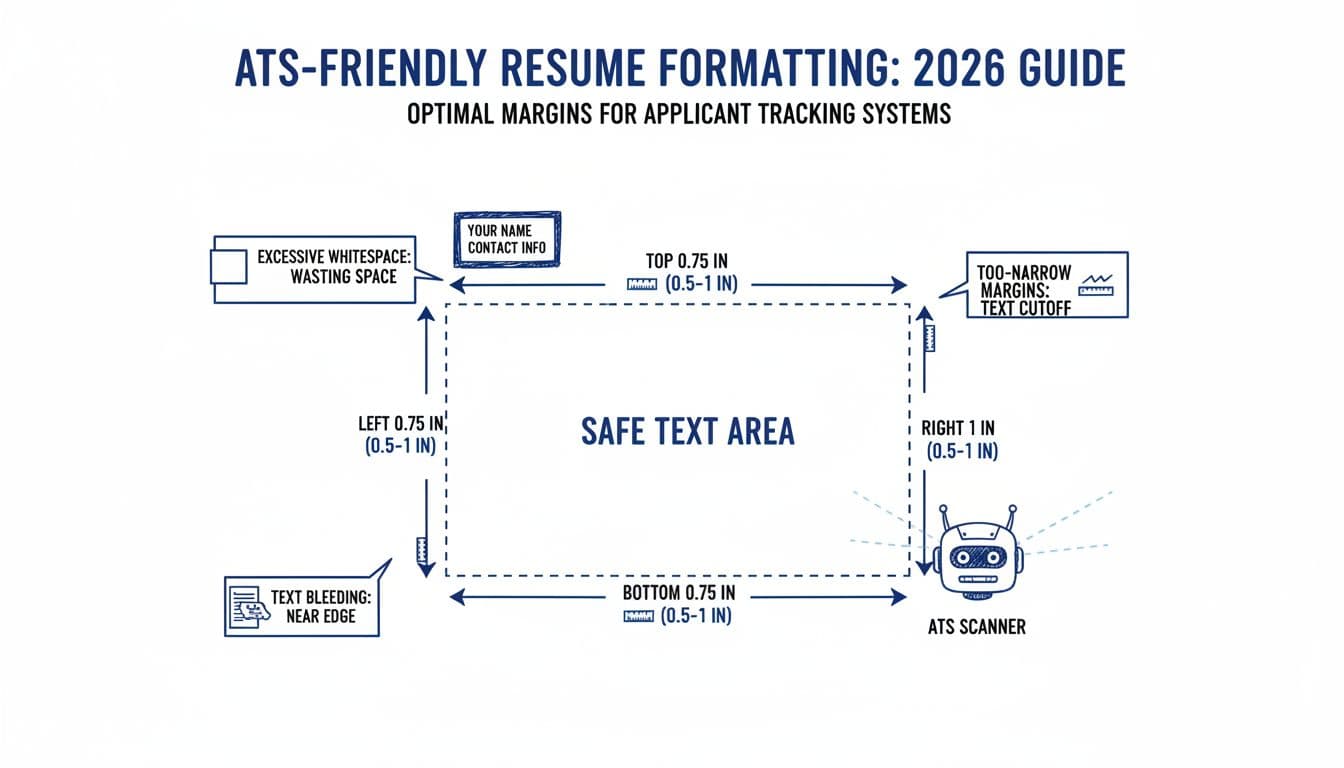
Here are resume margin settings that stay readable and usually parse cleanly across major systems.
Recommended settings (quick summary)
| Setting | Best default (2026) | Safe range | Avoid |
|---|---|---|---|
| Page margins (top, bottom, left, right) | 1-inch margins | 0.75 to 1-inch | Under 0.5 inch |
| Header top padding (space above name) | 0.2 to 0.3 inch | 0.15 to 0.4 inch | Text touching page edge |
How to choose within the range
- Use 1-inch margins if your resume is already one page, or if readability is your priority, as they provide sufficient white space, especially in a single-column layout.
- Use 0.75-inch margins if you need a little space back, but keep the layout calm and consistent.
- Avoid going tighter than 0.5 inch. It can look cramped, and it increases the risk of clipping in uploads and previews.
Also keep contact information (name, phone, email, LinkedIn) in the main body area, not in headers, footers, or text boxes. Some Applicant Tracking Systems still ignore header, footer, and text box content.
If you want format-safe templates that keep spacing consistent, CareerScribeAI’s AI Resume Builder can help you keep margins and indents steady while you focus on content.
Line spacing, paragraph spacing, and bullet indentation (exact numbers)
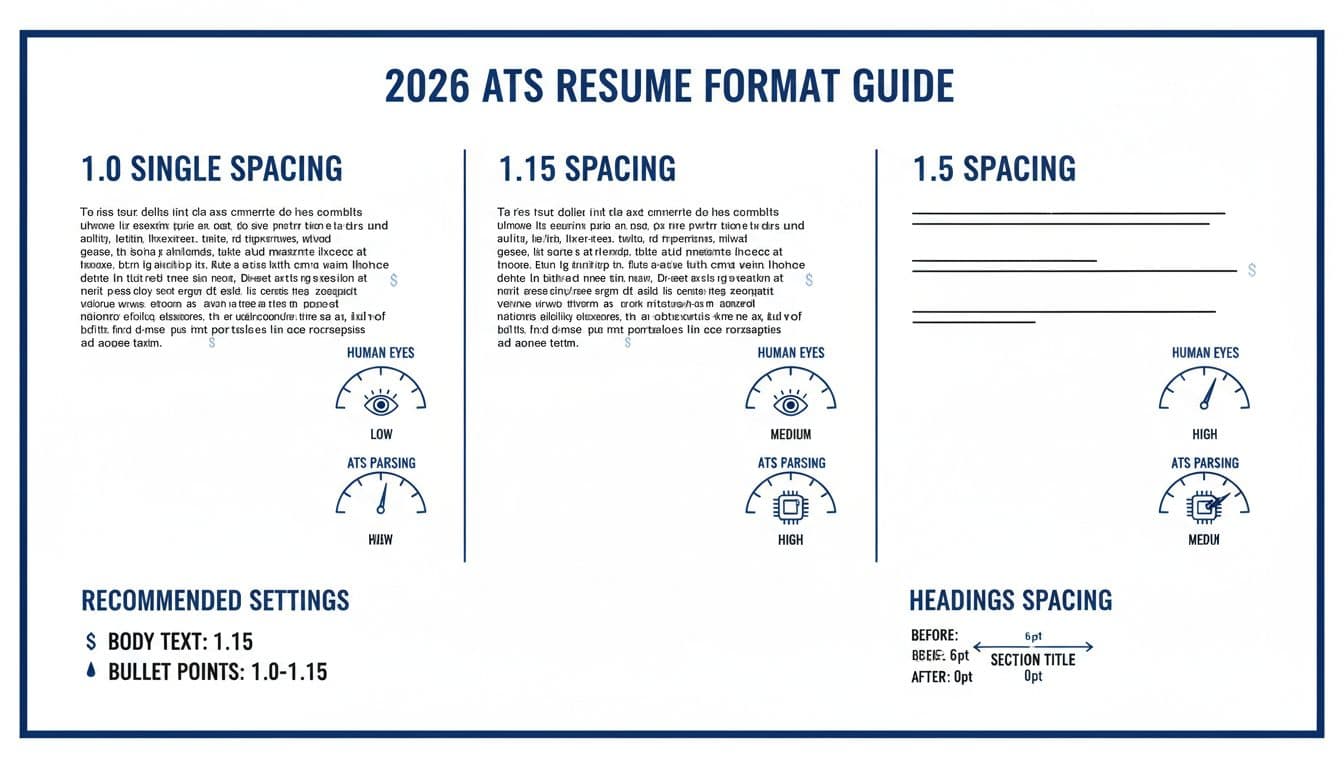
Margins set the frame, but spacing controls how your story scans. These settings balance density with clarity.
Line spacing (leading)
- Best default line spacing: 1.15 for body text
- Safe range: 1.0 to 1.15
- Bullets: 1.0 (tight and scannable) or 1.15 (if bullets wrap to a second line)
Single spacing is still common, and some guides recommend it for compactness. But 1.15 often reads better on screens without confusing parsers, as long as you keep the rest of the layout simple. For spacing examples, see best line spacing for a resume.
Paragraph spacing (space before and after)
This is the quiet setting that causes loud problems when it’s inconsistent.
- Body bullets (within a role):
- Space Before: 0 pt
- Space After: 0 to 2 pt
- Between roles (Job A to Job B):
- Space After the last bullet: 6 pt
- Section headings (EXPERIENCE, SKILLS):
- Space Before: 6 to 10 pt
- Space After: 2 to 6 pt
If you prefer a cleaner look, use slightly more space around headings, not between every bullet. Consistent spacing between section headings helps an Applicant Tracking System categorize your work experience. That keeps the resume scannable and keeps ATS extraction stable.
Bullet indentation (so wrapped lines don’t drift)
Bullet alignment matters most when bullets wrap.
- Best default bullet settings (Word-style):
- Left indent: 0.25 inch
- Hanging indent: 0.25 inch
- Safe range: 0.2 to 0.35 inch for each
This creates a straight left edge for the bullet symbol and a clean text column for the content. Using action verbs and quantifiable achievements within this clean formatting makes an ATS-friendly resume more effective. It also prevents the second line from starting under the bullet, which looks messy and can reduce readability.
For another recruiter-focused view, see resume line spacing advice.
Quick setup checks and formatting rules in Word, Google Docs, and PDF export
Spacing problems usually come from mixed styles. Do this quick audit before you submit.
5-minute spacing audit (Resume checklist)
- Select all text (Ctrl+A or Cmd+A) and ensure standard fonts like Arial or Calibri to avoid parsing errors.
- Set line spacing to 1.15 (or 1.0 if you must fit content).
- Set paragraph spacing to 0 pt before and 0 pt after.
- Re-apply spacing only where needed:
- 6 pt after each role (or after the last bullet)
- 6 to 10 pt before section headings
- Click into three random bullets and confirm the same indent each time.
Word: where the settings live
- Margins: Layout, Margins, Custom Margins
- Line spacing and paragraph spacing: Home, Paragraph dialog (small arrow)
- Hanging indent: Paragraph dialog, Indentation, Special, Hanging
Google Docs: where the settings live
- Margins: File, Page setup
- Line spacing: Format, Line and paragraph spacing
- Indent: Format, Align and indent, Indentation options
PDF export guidance (so text stays selectable)
- For file format, prefer DOCX when a portal recommends it, or when you see parsing issues in previews.
- If you export a PDF, open it and try to select text. If you can’t select lines cleanly, an applicant tracking system (ATS) may struggle too, especially without a single-column layout for your ATS-friendly resume.
- Avoid “Print to PDF” options that flatten text. Use file formats from the app’s normal “Save as PDF” or “Download as PDF.”
When you generate a matching cover letter, keep the same margin and spacing rules. CareerScribeAI’s Cover Letter Generator can mirror your resume’s formatting so the pair looks consistent.
FAQ: spacing and margins for Applicant Tracking Systems (ATS) in 2026
Should I use 0.5-inch margins to fit more?
Only as a last resort. 0.75-inch margins often recover enough space without making the page feel cramped.
Is 1.5 line spacing ever a good idea?
Not for resumes. It usually wastes space and makes dates and titles feel disconnected.
Do ATS systems dislike bullets?
Simple bullets (solid circles or hyphens) are fine. Avoid custom icons and unusual symbols.
Can I use tables and columns to control spacing?
Avoid tables and columns in the resume itself. They can interfere with the extraction of work experience and parse unpredictably. Use plain text and consistent indents instead.
Why is keyword optimization important?
Keyword optimization is crucial for ATS success. Place job description keywords from the job description within correctly spaced sections; this placement is vital.
Conclusion
The safest resume spacing in 2026 is boring in the best way: 1-inch margins, 1.15 line spacing, controlled paragraph spacing, and consistent bullet indents. 1-inch margins and line spacing create a machine-readable document, while these formatting rules help an ATS-friendly resume pass digital screening so an ATS can extract your details cleanly and a recruiter can skim fast without squinting.
After spacing is locked, use reverse-chronological order for your work experience and clearly list hard skills to satisfy the Applicant Tracking System. Put your energy into stronger bullets and better role alignment. When you’re ready for the next step, CareerScribeAI’s Interview Prep Tools can help you turn that clean resume into confident answers.