
A resume can look polished on your screen and still break inside an ATS, failing as an ATS-friendly resume. That mismatch is a real problem with BrassRing ATS resume format choices in 2026.
BrassRing works best with resumes that stay clear after plain-text conversion. So the safest approach is a one-column layout: standard headings, steady dates, and no decorative formatting. Below, you’ll see what BrassRing ATS reads, how to format for cleaner resume parsing, and how to run a fast copy-paste test before you apply.
What BrassRing ATS actually reads from your resume
BrassRing is an Applicant Tracking System that collects applications, uses automation and screening algorithms to parse resume text, and maps details into searchable fields for recruiters. It looks for basics first, your name, contact info, work history, dates, education, and skills. Then it compares your content to the job description.
In 2026, there are no widely reported BrassRing-only formatting changes. That means general Applicant Tracking System rules still apply. A clean, ATS-friendly resume with a simple design usually performs best.
Think of resume parsing like a barcode scan. If the lines are clean, the scan works. If the code is bent by tables, icons, text boxes, or sidebars, the system may read your content out of order.
BrassRing also tends to handle resumes in chronological order and hybrid resumes better than functional ones. Recruiters and hiring managers want a clear timeline, and Applicant Tracking System tools usually do too, ensuring your application advances through the recruitment funnel during the hiring process. If you’re unsure which job requirements matter most before tailoring, this guide on must-have vs nice-to-have job skills can help you decide what belongs near the top.
If your resume falls apart in plain text, assume BrassRing may struggle with it too.
For a broader 2026 view, this ATS formatting guide lines up with the same plain-text-first approach to building an ATS-friendly resume.
BrassRing ATS resume format that works in 2026
Start with a one-column layout and simple design. That gives BrassRing one clear reading path from top to bottom. Next, use standard fonts such as Arial, Calibri, or Times New Roman in 10 to 12 point size for your resume format. Keep bolding light and skip icons, graphics, charts, skill bars, and photos.
Your section headings should sound boring, and that’s a good sign. Use standard headings like Professional Summary, Work Experience, Education, Skills, and Certifications. The education section and skills section work well as specific examples. Avoid headings like “My Story” or “Career Highlights” if they replace standard section names.
Dates matter too. Pick one format, such as MM/YYYY, and use it everywhere. In addition, put your contact details in the body of the document, not the resume header or footer. Spell out full URLs for LinkedIn instead of hiding them behind text.
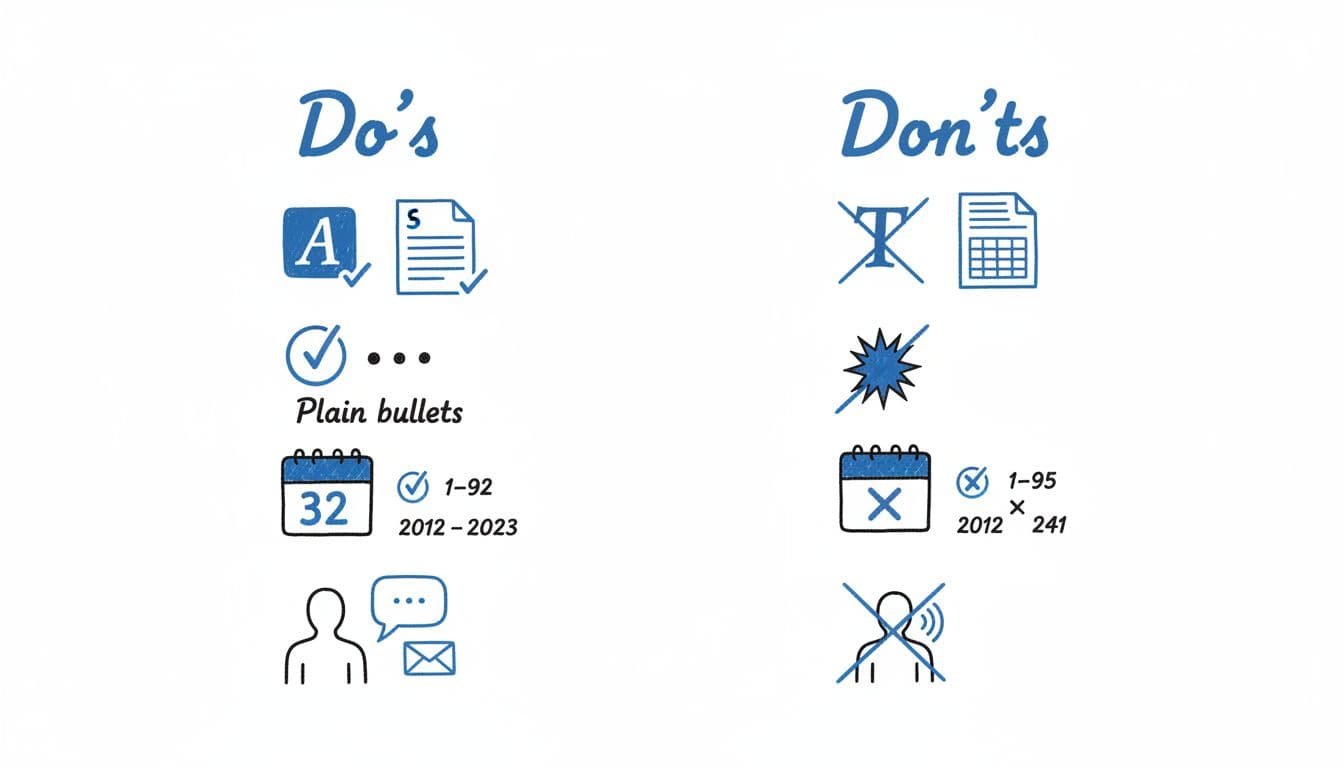
A safe order is contact info, summary, work experience, education, skills, then certifications. Use plain bullet points throughout. Keep the summary short. For example: “Operations analyst with 5 years of experience in reporting, SQL, and process improvement. Reduced reporting time by 30%.”
If the employer doesn’t specify a file type, a Word document usually causes fewer parsing surprises than PDF format. Still, a simple PDF can work if it passes the copy-paste test.
When you tailor often, formatting can drift. CareerScribeAI’s AI Resume Builder can help keep structure stable with resume templates while you update bullet points for each posting. Its Cover Letter Generator also helps mirror the same language across your application. If you want a side-by-side ATS example from another platform, this Recruitee ATS resume format 2026 follows many of the same rules.
The copy-paste test, step by step
The copy-paste test is the fastest way to catch formatting issues before an Applicant Tracking System like BrassRing does. It takes about three minutes and works like a stress test for your layout.
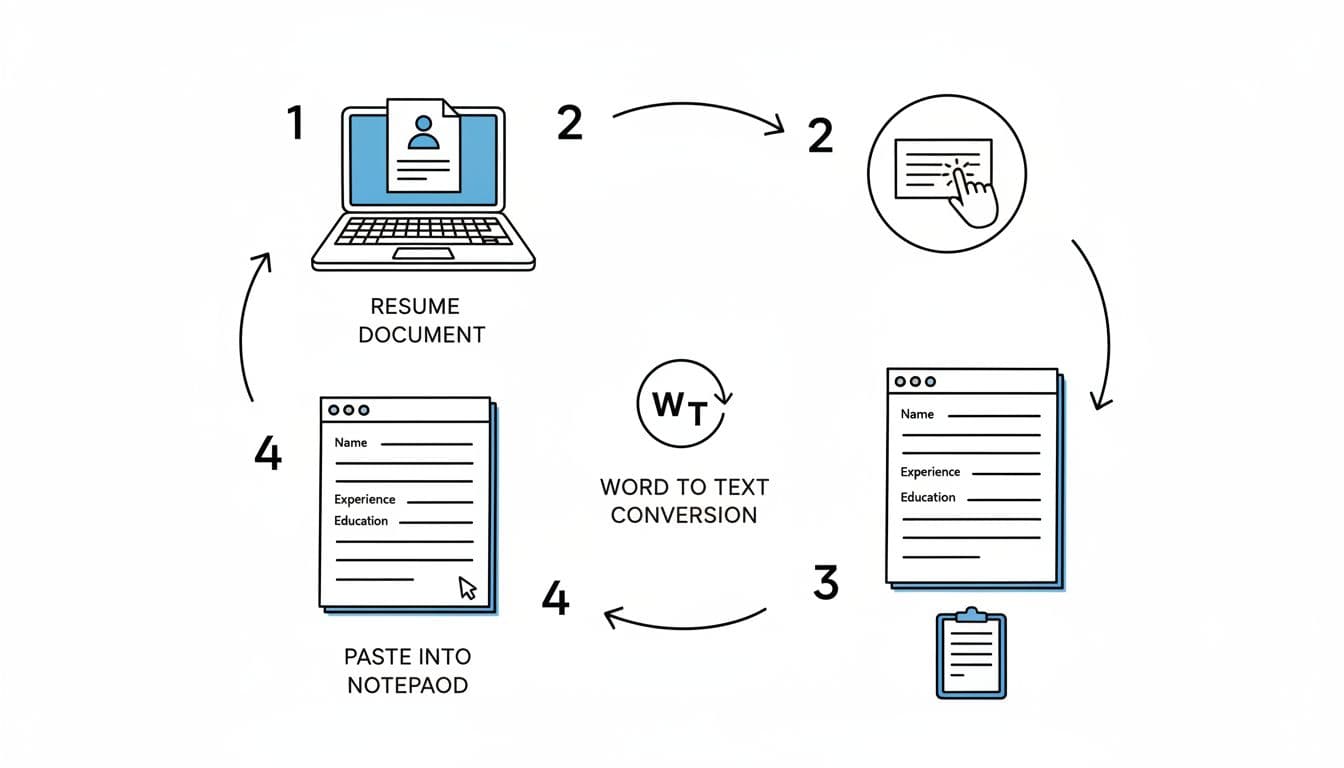
- Save your resume as DOCX, even if you may submit a PDF later.
- Open the file and copy all text.
- Paste it into Notepad, TextEdit in plain-text mode, or another basic editor to simulate a plain text file.
- Read the pasted version from top to bottom.
A pass looks simple. Your headings stay clear, job entries stay grouped, dates stay beside the right role, and bullets remain readable, even if they turn into hyphens.
A fail usually shows up fast. Maybe your contact info disappears because it sat in the header. Maybe dates jump lines. Maybe one job’s bullets slide under another employer. Those are parsing warnings from Applicant Tracking Systems.
Fix the smallest thing first. Remove tables and text boxes. Replace custom bullets with basic bullets or hyphens. Move all key details into the document body. Keep each role in the same pattern for your professional experience, company, title, location, dates, then bullets. Ensure relevant experience stays grouped properly. Also, if you use PDF, test the exact PDF you plan to upload, not just the Word file.
For an extra check, this ATS resume checklist for 2026 is a useful final review. After your resume is solid, CareerScribeAI’s Interview Prep Tools can help turn those same bullets into short STAR answers, so your written story and interview story match.
Final BrassRing resume tips before you apply
Use this quick checklist right before submission to ensure compatibility with BrassRing’s Applicant Tracking System:
- Keep the layout single-column and left-aligned.
- Use standard headings, not creative labels.
- Put contact info in the body, never in headers or footers.
- Keep dates consistent, ideally in
MM/YYYYformat. - Avoid tables, text boxes, icons, images, and skill bars.
- Include parsing keywords from the job description to boost visibility.
- Run the copy-paste test on the exact file you’ll upload.
A BrassRing resume doesn’t need to look flashy. It needs to read cleanly, both for the Applicant Tracking System and for the human reviewing it. Large companies use these systems to enhance candidate experience and maintain regulatory compliance, with automation driving resume screening for data-driven decisions.
Conclusion
The best BrassRing ATS resume format in 2026 is simple, readable, and tested. Stick to one column, use standard headings, tailor your wording to the job, and verify everything with a copy-paste test before you hit submit. When your BrassRing ATS resume format stays plain, your achievements have a better shot at being seen by the Applicant Tracking System, helping you navigate the hiring process successfully.