
Ever upload a resume that looks perfect, then get radio silence? Sometimes it’s not your experience. It’s how the system reads your file.
In 2026, a UKG Pro ATS resume needs to behave like clean text first, and a designed document second, because it must pass through an applicant tracking system that utilizes AI resume screening to evaluate candidates. The safest approach is simple, single-column formatting, standard headings, and dates the parser can understand. Then you confirm it all with a quick copy-paste test that takes about two minutes.
This guide gives you the exact layout rules to follow, a Do/Don’t checklist, and a mini template you can copy into your own document.
What UKG Pro Recruiting parses best in 2026 (and what breaks it)
Think of UKG Pro Recruiting, a cornerstone of modern HR technology and recruitment technology, like an airport baggage scanner. Your resume goes through a text scan as part of job seeker applications, and the system tries to sort what it finds into fields like employer, job title, dates, skills, and education. If your layout forces the scanner to “guess,” your information can land in the wrong place.
Here’s what tends to work reliably:
- File types: DOCX is usually the safest. A text-based PDF can also work well, as long as it’s not image-heavy or scanned. UKG Pro Recruiting’s job postings management tools often include career marketplace integration like ZipRecruiter Apply to sync candidate data smoothly.
- Fonts: Stick to Calibri, Cambria, Arial, or similar. Keep body text 11 pt or larger.
- Layout: Use one column with left-aligned text. Avoid sidebars, text boxes, tables, icons, and charts. Clean layouts enhance the candidate experience in hiring workflows and contribute to a positive employee experience.
- Headings: Use plain labels like “Work Experience,” “Education,” and “Skills.”
- Dates: Keep them consistent, and make them easy to parse. MM/YYYY is a safe default (for example, 03/2024).
For extra context on UKG Pro Recruiting ATS formatting expectations, see UKG Pro Recruiting ATS formatting notes.
A quick comparison helps when you’re deciding how to save your file:
| Format | When to use it | Common problem to avoid |
|---|---|---|
| DOCX | Best default when the job post doesn’t specify | Over-styling with tables or shapes |
| PDF (text-based) | When the employer asks for PDF, or you need consistent viewing | “Printed” PDFs that turn text into images |
| TXT (testing only) | For the copy-paste test and troubleshooting | Not suitable as a final submission |
If you want a parallel example from a similar system, the Lever ATS resume format guide explains why single-column structure and standard headings beat flashy layouts.
When you’re ready to tailor content, CareerScribeAI.com helps you stay inside these guardrails. Use the AI Resume Builder to keep formatting ATS-safe while aligning skills and keywords to the job post.
UKG Pro ATS resume format checklist (Do/Don’t)
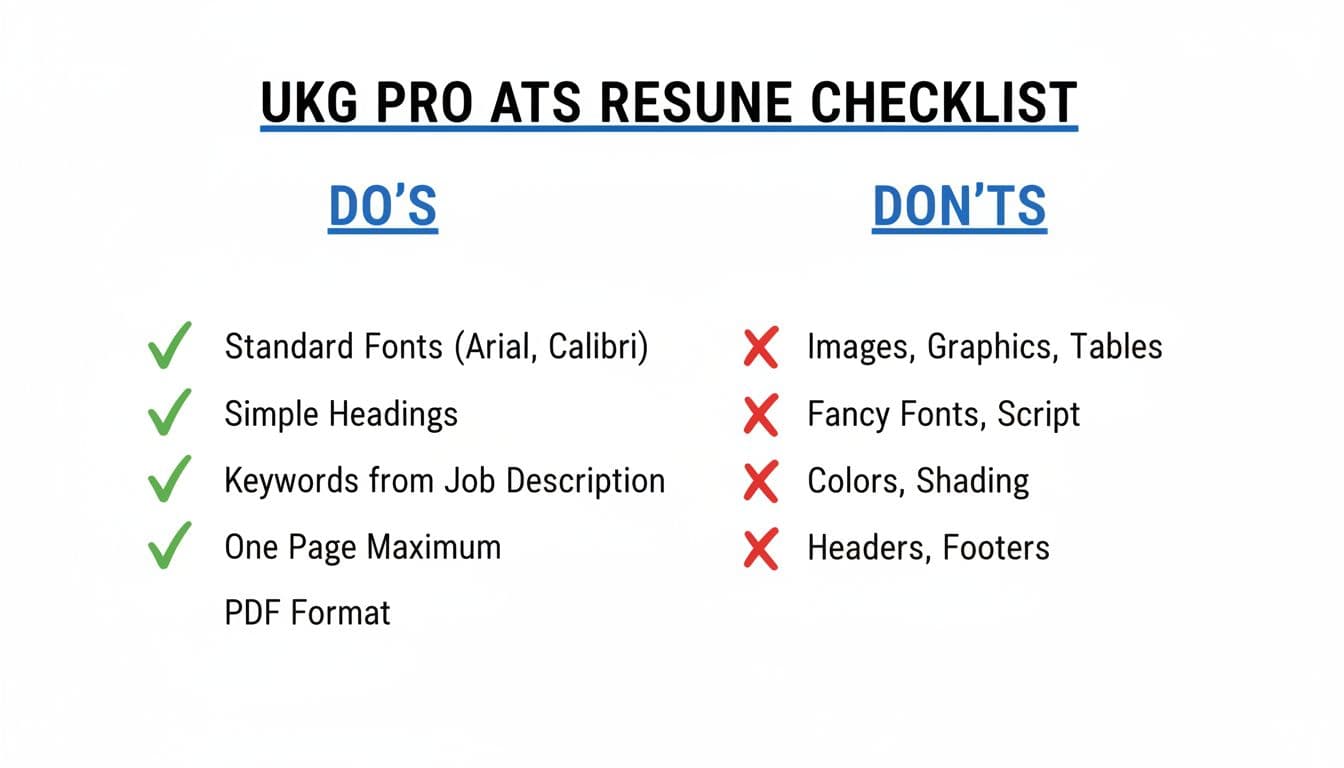
Talent acquisition teams use UKG Pro Recruiting, a powerful applicant tracking system, to manage job requisitions and streamline hiring. The goal is boring formatting that makes your achievements easy to extract. A recruiter can still appreciate clean design, but UKG Pro needs predictable structure.
The “Do” choices that usually parse cleanly
Use these as your default settings:
- Single-column layout, full width, left aligned
- Standard section headers: Summary, Skills, Work Experience, Education, Certifications (these facilitate resume screening automation and AI resume screening)
- Simple bullets (round bullets or hyphens), with consistent indentation
- Clear job entries: job title, company, location, dates, then bullets
- One date format everywhere (MM/YYYY is a safe choice)
The “Don’t” choices that cause missing or scrambled text
These look nice on screen, but they often fail during text extraction, disrupting recruiter workflow and delaying candidate communication. A clean file also makes it easier for the system to process hiring panel feedback later:
- Tables (even invisible ones used for alignment)
- Text boxes, shapes, sidebars, and multi-column templates
- Icons for phone, email, or location (write the words instead)
- Skill bars, charts, and logos
- Contact info placed in headers or footers
Gotcha: if your phone number or email sits in a header, the parser may skip it. Put contact details in the main document body.
After you format the resume, match your cover letter to the same clean structure for a positive candidate experience within the applicant tracking system. CareerScribeAI.com’s Cover Letter Generator is useful here because you can produce a UKG-tailored letter without adding layouts that break parsing.
Copy-and-paste mini template (ATS-safe skeleton)
Paste this structure into Word or Google Docs, then fill it in with your details:
- NAME
City, Postcode (or City, State) | Phone | Email | LinkedIn URL - PROFESSIONAL SUMMARY
2 to 3 lines matching the role, include 1 to 2 core skills. - SKILLS
Skill 1, Skill 2, Skill 3, Skill 4 (group by category if needed) - WORK EXPERIENCE
Job Title | Company | City | MM/YYYY to MM/YYYY
Bullet with outcome + metric
Bullet with tool/skill + impact
Bullet with scope (team, budget, volume) - EDUCATION
Degree | School | City | Graduation Year (or MM/YYYY) - CERTIFICATIONS (optional)
Certification | Issuer | Year - PROJECTS (optional)
Project | 1 line result | Tools used
If you’re not sure what skills matter most, CareerScribeAI.com’s job description analysis can help you separate must-haves from nice-to-haves before you rewrite bullets.
The UKG Pro copy-paste test (fast, revealing, repeatable)
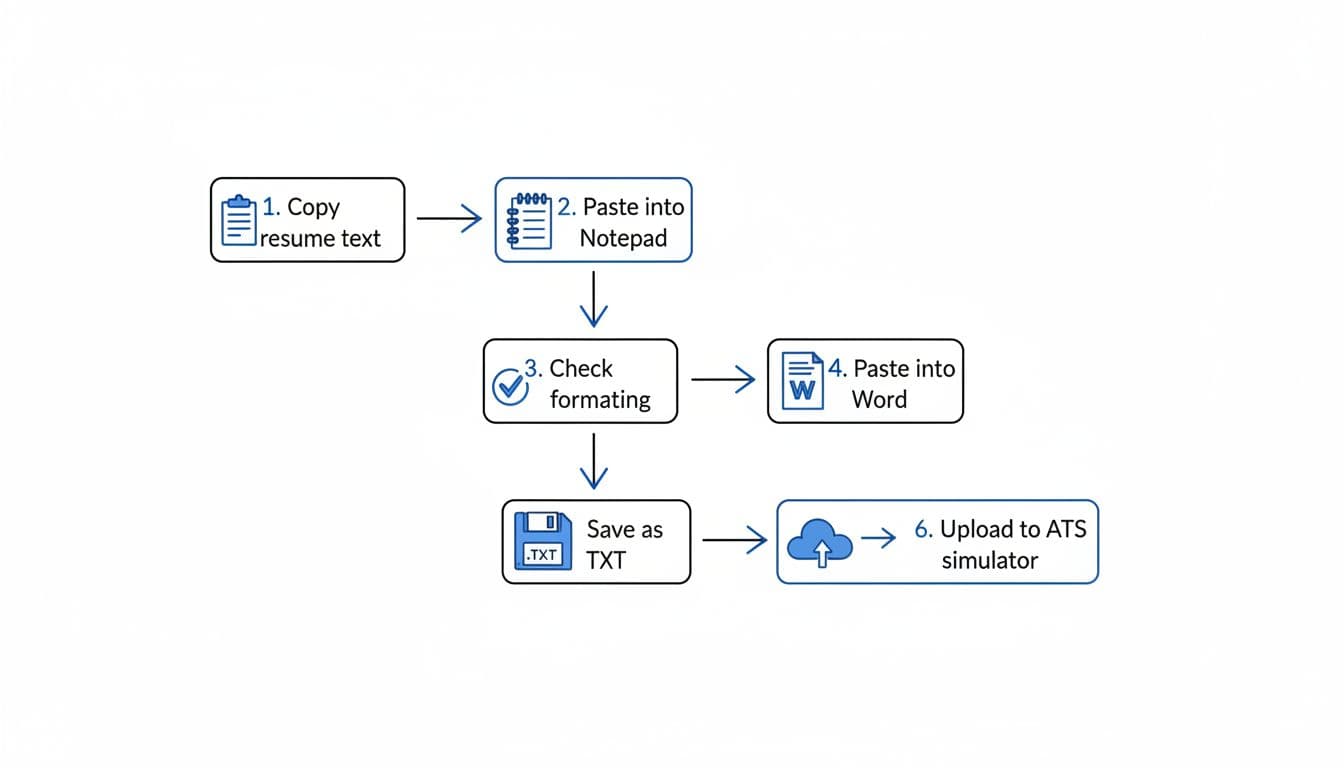
This test is your resume’s X-ray, ensuring smooth candidate sync with internal HCM systems. If the text stays readable after paste, your UKG Pro ATS resume is much more likely to parse cleanly, supporting the efficiency of broader corporate hiring engines.
Run the test in about two minutes
- Copy all text from your resume.
- Paste into Notepad (or TextEdit in plain text mode).
- Scan the pasted text for missing lines, strange symbols, or mixed sections.
- Paste into Word to see if spacing and bullets behave.
- Save as TXT (testing only) and re-open it to check the order.
- Fix one issue at a time, then repeat the test.
What to look for (and quick fixes)
When the paste looks wrong, the cause is usually simple:
- If sections appear out of order, remove columns and replace creative headings with standard ones.
- If dates drift away from roles, put dates on the same line as the company, or directly beneath it, and keep MM/YYYY. Fixing these prevents delays in hiring workflows and helps maintain an accurate hiring metrics dashboard.
- If bullets turn into weird characters, switch to basic bullets or hyphens, then reduce indentation.
- If contact info disappears, move it out of headers/footers and into the body.
Also watch out for mobile uploads. They can introduce odd line breaks and spacing changes, especially when a file converts during upload.
CareerScribeAI.com fits nicely into this workflow and HR technology stacks: generate an ATS-safe version in the AI Resume Builder, tailor it to the posting, then run the copy-paste test before you submit. Optimizing this way reduces time-to-hire and enables advanced features like automated interview scheduling, predictive analytics, or automated outreach once the profile links to specific job requisitions. After that, use the Interview Prep Tools to practice answers that match the same role keywords and requirements you used on the resume.
For a broader UK-focused refresher on ATS-friendly CV structure, this ATS-friendly UK CV guide is a helpful reference.
Conclusion
A strong UKG Pro ATS resume is easy to scan because it’s easy to parse, helping you gain essential pipeline visibility. Keep the layout single-column, use standard headings, and stay consistent with dates and bullets. Then run the copy-paste test until the text looks clean in plain format. Talent professionals rely on these systems for their compliance and security features and robust data encryption. Once the structure is solid, your achievements finally get the attention they deserve, with succeeding at resume screening automation as the first step toward a great employee experience.