
Freelance work can read like a highlight reel or a messy pile of gigs, the difference is how you frame it. Framing freelance work correctly is essential for a professional summary that addresses potential employment gaps. Hiring teams want to know what you did, for whom (or at least in what industry), and whether your results match the job.
In 2026, the safest approach for most job seekers is a freelance work resume section that uses a client-based format but still looks like traditional experience to an applicant tracking system (ATS). Think of it like a bookshelf for an ATS-friendly resume, same size books, clear labels, easy to scan.
Pick a client-based resume format that fits your volume of work
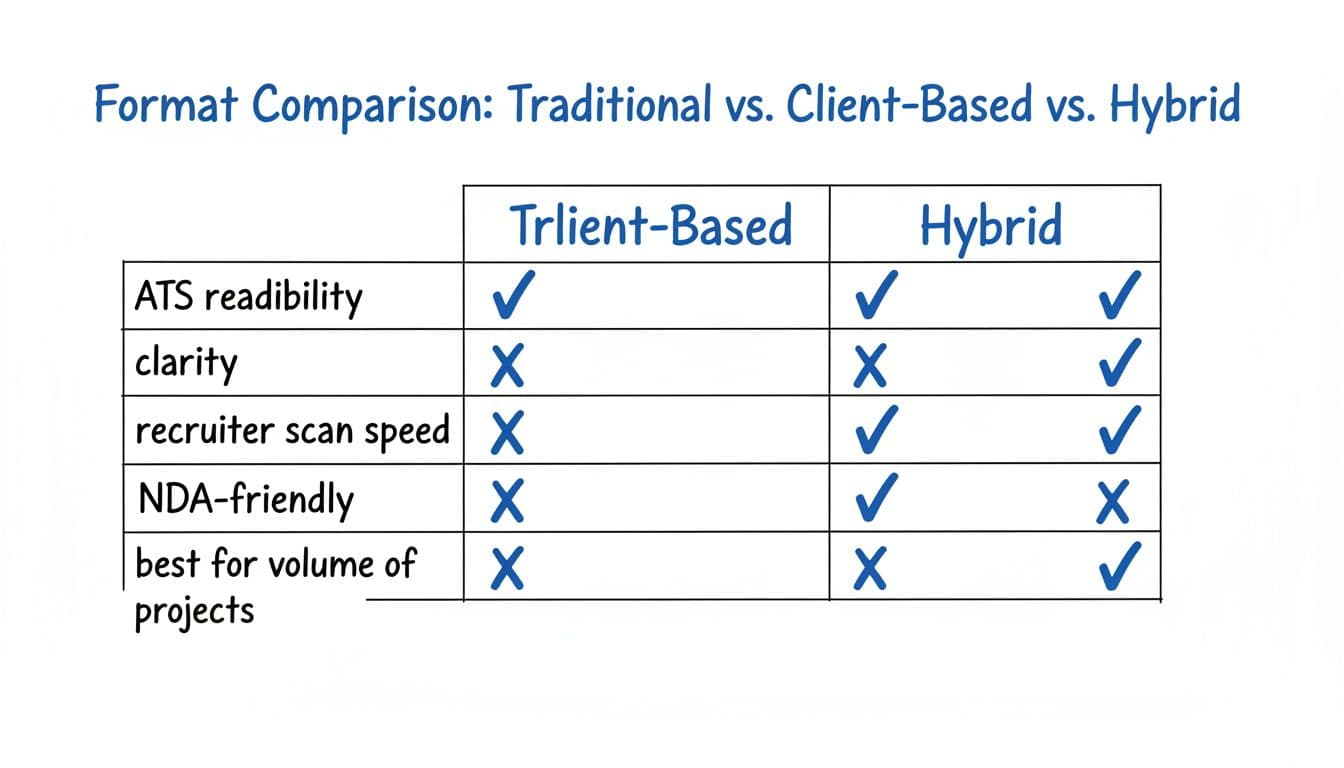
As an independent contractor, a client-based format works because it answers the recruiter’s real question: “Can this person do the work here?” It also lets you display work experience without freelance looking like a side hustle, as long as you keep titles and dates consistent.
Use one of these three approaches:
| Format | Best when | ATS readability | Recruiter scan speed | NDA-friendly |
|---|---|---|---|---|
| Traditional (each client as a job) | You had 1 to 3 long client engagements | Medium (can look fragmented) | Medium | Low |
| Client-based project list | You have many short projects | High (if consistent labels) | High | High |
| Hybrid resume (one role + selected projects) | You want a clean timeline plus proof | High | High | High |
If you’ve done steady freelance for a while, the hybrid resume is often the sweet spot: one umbrella entry to keep your timeline clean, then a “Selected Client Projects” list to show range.
Two quick guardrails:
- Don’t turn your resume into a portfolio. Keep the best 2 to 4 projects and add a portfolio link to show relevant experience in a separate line if needed, while keeping the main document focused on highlights.
- Don’t hide the fact it’s freelance. Labeling it clearly builds trust and keeps background checks simple.
For broader formatting basics that still hold true in 2026, Coursera’s 2026 resume writing guide is a solid refresher on structure and keyword placement.
Use a 6-Step Method to Keep Freelance Readable for Applicant Tracking Systems
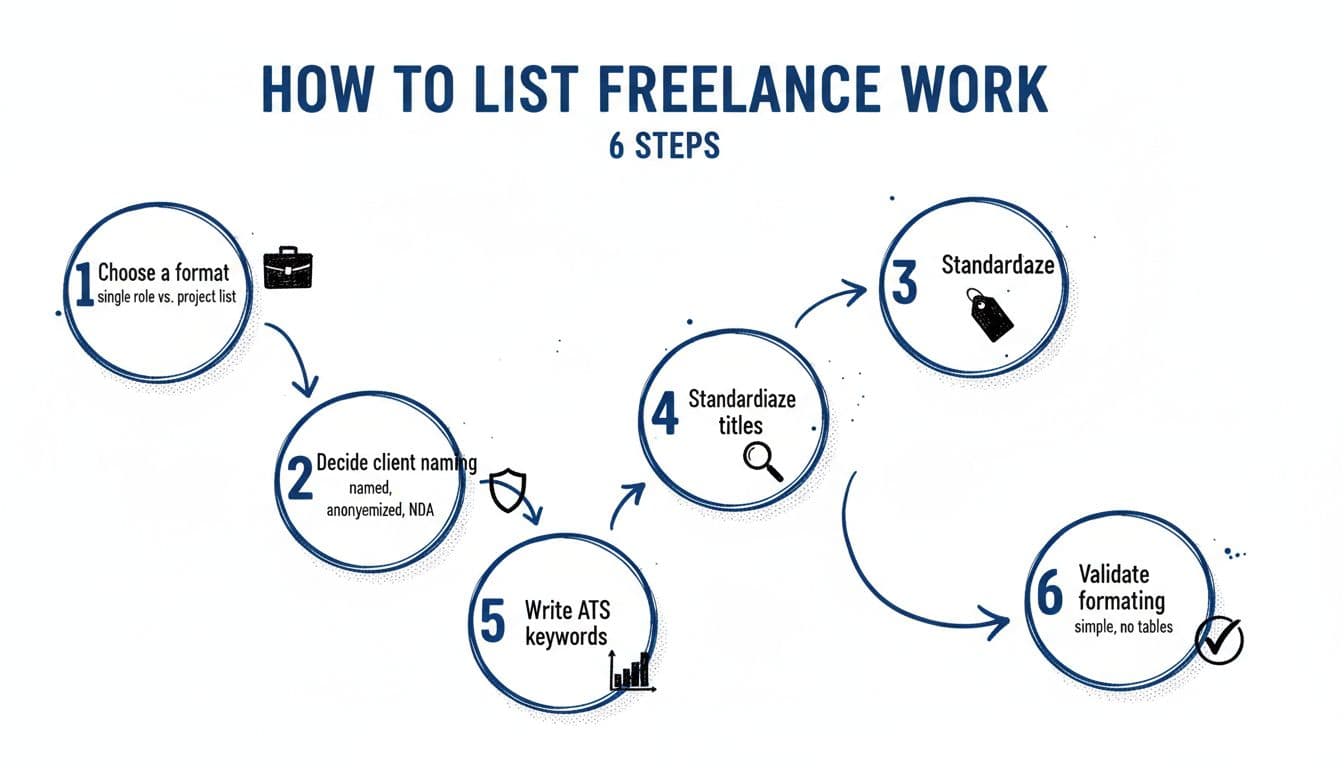
Here’s a repeatable process that keeps your resume clean (and machine-readable) without flattening your work into vague claims.
Step-by-Step: The Client-Based Format That Won’t Break Applicant Tracking System Parsing
- Choose a structure: single “Freelance Consultant” role, a project list, or a hybrid of both.
- Decide client naming: use real client names when allowed, use a business name to anonymize when necessary, and note NDA limits.
- Standardize professional titles: pick one main professional title that matches your target role (for example, “Freelance Product Designer”), then stick to it.
- Mirror Applicant Tracking System keywords: pull skills, tools, and responsibilities from the job description and reflect them naturally in bullets.
- Quantify outcomes: numbers beat adjectives, even small ones (time saved, conversion rate, cycle time, revenue, cost).
- Validate formatting: recommend a single-column layout, simple bullets, standard headings, and predictable dates (for example, “Mar 2023 to Jan 2026”). This ensures compatibility, unlike some traditional chronological resumes with complex layouts.
Copy-Paste Templates (Applicant Tracking System-Safe, Client-Based)
Use strong action verbs and quantifiable results for each bullet.
Template A: Single role entry (Freelance Consultant)
Freelance Consultant (Marketing Analytics), Self-Employed, Remote
Mar 2023 to Jan 2026
- Improved [metric] by [X%] by building [dashboard/model] in [tool] for [industry] clients
- Reduced reporting time from [A] to [B] using [automation/process]
- Partnered with stakeholders to define KPIs, reporting cadence, and success criteria
Template B: Selected Client Projects list
Selected Client Projects (Freelance)
- [Client Name], [Industry], [Role], [Month YYYY to Month YYYY]: Delivered [outcome] resulting in [metric]
- [Client Name], [Industry], [Role], [Month YYYY to Month YYYY]: Built [deliverable] that increased [metric] by [X%]
- [Client Name], [Industry], [Role], [Month YYYY to Month YYYY]: Led [scope] across [team/tools], cut [cost/time] by [X]
Template C: NDA or anonymized client entry
Confidential Client (B2B SaaS), [Role], [Month YYYY to Month YYYY] (NDA)
- Shipped [feature/campaign/system] used by [# users/teams], improving [metric] by [X%]
- Collaborated with [functions] to deliver [deliverable] within [timeline]
- Documented process and handed off playbooks to internal team
If you want more examples of where freelance fits on a resume, Teal’s guide to adding freelance work shows several clean placement options you can adapt.
Write bullets that match 2026 ATS scoring and recruiter expectations
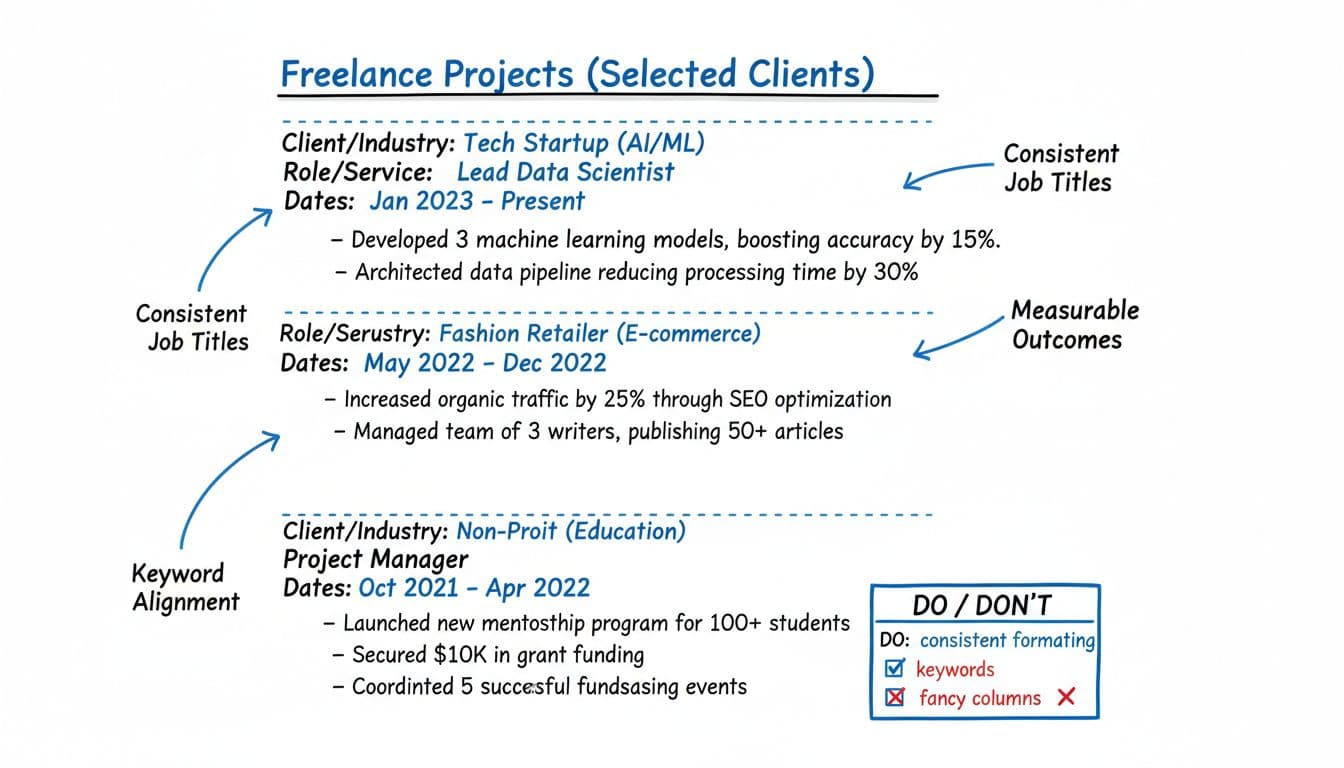
ATS tools still reward clear patterns: recognizable headings, consistent dates, and role titles that map to the job. Recruiters do the same thing, just faster.
Keyword alignment (without sounding fake)
To align effectively, incorporate industry-specific keywords into well-structured bullet points. Start with the job description and highlight:
- Core skills (for example, “SQL,” “stakeholder management,” “GTM strategy”)
- Tools (for example, “GA4,” “Figma,” “HubSpot,” “Python”)
- Output nouns (for example, “dashboards,” “wireframes,” “sales enablement,” “ETL pipelines”)
Then bake those terms into your bullets where they belong. A good rule is one primary skill or tool per bullet, tied to an outcome.
Quantified bullet examples that fit most freelance roles
Incorporate project management and transferable skills to showcase measurable achievements, such as:
- Increased landing page conversion 18% by rewriting copy and testing 6 variants in Google Optimize alternatives
- Cut monthly close reporting time 12 hours by automating SQL pulls and dashboard refreshes
- Reduced support tickets 22% by redesigning onboarding emails and in-app prompts
- Delivered a 10-page security policy update, passed vendor review with 0 major findings
Common ATS mistakes in freelance sections
Avoid logos, text boxes, multi-column layouts, and project tables on the resume itself. ATS parsers often scramble them. Hiring managers prefer standard fonts and a clean document format, so keep formatting boring on purpose; save design flair for a portfolio PDF.
If you want a second opinion on whether your resume matches a target role, tools like CareerScribeAI’s AI Resume Builder can help you tighten formatting, surface missing keywords, and highlight business acumen gained through self-employment; the Cover Letter Generator can frame client work as role-relevant impact instead of “random gigs.” For interviews, using Interview Prep Tools to practice STAR stories based on 2–3 anchor projects helps you sound consistent across resume, cover letter, and live questions.
For another perspective on optimizing freelance entries for parsing and relevance, Jobscan’s tips for listing freelance work effectively are useful, especially around keyword matching and ATS-safe structure.
Conclusion
A strong client-based format for your freelance section reads like a focused job history, not a scatterplot. It creates a cohesive narrative of work experience. Pick a format you can keep consistent, standardize titles and dates, then write bullets that show outcomes and match the role you want. Do that, and your freelance work will result in an ATS-friendly resume that scans clean and still feels human to the recruiter reading it.