
Hiring teams still use certifications as quick proof that you can do the work. But professional certifications only help when they’re easy to find, easy to trust, and easy for an Applicant Tracking System to parse.
In 2026, recruiters skim faster than ever. A certification that’s buried in a sidebar, formatted like a badge, or missing key details can look like it doesn’t exist. Think of your resume like a well-labeled toolbox. If the “socket set” is tossed into a drawer with no label, it’s not saving anyone time. Maintain quality without resorting to keyword stuffing to ensure the content remains high-quality for recruiters.
This guide covers where to put certifications, what details to include, and ATS-safe formatting that won’t break parsing.
Where to put certifications on a resume (the placements recruiters scan first)
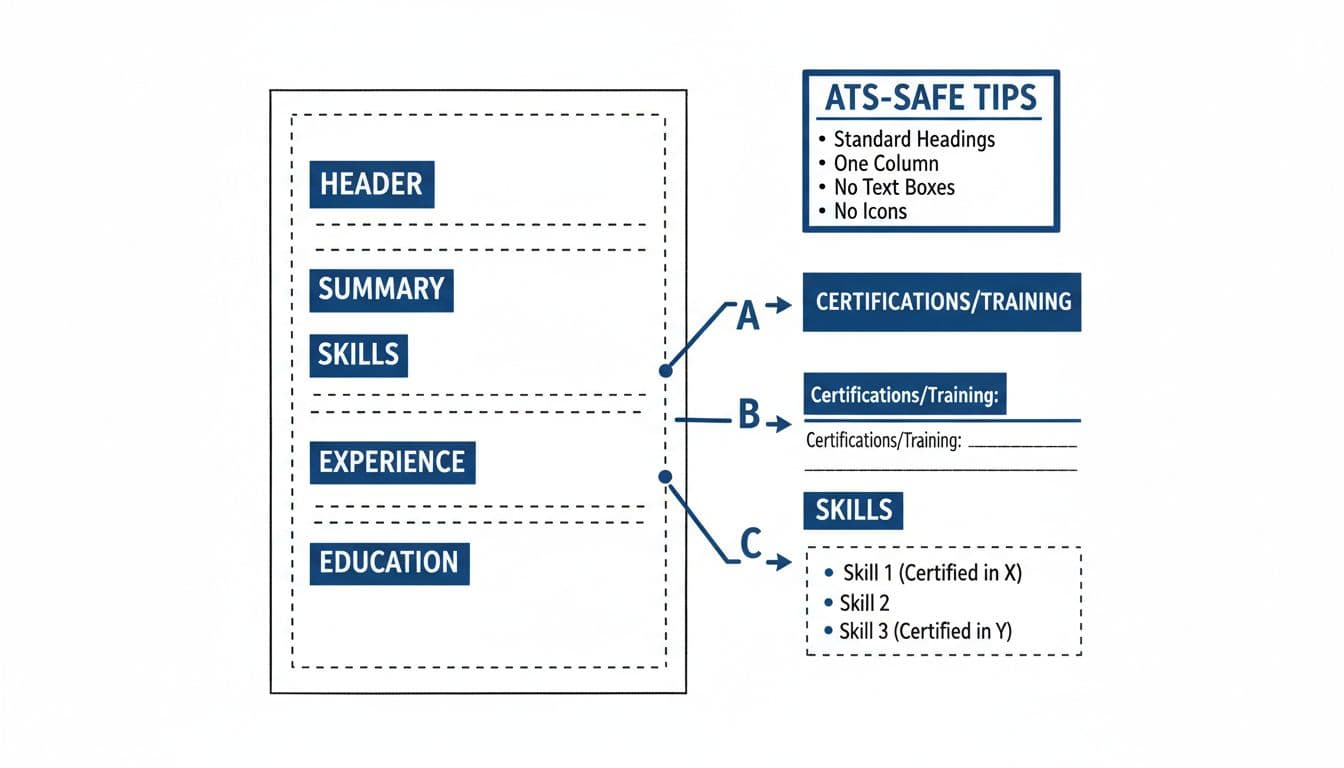
Placement options for certifications on a one-column, ATS-safe resume layout, created with AI.
When deciding certifications on a resume, the “right” spot depends on how central the certification is to the job. Your goal is simple: make it show up where a recruiter’s eyes (and the ATS) naturally go.
Most candidates should choose one of these three placements:
- Dedicated “Certifications” section (best default): Place it below the education section or Skills. This is the cleanest option for ATS parsing and recruiter scanning.
- Under Education (good for new grads and academic certs): Useful when your cert is tied to a program, bootcamp, or university extension.
- Inside Skills (only when tightly job-relevant): Use this when the job posting screams for the credential and you want it near the keyword cluster. Keep it text-only, no icons.
A quick way to decide:
| If this is true… | Do this |
|---|---|
| The cert is required or strongly preferred | Create a Certifications section and place it high (near Skills/Education in a single-column layout for better parsing) |
| You’re early-career and education is the main story | Put the cert under the education section as a sub-line |
| The cert is one supporting proof point for a skill | Mention it in Skills, then list full details in Certifications |
Two guardrails matter in 2026. First, avoid side columns and text boxes; many Applicant Tracking System tools still struggle with them. Second, don’t hide certifications at the bottom if they’re key to the role. For a chronological resume or one following reverse-chronological order, certification placement should still align with the job description requirements. If you want more examples of common layouts, this guide on listing certifications on a resume shows typical section structures recruiters expect.
What to include when listing a certification (so it looks real, not vague)
A certification entry should answer three recruiter questions fast: What is it, who issued it, and is it current? When you leave out those basics, the credential can read like a claim instead of proof.
Infographic-friendly “what to include” checklist
Include these fields in your certification line(s), as long as they’re accurate and relevant:
- Certification name: Use the official name, then add the acronym in parentheses if common.
- Issuing organization: The cert is only as trusted as the issuer.
- Date earned: Month and year is enough in most cases.
- Expiration date (if it expires): If it’s current, say so. If it’s expired, don’t list it unless the role asks for it and you’re re-certifying.
- Credential ID (optional): Add it if the issuer provides one and it helps verification.
- Verification method: If you include a verification URL on your resume, paste it as plain text in your document, but keep the rest of the entry simple so the ATS doesn’t choke on formatting.
- Relevant skills or scope (short): One short phrase including both hard skills and soft skills can maximize resume keywords and align with target keywords found in the job description (for example: “Agile delivery, stakeholder management”).
If your certification is in progress, say that clearly. Recruiters dislike mystery dates. Use “In progress” or “Expected Month Year,” but only when you’re actively enrolled.
This is also where your application materials should agree. If your resume says “Earned 2026,” your cover letter and interview story should match. If you use CareerScribeAI’s Cover Letter Generator, treat the certification as evidence for one claim (for example: “Certified in X, applied it to Y, got result Z”), not as a trophy list.
ATS-safe formatting for resume certifications (and example lines you can copy)
Formatting problems don’t look like problems to humans. They look normal, until an ATS reads your two-column design as scrambled text. For resume certifications, simple beats stylish.
ATS-safe formatting rules that actually help
Stick to these basics for ATS-safe formatting that makes your document machine-readable for the Applicant Tracking System while remaining human-readable:
- Use standard headings: “Certifications” or “Certifications and Training.” Avoid clever labels like “Badges.”
- Maintain a single-column layout: Especially if you’re applying to large employers or high-volume roles.
- Choose the correct file type: Such as .docx, to ensure the single-column layout is preserved.
- Use plain text: No icons, no tables for the certifications list itself, no graphics, no badges.
- Use consistent date formatting: Pick one style (for example, “Feb 2026” or “2026”) and keep it consistent.
- Don’t rely on hyperlinks for meaning: A recruiter may never click. The entry should stand on its own.
- Stick to standard headings across sections like relevant experience.
If you’re unsure about your overall resume format, compare your resume against an ATS formatting reference like this ATS resume format guide. It’s easier to prevent parsing issues than to guess why applications vanish.
ATS-safe example lines (clean and scannable)
Use a simple pattern: Name, issuer, date, optional details.
- Project Management Professional (PMP), Project Management Institute (PMI), Earned: 2026
- AWS Certified Solutions Architect (Associate), Amazon Web Services, Earned: Feb 2026, Expires: Feb 2029
- CompTIA Security+, CompTIA, Earned: 2025
- Professional Scrum Master I (PSM I), Scrum.org, Earned: 2026, Credential ID: (optional)
If the certification is critical, echo it in other places like the professional summary, work experience section, and skills without duplicating full details. Match target keywords and resume keywords from the job description, and describe impact with action verbs and quantifiable achievements using the CAR framework for achievement-oriented results. For example:
- In your professional summary: “PMP-certified project manager with 6 years in SaaS delivery.”
- In work experience section: “Led project teams (PMP), delivering 20% faster timelines.”
Tools can help you keep this consistent. CareerScribeAI’s AI Resume Builder is useful for keeping section headings standard and formatting stable, and its job description analyzer can help you decide which certifications deserve top placement based on what the employer repeats. Then, use interview prep tools to practice the one-minute story behind the credential: why you earned it, what you learned, and where you applied it.
For broader ATS keyword and structure tips, this ATS-friendly resume guide for 2026 breaks down common reasons resumes fail automated scans.
Conclusion: Make certifications easy to spot, trust, and parse
Professional certifications bridge the gap between transferable skills and relevant experience. They work when they’re placed where recruiters look, written with the details that build trust, and formatted so an Applicant Tracking System can read them. Treat resume certifications like signposts, not decorations. A clean resume format is essential for the Applicant Tracking System to successfully extract resume keywords from the work experience section.
Quick copy checklist
- Use a Certifications section (or place under Education when appropriate)
- Write: name, issuer, earned date, plus expiry if needed
- Keep formatting plain, one column, standard headings
- Add acronyms in parentheses when common
- Practice a short interview explanation that ties the cert to real work