
If your resume feels like it has two readers, you’re right. One is a person with limited time. The other is an Applicant Tracking System (ATS) sorting hundreds of applications before a human ever opens a file.
Resume optimization through getting ATS resume sections in the right order is how you control what both readers see first. The goal for 2026 is simple: achieve efficient data extraction with machine readability for automated scanners, making the most relevant proof (skills and results) show up early, in plain section headings, in a format that scans cleanly.
This guide walks through the best default order, the moments when you should change it, and a quick method to pick the right layout for your situation.
Why resume section order matters for ATS and Hiring Managers in 2026
An Applicant Tracking System doesn’t “read” like a hiring manager. It extracts structured data (names, dates, titles, skills) and tries to map it into fields.
Hiring managers, on the other hand, skim fast. They look for a match against the job description, scope, and outcomes in seconds.
That’s why order matters. Your first third of the page often decides whether someone keeps reading. If your most relevant keywords and proof sit below unrelated content, you’re asking both the ATS and the hiring manager to work harder. They won’t.
A good 2026 section order does three things:
- Front-loads keyword alignment: the job title match, core skills, and strongest achievements to the job description appear early.
- Uses standard section headings: “Summary,” “Skills,” “Experience,” “Education” are safer than creative labels.
- Reduces scanning friction: single-column layout, predictable date formatting, and consistent spacing to ensure visual hierarchy.
If you want a quick refresher on what ATS systems look for, Indeed’s guide is a helpful baseline: how to write an ATS resume.
One more reality check: “right order” isn’t one-size-fits-all. While optimization is key, users must avoid keyword stuffing to pass both the machine and the human review. The best order is the one that shows your match to the job within the first page, without confusing the ATS parser.
The best ATS resume sections in the right order (default layout)
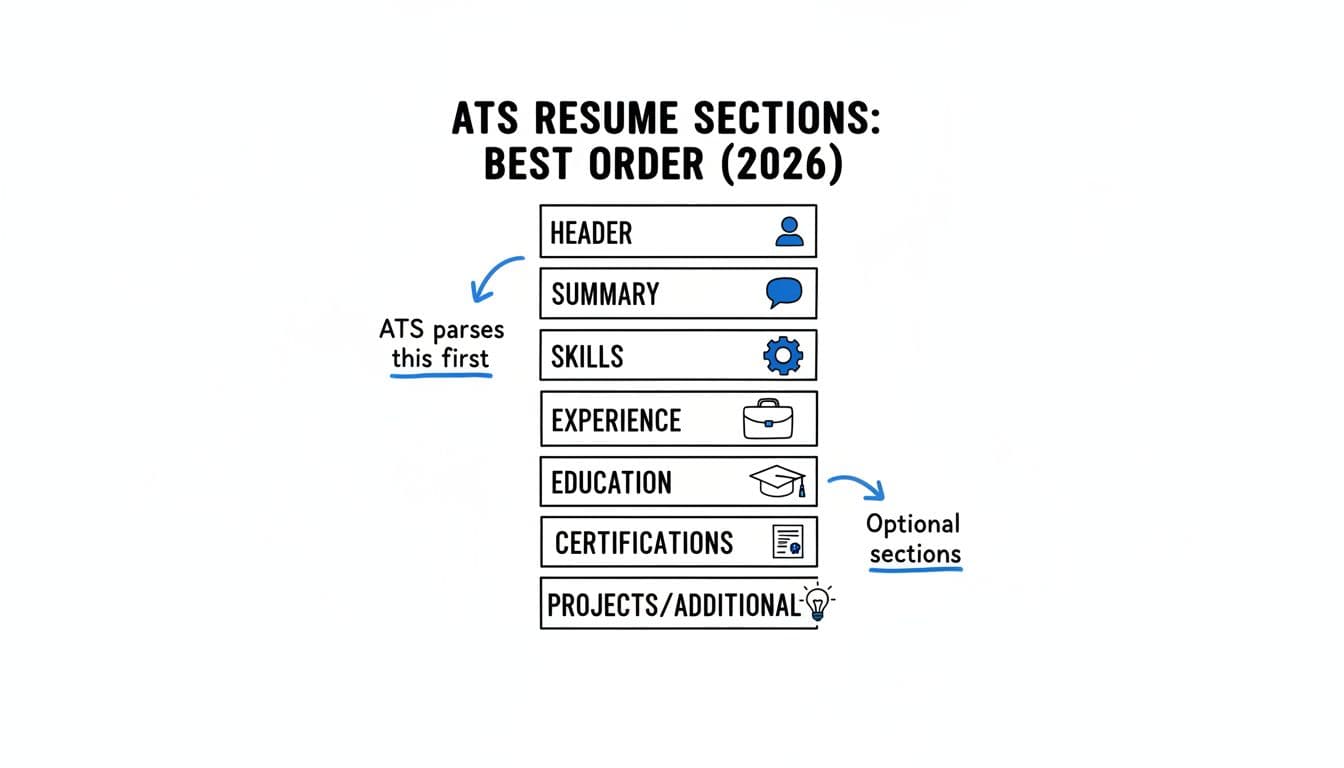
Here’s the default order that works for most job seekers (especially with 2 or more years of relevant experience). It’s ATS-readable and recruiter-friendly.
1) Contact information
Put this first, always. Keep it simple: name, phone, email, city/state, LinkedIn URL, portfolio. Skip full addresses unless a job post asks.
2) Professional summary (2 to 4 lines)
Think of it as your “match statement.” Lead with your role identity, years of experience, and the niche you fit. Add 1 to 2 proof points (tools, industries, metrics).
Avoid a generic objective. If you’re changing fields, this section matters even more because it sets context before the Experience section.
3) Skills section (targeted, not endless)
Place Skills section above Experience when the job is skills-driven (tech, ops, analytics, healthcare, many corporate roles). Keep it tight and relevant, grouped if needed (for example: “Data,” “Tools,” “Methods”). Include both hard skills and soft skills.
This is also where ATS keyword matching often happens first. Don’t hide your best skills at the bottom.
4) Work experience (reverse chronological)
Put the most relevant role first, even if it wasn’t your most recent, only if you can do it honestly with a “Relevant Experience” section and clear dates. Otherwise, stick to reverse-chronological format.
Write bullet points like proof, not duties. Aim for:
- Action verbs plus scope plus outcome (measurable results with numbers when you have them)
- Tools or methods used (when they match the job post)
- 4 to 6 bullet points for recent roles, fewer for older roles
For more detail on section order logic, Resume Worded’s breakdown is a solid reference: correct order for resume sections.
5) Education
If you graduated long ago, Education usually belongs below Experience. If you’re a new grad, you’ll move it up (we’ll cover that next).
6) Certifications (if they help you qualify)
Certifications can move higher if they’re required (security, project management, cloud, clinical). Otherwise, keep them below Education.
7) Projects, volunteer, awards, publications (optional)
These sections earn a spot when they support the target role. If they don’t, they become noise. Optional doesn’t mean useless, it means “only include if relevant.”
If you want help keeping headings consistent and in a clean one-column layout, CareerScribeAI’s AI Resume Builder can be a practical way to structure sections and keep spacing steady while you tailor for each job. To further ensure ATS compatibility, save your document as a .docx file to prevent parsing errors that often occur with complex tables and text boxes.
Choose the right resume section order for your situation (decision guide + examples)
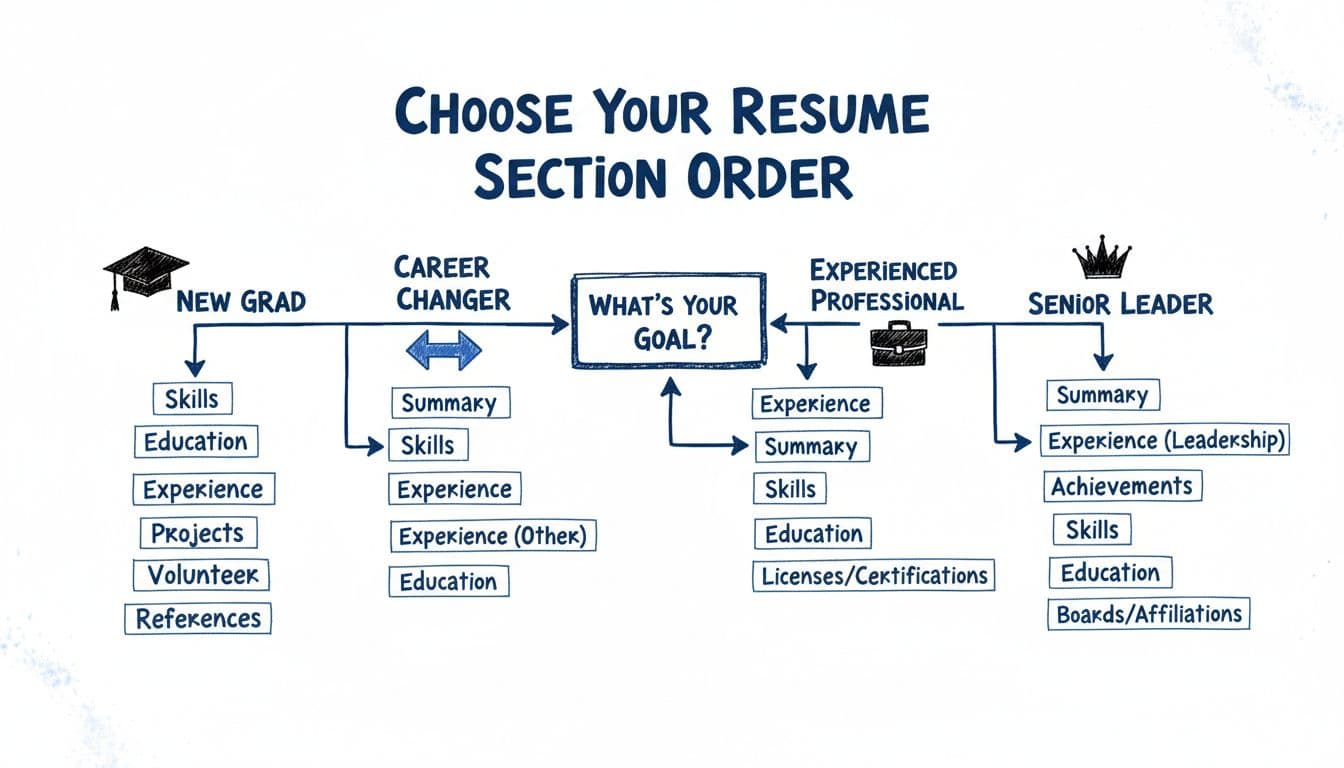
Instead of guessing, use this quick decision process to pick the best ATS-friendly resume format for you.
A simple step-by-step selector
- Pick the job description you’re targeting. Use one job description, not ten.
- List the top 6 to 10 requirements (skills, tools, credentials, role scope) and matching keywords from the job description.
- Choose what proves your match fastest:
- If proof is mostly work results, put Work Experience higher.
- If proof is mostly skills, training, or projects, put Skills and Projects higher.
- Move qualifying items up (licenses, required certs, security clearance, portfolio), including matching keywords from the job description.
- Run a “10-second skim test.” If a recruiter scans the first third, do they see role fit and proof? This also boosts ATS performance.
Infographic-style comparison: three strong section orders
| Situation | Best first sections | Why it works for ATS and humans |
|---|---|---|
| Experienced professional (same field) | Header, Professional Summary, Skills, Work Experience, Education, Certifications, Additional | Keywords show up early, then you back them up with results fast. |
| Career changer | Header, Professional Summary, Skills, Projects or Relevant Experience, Work Experience, Education, Certifications | You explain the pivot, then prove transferable skills before older titles distract. |
| New grad | Header, Professional Summary, Skills, Education, Projects, Work Experience (internships), Certifications, Additional | Education and projects carry more weight, internships still appear with clear dates. |
Senior leaders (quick note)
If you’re a director or VP, you can add a “Selected Leadership Highlights” section right after the Professional Summary (3 to 5 bullet points). Use standard fonts and bullet points, avoiding tables and text boxes. Keep it plain text, no fancy boxes.
Make the resume and cover letter agree
Once your section order is set, match your cover letter to the same story: same target title, same top skills, same proud wins. To verify machine readability, run a Plain Text Test on both documents. CareerScribeAI’s Cover Letter Generator can help keep that alignment tight so the two documents don’t contradict each other.
Then pressure-test your content before interviews. If your resume emphasizes certain skills, expect questions on them. CareerScribeAI’s Interview Prep Tools can help you practice the skills and keywords that appear most on your resume, so you sound as strong as you look on paper. For the final version, save in PDF format only if the Applicant Tracking System explicitly accepts it; otherwise stick to a .docx file to avoid parsing errors and other Applicant Tracking System issues.
For more ATS readability basics (fonts, headings, and common pitfalls), this checklist is useful: ATS-friendly resume components.
Conclusion
The right ATS resume sections order is about attention to the Applicant Tracking System. Effective resume optimization relies on standard section headings that every ATS expects. Put your best match near the top, use standard section headings, and make proof easy to find for the Applicant Tracking System (ATS). Prioritize keyword alignment with the job description through action verbs and bullet points in work experience and education. This keyword alignment with the job description using action verbs and bullet points highlights your work experience, education, and fit for the hiring manager. Start with the default ATS layout, then adjust based on whether your strongest evidence is skills, projects, work experience, or education. Tailor bullet points in work experience and education for ATS parsing and hiring manager review. Your resume shouldn’t feel like a biography; it should feel like a clear argument for the role, with job description keyword alignment optimized for the Applicant Tracking System (ATS) and hiring manager.