

A resume can be solid, but a bad resume file name can still trip you up and harm your first impression with recruiters. It’s like putting the right letter in an envelope with the wrong address. Some hiring portals reject the upload, some strip characters, and some store your file in a way that makes it hard for recruiters to find later. A well-named file conveys professionalism right from the start.
In 2026, these issues show up more often because more applications happen on mobile, more portals use strict file validators, and more people upload from cloud drives that don’t always behave like local files. The fix is simple: use a clean, consistent naming convention when naming your resume that works everywhere.
Why resume file names still break uploads in 2026
Applicant tracking systems usually don’t “rank” you based on your resume filename, but the filename can still affect whether your file gets accepted, stored correctly, and found quickly by a recruiter. Many systems validate file uploads before the resume even reaches the ATS database. That’s where problems start.
Common failure points look small, but they’re real:
- Portal validators for job applications that block special characters (like
&,/,#), invalid file format, or very long names. - Email and recruiter workflows where attachments get downloaded into shared folders, and generic names like
resume.pdfget overwritten. - Mobile uploads where the file picker may truncate long names or add extra text like
(1)orcopy. - ATS import quirks where odd characters become question marks, or spaces become
%20, or the system stores your file under an unreadable internal label.
Even when the upload succeeds, messy filenames can hurt you in a different way: recruiters often download multiple resumes at once. If yours saves as Document(14).pdf, it’s easy to lose in the pile.
If you’re also updating your resume content for ATS readability, it helps to follow the same “keep it simple” approach you’d use for formatting. Indeed’s overview of ATS resume basics and templates aligns with that idea: clear structure, fewer surprises, and fewer chances for a system to mis-handle your file.
The simple rules for an ATS-friendly resume file name
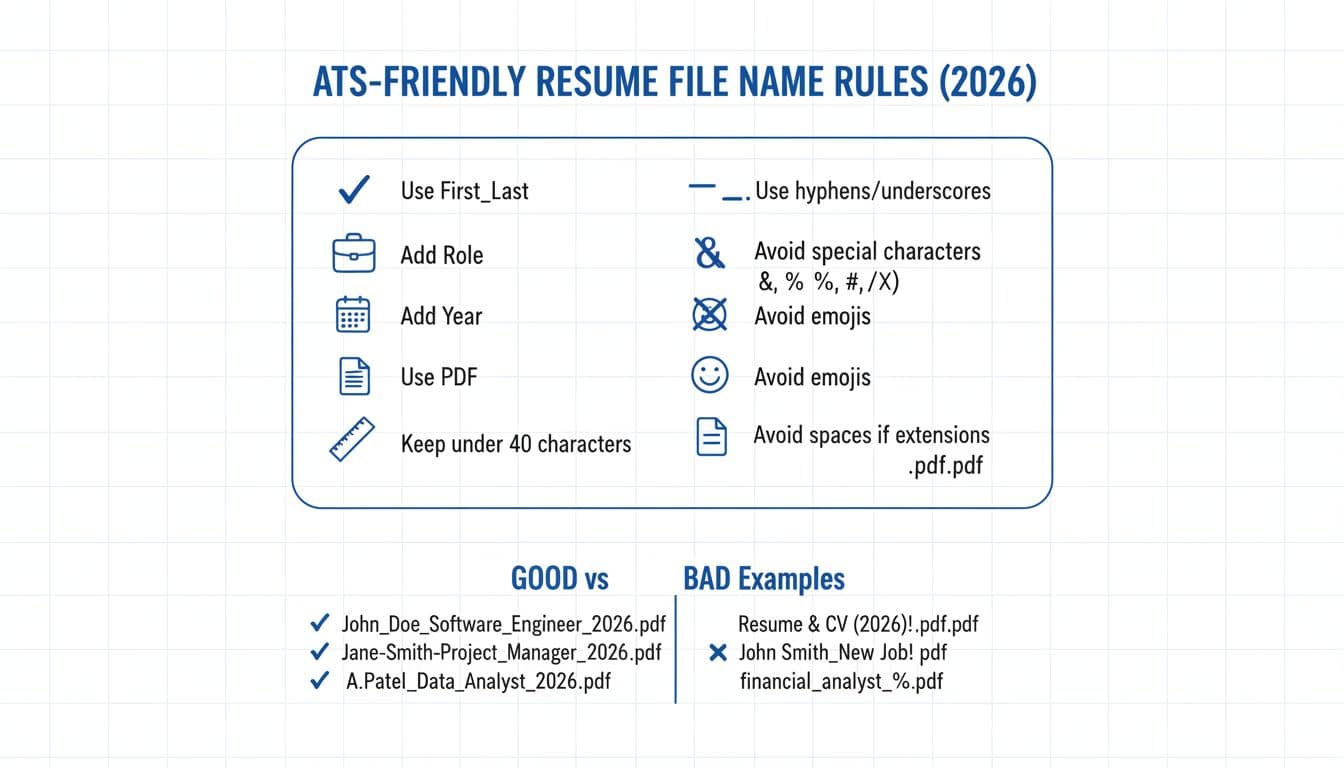
A good ATS-friendly resume file name does two jobs: it passes picky upload checks and it makes sense to a human scanning downloads.
Recommended default naming formula (use this first)
First_Last_Role_2026.pdf
Why this ATS-friendly resume filename format works:
- First_Last (full name): Identifies you immediately (and sorts well).
- Role (job title in title case): Tells the recruiter what this version targets (helpful if you’re applying to more than one role); format it like
Data_Analyst. - 2026: Signals recency without needing “final” or “latest.”
- .pdf: A stable format that usually preserves layout across devices. (PDF is the top choice for compatibility.)
Keep it under 40 characters when you can. If your role title is long, shorten it (for example, Customer_Success_Mgr).
Safe characters vs risky characters
Character typeSafe examplesRisky examplesWhy it mattersLetters and numbersA-Z, a-z, 0-9Non-Latin symbolsSome portals fail on uncommon encodingsSeparatorsUnderscores (_) and hyphens (-)Multiple separators like ___Cleaner names reduce parser errorsSpacesOften works: First Last.pdfTrailing spacesSome systems misread or trim them; underscores (_) are a safer alternativePunctuation (Avoid)& % # @ ! ? : ; ,-Frequently blocked by validatorsPath characters (Avoid)/ -Can be treated like folder pathsParentheses (Use sparingly)(final) (1)-Can look auto-generated or duplicatedExtensions.pdf or .docx.docx.pdf.pdf“Double extensions” can be rejected
If you want a quick sanity check with more examples, Jobscan’s guide on how to name your resume file maps closely to what tends to work across major hiring systems.
Best practice templates for real-life scenarios
ScenarioTemplateExampleNotesStandard applicationFirst_Last_Role_2026.pdfAva_Chen_Data_Analyst_2026.pdfBest default for most job seekersCareer changeFirst_Last_TargetRole_2026.pdfAva_Chen_Product_Analyst_2026.pdfUse the role you’re applying for, not your past titleMultiple roles at same companyFirst_Last_Role_Company_2026.pdfAva_Chen_Data_Analyst_Acme_2026.pdfHelps you track applications without adding special charactersTailored per job postingFirst_Last_Role_REQID_2026.pdfAva_Chen_Analyst_84217_2026.pdfUse the job ID from the job description if available, keep it shortRecruiter submissionFirst_Last_Role_City_2026.pdfAva_Chen_Data_Analyst_Boston_2026.pdfAdds quick context, avoid full addresses
A naming workflow that prevents resume upload issues (desktop, mobile, and cloud)
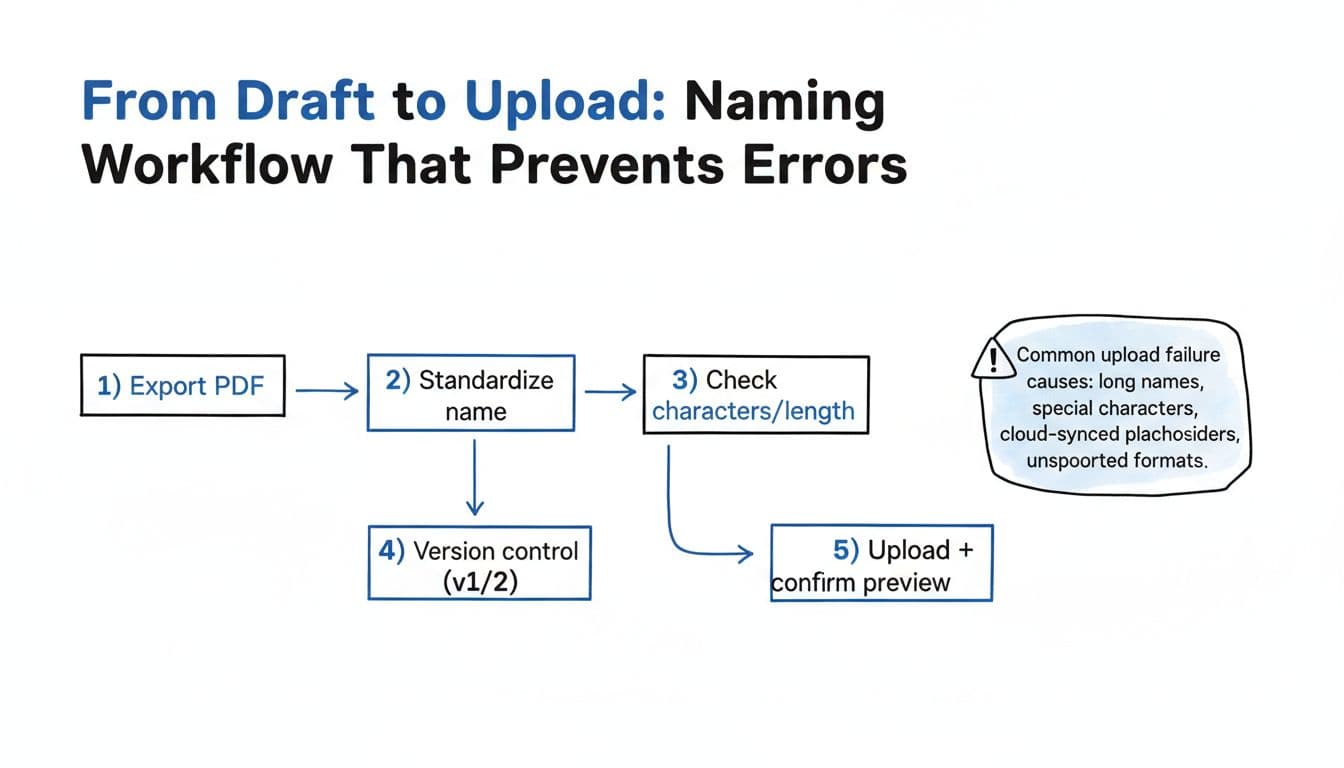
In 2026, “I uploaded it” isn’t always the same as “they received it.” A reliable workflow following best practices cuts down the weird edge cases.
Step 1: Export a fresh PDFExport from your editor, don’t print to PDF if it breaks fonts or adds odd metadata.
Step 2: Apply your standard resume naming conventionRename the file before you attach it anywhere. This prevents portals from auto-naming it based on your device.
Step 3: Do a quick validator checkLook for: length, special characters, double file extensions, and accidental commas or apostrophes.
Step 4: Version control without chaosUse version numbers like v1 and v2 only while drafting. For submission, remove the version numbers and rely on the year. For example, keep Ava_Chen_Data_Analyst_2026_v3.pdf locally, upload Ava_Chen_Data_Analyst_2026.pdf.
Step 5: Upload, then confirm previewMany portals show a preview or file details after upload. If the preview is blank or the filename changes into gibberish, re-export and re-upload.
Two 2026 gotchas to watch:
- Cloud sync placeholders (OneDrive or Google Drive): some devices try to upload a “placeholder” instead of the real file if it’s not fully downloaded. Open the file first to force a local copy.
- Mobile file pickers: iOS and Android sometimes attach an older version with the same name. Check the timestamp and preview.
If you want consistency across exports, CareerScribeAI.com can help. Its AI Resume Builder can keep your outputs consistent, its Cover Letter Generator makes it easy to match naming, and its Interview Prep Tools are useful once applications are out the door. For broader ATS trends and what systems tend to accept, especially preferring PDF over word document, Jobscan’s breakdown of ATS-friendly resume guidance for 2026 is a solid reference point.
Cover letter file naming that matches (and doesn’t confuse anyone)
Treat your cover letter like the resume’s partner file by following a consistent naming convention. Recruiters often download both at once, so alignment matters.
A clean pattern:
- Resume: First_Last_Role_2026.pdf
- Cover letter: First_Last_Role_CoverLetter_2026.pdf
Keep the role text identical in both filenames. If you abbreviate Customer_Success_Mgr in the resume, use the same abbreviation there. That tiny consistency helps when a hiring manager is scanning a folder fast.
Quick checklist and FAQs
Checklist before you hit “Submit”
- Use First_Last_Role_2026.pdf as your default.
- Keep it under 40 characters when possible.
- Use PDF unless the posting requests DOCX.
- Stick to letters, numbers,
_or-. - Avoid special characters, emojis, and double extensions.
- Confirm the preview after upload.
- If uploading from a cloud drive, open the PDF first to confirm it’s local.
FAQs
Should I use PDF or DOCX in 2026?
PDF is usually safer for layout and mobile viewing. Use DOCX only if the posting asks for it or the portal rejects PDFs.
Spaces vs underscores in a resume file name?
Spaces often work, but underscores are more reliable across older portals and strict validators. If you’re trying to prevent resume upload issues, that format is the safer default.
How should I name files when applying to multiple roles?
Keep the same base format and change only what’s needed, usually the role and (optionally) the company or req ID. Consistency keeps you organized and makes your application easier to spot later.
Your resume content should speak for you, not your filename. In every job application, a simple, consistent resume file name with proper formatting removes a pointless point of failure, showcases your professionalism, and makes you look organized before anyone reads a word.



I as well as my guys were examining the good secrets and techniques from your website and then quickly I got a horrible suspicion I had not thanked the web site owner for them. All the guys were as a consequence warmed to read through them and have now surely been enjoying them. Thank you for truly being really thoughtful and for having such nice useful guides millions of individuals are really eager to understand about. My personal sincere regret for not expressing appreciation to sooner.
Outstanding post, I think website owners should acquire a lot from this web blog its very user friendly.