A Resume skills section is like the index of a book. If it’s organized, the reader finds what they need fast. If it’s a messy pile of words, the right details get missed, even when you’re qualified.
In 2026, that “reader” is often Applicant Tracking Systems first, then a recruiter scanning on a small screen. An ATS friendly skills section isn’t about stuffing keywords, it’s about making your best matches easy to spot and easy to parse.
What ATS systems notice in a Skills section (and what they ignore)
Most ATS software does three basic things with skills: it parses text, matches it to job requirements, and helps recruiters filter and rank candidates. That’s why clarity matters more than clever design. Simple text wins.
Three 2026 realities shape what works:
1) Hybrid skill sets are the norm. More roles blend hard skills, like technical tools, with business work. A marketer might need GA4 and SQL. A project manager might need Jira plus stakeholder management. Your Skills section should show range, but it must still mirror the role’s core needs.
2) Tool-specific keywords carry weight. “Data visualization” is fine, but keywords such as “Tableau” or “Power BI” often get flagged as a stronger match. Same with “Salesforce,” “Workday,” “ServiceNow,” “Azure,” “HubSpot,” and role-specific systems.
3) Consistent phrasing beats variety. If the job posting says “Python,” don’t swap it for “programming in Python.” If it says “financial modeling,” don’t only list “forecasting.” Keep the exact phrase somewhere.
If you want broader ATS context, Jobscan’s overview of how to create an ATS-friendly resume in 2026 explains why clean formatting and keyword alignment still matter.
Pick skills the ATS can match (without sounding fake)
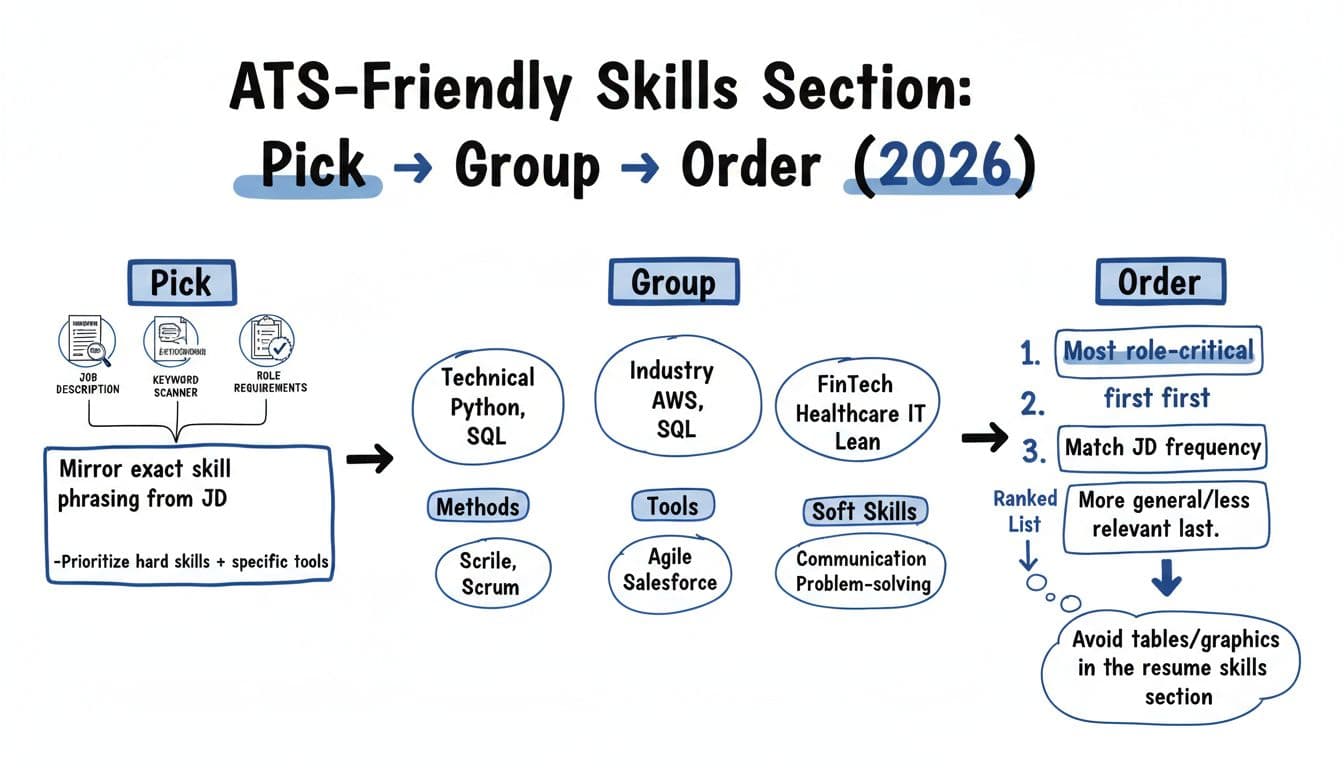
Start with the job description, not your old resume. Think of it like matching a lock and key. Your goal is to match the relevant skills language the employer used, as long as it’s true for you.
Here’s a fast, reliable way to extract skills:
- Scan for repeated nouns (tools, platforms, methods, certifications).
- Circle required items (often listed under “Must have” or “Qualifications”).
- Pull out transferable skills from responsibilities (example: “build dashboards” implies Tableau/Power BI, KPI reporting, stakeholder communication).
- Watch for “bonus” tools that show up twice. Those are often quiet filters.
A helpful rule for most roles: choose 12 to 20 skills that match the target job. Too few looks thin, too many looks unfocused.
SeniorityTypical skills countWhat to emphasizeEntry-level12 to 16Tools, core methods, job-ready basicsMid-level14 to 18Technical skills plus end-to-end ownership skillsSenior16 to 20Strategy, leadership skills, plus key platforms
If you want help finding and formatting the right skills quickly, CareerScribeAI’s AI Resume Builder can extract skill keywords from a job post and place them in a clean resume template layout. Its Cover Letter Generator is also useful for reinforcing the same skill phrases naturally in a short narrative, instead of repeating a list.
For ideas on modern skill mixes (including AI-related skills that show up more often now), Extern’s roundup of skills to put on a resume in 2026 is a solid reference point.
Quick gut check: if you can’t picture a real work example for a skill, don’t list it.
Group skills into 3 to 5 categories recruiters can scan in seconds
Grouping is where your Skills section stops looking like a junk drawer. It also helps an ATS because your skills are easier to parse when they’re clean, separated by commas, and labeled with simple section headers.
Aim for 3 to 5 categories, based on the role. Common, ATS-safe labels:
- Tools (software, platforms, systems)
- Technical (languages, frameworks, data skills)
- Methods (processes, workflows, best practices)
- Industry (domain knowledge, regulations, standards)
- Soft skills (keep this short and specific)
Keep category names plain. “Growth Toolkit” might be cute, but standard section titles like “Tools” are clearer.
Two details that matter in 2026:
Use the employer’s spelling. If the job post says “Power BI,” don’t write “PowerBI.” If it says “Google Analytics 4,” consider listing “Google Analytics 4 (GA4)” once, then stick to one version elsewhere.
Don’t hide skills in graphics or tables. Many ATS parsers still struggle to parse resume content with complex formatting. If you need format ideas, Resume.io’s ATS resume templates guidance shows why simple structures are safer.
Order skills by role-critical relevance (not by what you like most)
Ordering is your quiet advantage. Hiring managers often skim the top few words in each line. Some systems also weigh what appears earlier.
Use this ordering logic for the resume skills section:
1) Put the “must-have” key proficiencies first. If the role is for a data analyst, SQL shouldn’t be buried behind “communication.”
2) Follow the job description’s emphasis. Skills that appear multiple times, or in the requirements section, should rise to the top.
3) Keep your strongest, most defensible skills early. You want interviews to focus on what you can prove with stories and results.
4) Add proficiency levels carefully. “Advanced” or “Intermediate” can help, but avoid bars, stars, or charts. Use text only, and only for a few key skills.
CareerScribeAI’s Interview Prep Tools can help you turn your top 5 skills into short stories (problem, action, result), so the Skills section connects to what you’ll say in interviews.
For another perspective on ATS matching and filtering, iSmartRecruit’s breakdown of how ATS-friendly resumes work is a useful explainer.
Two examples you can copy (and improve)
Example 1: Before and after (same candidate)
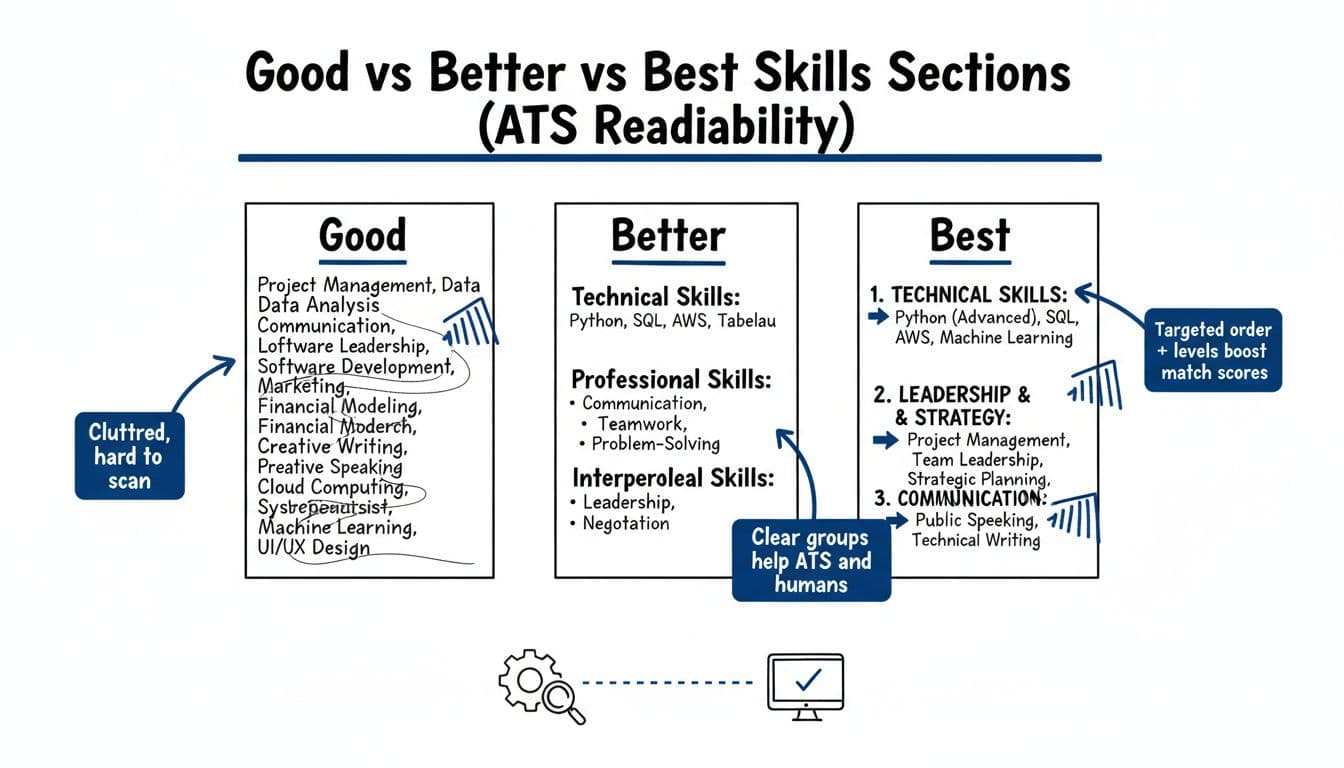
Before (hard to scan):
Skills: Communication, teamwork, leadership, Excel, SQL, Tableau, Python, time management, problem solving, reporting, dashboards, stakeholder management, agile, Jira, PowerPoint, data analysis, presentations
After (ATS-friendly and readable):
Technical: SQL, Excel (Advanced), Python (Intermediate)
Data & BI Tools: Tableau, Power BI, Looker
Methods: Data cleaning, KPI reporting, A/B testing, dashboard design
Collaboration: Stakeholder communication, requirements gathering, Agile (Scrum), Jira
Why it works: It balances hard and soft skills with fewer vague traits, clearer grouping, and the most role-related tools up front. These should align with your resume summary for a cohesive document. To improve descriptions further, incorporate action verbs.
Example 2: Role-specific sample (Customer Success Manager, SaaS)
Tools: Salesforce, Gainsight, Zendesk, HubSpot, Excel
Customer Success Methods: Onboarding, renewal management, QBRs, health scoring, adoption planning
Commercial Skills: Upsell identification, churn risk mitigation, pipeline hygiene
Communication: Executive updates, cross-functional coordination, conflict resolution
This bullet points layout signals “I can do the job” in a quick skim. It also gives you a ready outline for your cover letter and interview stories.
ATS-friendly formatting rules (mini checklist)
- Use simple section headers: “Skills” or “Core Skills”
- Use plain text and simple fonts, no icons, no columns, no tables inside the Skills section
- Separate skills with commas or clean line breaks
- Keep category labels consistent (Tools, Methods, etc.)
- Avoid long soft-skill lists, show those in experience bullets
- Match the job post’s exact skill phrasing when possible
- Save the final document in PDF format for best ATS compatibility
Final QA checklist before you submit
- Do you have 12 to 20 relevant skills for this role and level?
- Are your top skills repeated in your work experience bullets (with proof by quantifying achievements)?
- Do the first 6 to 8 skills mirror the job’s must-haves?
- Did you include key tools and platforms named in the posting?
- Are you using one consistent version of the keywords?
- Is everything readable in a quick skim on a phone?
- Did you remove skills you can’t explain with a real example?
- Does your cover letter reinforce 2 to 4 of the same skills?
Conclusion
Your Skills section shouldn’t be a wall of words. In 2026, the best results come from a focused list that’s easy for Applicant Tracking Systems to parse and easy for hiring managers to trust. Pick skills from the job post, group them into clean categories, and order them so the most role-critical matches lead. When your ATS friendly skills section reads like a confident summary of what you can prove, interviews get a lot easier.