
Resume tailoring makes applying to a lot of roles feel less like speed dating with paperwork. You want to impress the hiring manager as “the right fit” each time, but you don’t have hours to rewrite your resume from scratch, and sending a generic resume falls flat.
Done well, it’s not busywork; it’s a quick alignment pass that helps your most relevant proof rise to the top.
Below is a time-boxed, repeatable workflow for your targeted job search you can run for each job target in about 10 minutes, plus a copyable checklist, AI prompts, and a final QA routine that keeps your versions organized.
Set up a “Core Resume” so tailoring stays fast
Ten-minute tailoring only works if you stop reinventing the wheel. Your core resume is the wheel.
Keep these ready before you start applying, and consider using an AI resume builder to generate or organize them:
- Core resume: Your best, most complete version, with strong bullets and real outcomes.
- Achievement bank: 12 to 20 bullets drawn from your professional background you can swap in (by role type), each showcasing relevant experience with scope, action, and result.
- Skills inventory: A simple list of Skills, tools, platforms, methods, and domain terms you actually know.
- Target library: 3 to 5 “job families” you’re applying for (example: Customer Success Manager, Account Manager, Implementation Manager).
If you want a quick refresher on what tailoring means and why it matters, the Center for Career Readiness guide on tailoring your resume is a solid reference.
The 10-minute resume tailoring workflow (repeatable every time)
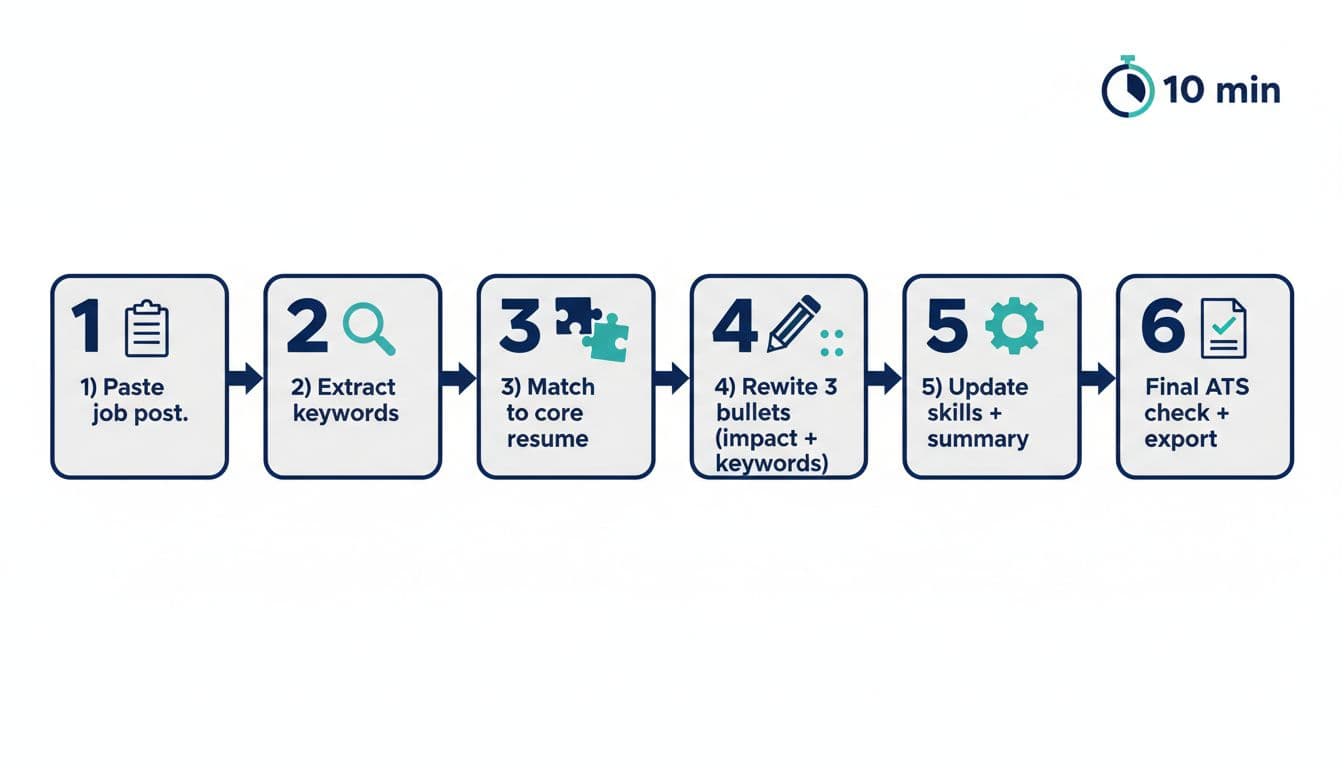
The goal is not to change everything. The goal is to create an ATS-friendly resume by changing the few things a recruiter and the Applicant Tracking System (ATS) scan first.
Minute-by-minute plan (use this timing)
MinuteWhat you doOutput0 to 1Paste job description into a docClean text to analyze1 to 3Extract keywords and must-havesA short “target list”3 to 5Match Keywords to your core resumeGaps spotted, swaps chosen5 to 8Rewrite your top 3 bulletsProof that mirrors the role8 to 9Update Skills and SummaryAbove-the-fold alignment9 to 10Quick ATS and readability check, exportClean file, correct version, match score
For deeper examples of matching language to a job description, this walkthrough is helpful: how to tailor your resume to a job description (+ examples).
Copy-and-paste tailoring template (use for every job)
For every job application, use this as your repeatable worksheet. Keep it in the same folder as your resume versions.
Job Target Snapshot
- Job title:
- Company:
- Job post URL:
- Top responsibilities (paste 3 to 5 lines from the job description):
- Must-have skills (paste 5 to 10 words or phrases):
Keyword Target List (two buckets)
- Hard skills (example: Salesforce, SQL, Zendesk):
- Soft skills (example: onboarding, stakeholder management, forecasting):
Your Matching Proof (quick mapping for bullet points)
- 3 experiences that match this role:
- 2 wins to feature (numbers, speed, scale, quality):
- 1 gap to address (training, adjacent experience, coursework):
Top 3 bullets to tailor first (fill in)
- Bullet 1: Action + tool + scope + result
- Bullet 2: Action + process + baseline to improved + result
- Bullet 3: Action + cross-team work + outcome
A simple bullet formula that stays honest and readable:
- Start with a strong verb, add the keywords naturally, add context, end with a result.
If you’re unsure what keywords are common in ATS screens across industries, scan lists like Top 500 ATS resume keywords and compare them to the job post. Don’t paste random terms, use it to spot patterns.
Exact AI prompts for keyword extraction and bullet rewrites
You want the AI to behave like a strict editor, not a hype writer. Copy these prompts as-is into an AI resume builder and swap the bracketed parts.
Prompt 1: Extract keywords and must-haves (fast, structured)
You are helping me tailor a resume. From the job description below, extract: (1) 10 hard-skill keywords, (2) 10 role-skill keywords, (3) 5 must-have requirements, (4) 3 nice-to-haves. Use the exact wording from the post. Then group keywords by theme.
Job description: [paste]
Prompt 2: Choose the best bullets from my achievement bank
Below is my achievement bank. Select the best 6 bullets for this job, explain why each matches (1 sentence each), and suggest where they fit (which role section). Prioritize bullets that support the top requirements.
Job keywords: [paste keyword list]
Achievement bank: [paste]
Prompt 3: Rewrite 3 bullets (keep them true, add keywords naturally)
Rewrite the 3 bullets below to better match this job. Rules: keep meaning true, keep each bullet under 2 lines, include 1 to 2 keywords per bullet, include Metrics only if provided, avoid buzzwords. Provide 2 variations per bullet.
Job description: [paste 5 to 10 key lines]
My bullets: [paste 3 bullets]
Prompt 4: Summary rewrite for a specific job target
Rewrite my resume summary for resume optimization targeting this job in 2 to 3 sentences. Use plain language. Mention my role title, 2 relevant strengths, and 1 measurable outcome. Include 2 keywords from the job post.
Job title: [paste]
Keywords: [paste]
My current summary: [paste]
Tailor these sections first for the best ROI
When time is tight, aim your effort where attention goes first.
Summary (10 percent effort, big payoff)
A recruiter skims the top third like a movie trailer. Your summary should answer: what you do, what you’re strongest at, and proof you’ve done it.
Keep it tight. Two to three sentences is enough.
Skills (make it match, not massive)
Your skills section is an index. Put the job’s exact tools and methods first (if you truly have them). Avoid dumping every tool you’ve ever opened.
A good quick check: if a skill isn’t used in a bullet or role description, consider removing it.
Top 3 bullets (your “proof of fit”)
Most hiring managers won’t read all your bullets. Make the first 3 do the heavy lifting by showcasing accomplishments with quantifiable results that mirror the role’s priorities and demonstrate relevant experience.
Put keywords where they belong: in context. “Used Salesforce to forecast pipeline” reads like work. A keyword list reads like a cheat sheet.
Do not do this (it backfires fast)
Speed is good, sloppy is not.
- No keyword stuffing. Repeating the same term 10 times won’t help a human reader.
- No lying. Don’t claim tools, titles, or outcomes you can’t defend in an interview.
- No hidden text tricks. Formatting issues like white font keywords and weird styles can break parsing.
- No full resume rewrites per job. Swap the high-impact pieces first, then stop. Balance your time; don’t neglect cover letters or other application parts.
- No ignoring “must-have” requirements. If you meet them, say so clearly to ensure responsibility alignment.
For more context on how keywords fit into ATS screening, see ATS keywords guidance for 2026.
Final QA in 2 minutes: alignment, readability, ATS, naming, tracking
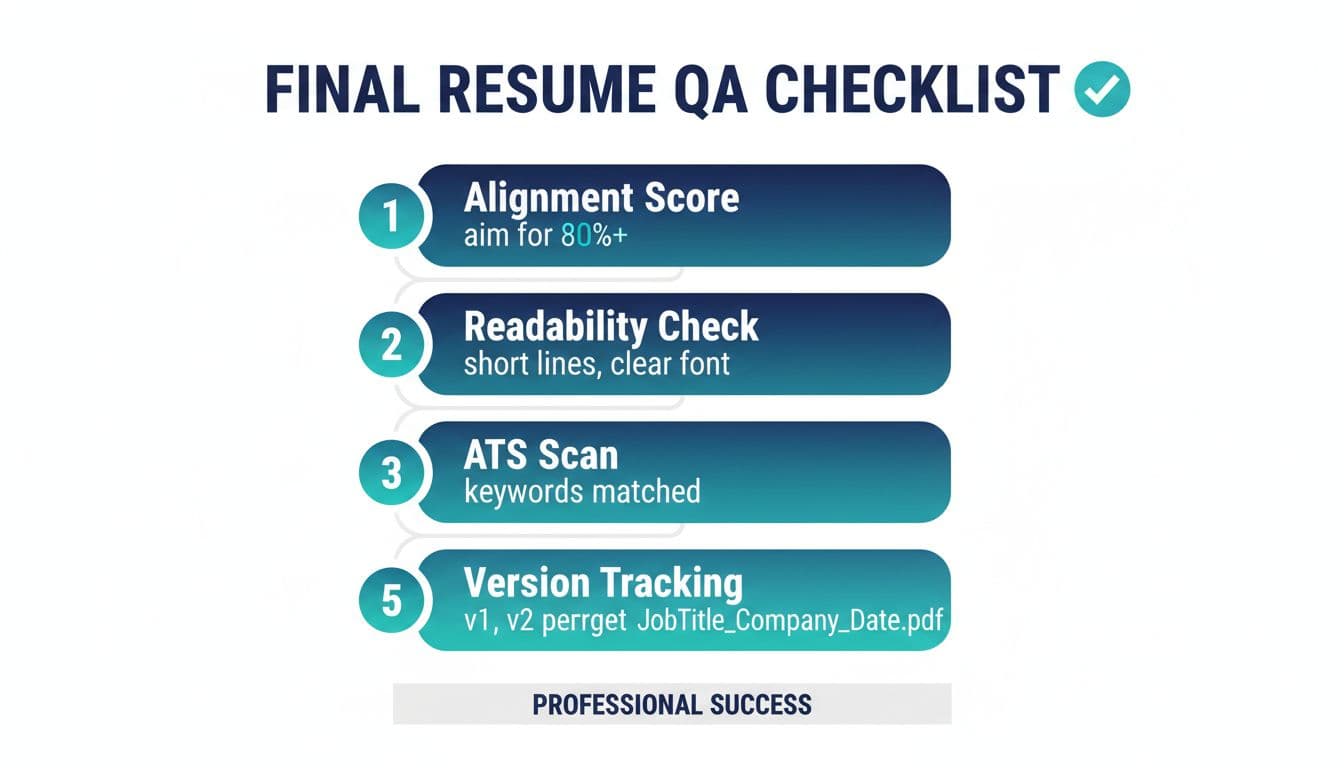
Run this before every submit:
- Alignment score: To boost interview conversions, count 10 must-have keywords and confirm your match score by naturally using at least 8 across Summary, Skills, and bullets.
- Readability: Short lines, consistent tense, no dense paragraphs, standard section headers.
- ATS scan mindset: Simple formatting, clear job titles, dates, and tools spelled out.
- File naming:
JobTitle_Company_2026-01-11.pdf(date helps you sort fast). - Version tracking: Log what you changed so you don’t lose the “good” version.
This QA logic applies to LinkedIn messages and social outreach too.
A simple tracker keeps you sane:
CompanyJob titleResume versionKeywords addedStatus[Company][Title]v3[3 to 5 keywords]Applied / Interview / Hold
Conclusion
Resume tailoring doesn’t need to eat your week. If you tailor the Summary, Skills, and top 3 bullets first, you’ll get most of the benefit in minutes, not hours.
Save the template, reuse the prompts, and track your versions like a pro to streamline every job application. The best part is that resume tailoring gets faster every time because your achievement bank grows with you, helping you align not just with keywords but also company culture.