
If your job search feels like juggling open tabs, emails, and half-remembered deadlines, you don’t need more hustle. You need a job application tracker spreadsheet that tells you what to do next.
In 2026, hiring teams move fast, remote and hybrid roles pull candidates from everywhere, and silence is common even after strong interviews. A tracker lets you track job applications and monitor job search progress, turning that chaos into a simple system: apply, follow up, prep, repeat, without guessing.
Below is a practical spreadsheet template you can copy into Google Sheets or Excel, plus follow-up rules you can automate so nothing slips.
The 2026-ready job application tracker spreadsheet template (columns that matter)
A good tracker works like a flight checklist. It’s not fancy, but it prevents avoidable mistakes. Start with columns that capture (1) proof, (2) timing, and (3) next action.
Use this table as your copy-ready header set. Add or hide columns later.
| Column header | What it captures | Example value |
|---|---|---|
| Company | Target employer | BluePeak Health |
| Job Title | Job title | Customer Success Manager |
| Job Link | Posting URL | (paste link) |
| Location/Remote | Remote, hybrid, city | Remote (US) |
| Salary | Salary range posted or expected | $85k to $100k |
| Source | Where you found the role (job board, LinkedIn, referral) | LinkedIn job board |
| Application Date | Your Day 0 | 2026-03-08 |
| Status | Dropdown stage | Applied |
| Resume Version | Resume version you sent | R-2026-03-CSM-v3 |
| Cover Letter Version | Cover letter version you sent | CL-BluePeak-v1 |
| Hiring Manager | Name + channel | Taylor Kim (email) |
| Last Contact Date | Last touchpoint | 2026-03-10 |
| Follow-Up #1 Due | Auto date | 2026-03-14 |
| Follow-Up #2 Due | Auto date | 2026-03-21 |
| Interview Date | All scheduled times | 2026-03-18, 03-20 |
| Notes | Short, useful context | Mentioned churn goal |
| Next Action | One clear step | Send follow-up #1 |
Two quick tips improve this spreadsheet template right away in Google Sheets or Excel. First, keep Next Action as a single verb phrase. This layout helps with personal organization. Second, paste the job link even if you applied on a company portal, because postings disappear.
If you want inspiration for additional fields, these guides can help you compare approaches without overcomplicating your sheet: a Google Sheets tracker template breakdown and job application tracking templates in Notion.
Placement callout: Insert the “Template Breakdown” infographic here.
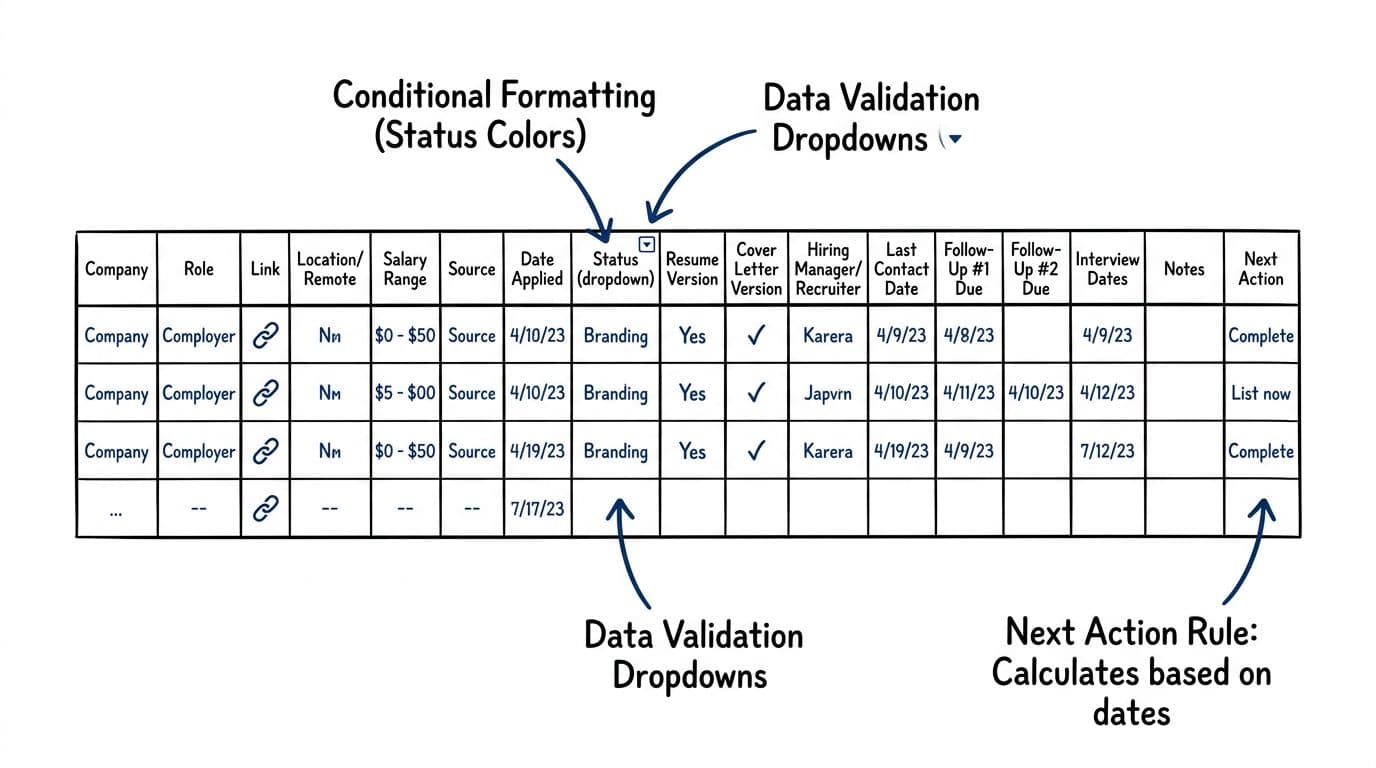
Status dropdowns and conditional formatting that prevent “lost” applications
Most trackers fail for one reason: application statuses become vague. “In progress” can mean anything, so it means nothing. In 2026, you want application statuses that match real recruiter steps and trigger clear follow-ups.
Create a data validation dropdown (Google Sheets: Data, Data validation; Excel: Data, Data Validation) with these options:
- To apply
- Applied
- Follow-up due
- Followed up 1
- Followed up 2
- Recruiter screen
- Interview scheduled
- Interview complete
- Job offer
- Rejected
- Closed (no response)
Then add two simple conditional formatting rules:
- Color by application status (for example, green for “Interview scheduled,” gray for “Rejected,” yellow for “Follow-up due”).
- Highlight overdue follow-ups to generate follow-up reminders by checking whether today is past the due date and the application status is still “Applied.”
If your sheet can’t tell you what to do in 10 seconds, it lacks the organization you need.
Finally, add one sanity column that saves hours later: Resume Version. If you tailor often (you should), you need to know what you actually sent. Tools like CareerScribeAI help here because you can generate applicant tracking system-friendly versions fast, then log the exact resume version name in the tracker (resume, cover letter, and even a quick “match score” note). That way, when a recruiter calls two weeks later, you aren’t scrambling.
Follow-up rules for 2026 (plus formulas that auto-calculate your next email)
Follow-up isn’t about pestering. It’s about being easy to work with. The trick is a consistent follow-up schedule, and a spreadsheet can enforce it.
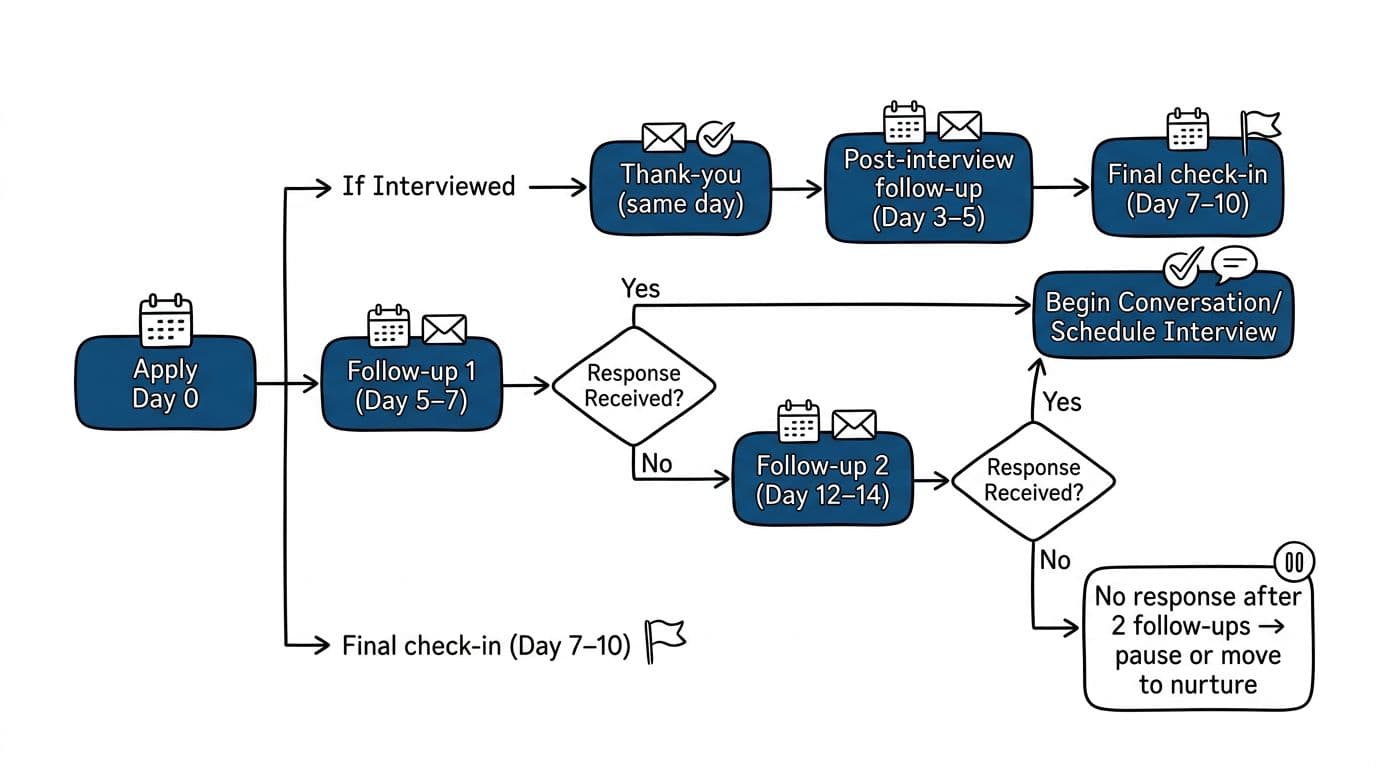
Here’s a simple cadence that fits most private-sector roles in 2026. It respects recruiter volume while keeping you visible.
| Situation | Follow-up action | Timing |
|---|---|---|
| Application submitted | Follow-up #1 | Day 5 to 7 |
| No response | Follow-up #2 | Day 12 to 14 |
| After interview | Thank-you email | Same day |
| No post-interview process update | Status check | Day 3 to 5 |
| Still no update | Final check-in | Day 7 to 10 |
For email wording, keep templates short and role-specific. This reference is helpful when you want a solid structure: Indeed’s follow-up email guidance.
Now, automate the dates so your tracker does the math. These formulas assume:
Date Appliedis in cellG2Last Contact Dateis inL2- You want business-like spacing based on data from successful searches (not daily nudges) for long-term metrics like response rates and offers
Use whichever applies to your workflow:
- Follow-Up #1 Due (based on apply date):
=G2+6 - Follow-Up #2 Due (based on apply date):
=G2+13 - Follow-up due flag (shows “DUE” when overdue):
=IF(TODAY()>M2,"DUE","")
If you’d rather base the next follow-up on your last contact, swap G2 for L2. Also, if a posting says “no calls or emails,” record that in Notes and skip the follow-up rules for that row.
Placement callout: Insert the “Follow-Up Timeline” infographic here.
Make the tracker a daily workflow (resume versions, links, and interview prep notes)
A job application tracker spreadsheet works best when it becomes your job search home base for job applications. Keep it open during application sessions throughout your workday, and update it right after any message.
Three 2026-specific habits matter most:
First, store links that reduce friction. Besides the job link, add the recruiter’s LinkedIn URL, the company careers page, and the scheduling link if you get one. When you’re applying to remote or hybrid roles across time zones, quick access prevents mistakes.
Second, keep your documents ATS-friendly and consistent. If you’re unsure whether your layout parses cleanly, this guide is a strong reference: One-column template for Lever ATS. Even if the company doesn’t use Lever, the formatting advice carries over to many systems.
Third, treat interviews like projects. In your Notes field, track interview notes for a data-driven approach:
- The top 3 requirements from the job description
- Your matching proof points (metrics, outcomes, tools)
- Questions you want to ask
- What you learned in each call
- Performance on take-home exercise
- Portfolio presentation details
CareerScribeAI fits naturally into this workflow. Use it to create tailored resume bullets, generate a clean cover letter faster, and produce interview practice prompts. Then log what you generated, what you sent, and what worked. Over a month, that history becomes your personal playbook.
Conclusion
A job search without a system is like trying to cook without a timer. You might get it right, but you’ll waste energy checking everything twice. A job application tracker spreadsheet gives you one place to see application status, follow-up timing, and next action, so you can focus on better applications and stronger interviews. This job application tracker spreadsheet makes it easy to track job applications and monitor job search progress.
Set up the columns, add the follow-up formulas, and commit to updating it daily for one week. After that, the tracker starts to carry the load, you’ll feel the difference, and you can even create a Sankey diagram at the end of your search to visualize the funnel.