
A resume can look perfect on your screen and still turn into scrambled text after upload. That’s why Cornerstone ATS resume format matters in 2026, especially if you’re applying to large employers that rely on an Applicant Tracking System.
This guide shows what typically breaks parsing, what an ATS-friendly resume looks like, and how to run a quick copy-paste test that exposes problems fast. You’ll also see simple examples you can reuse to navigate the modern digital application process, without rebuilding your resume from scratch.
How Cornerstone ATS parsing breaks, and what it “reads” best
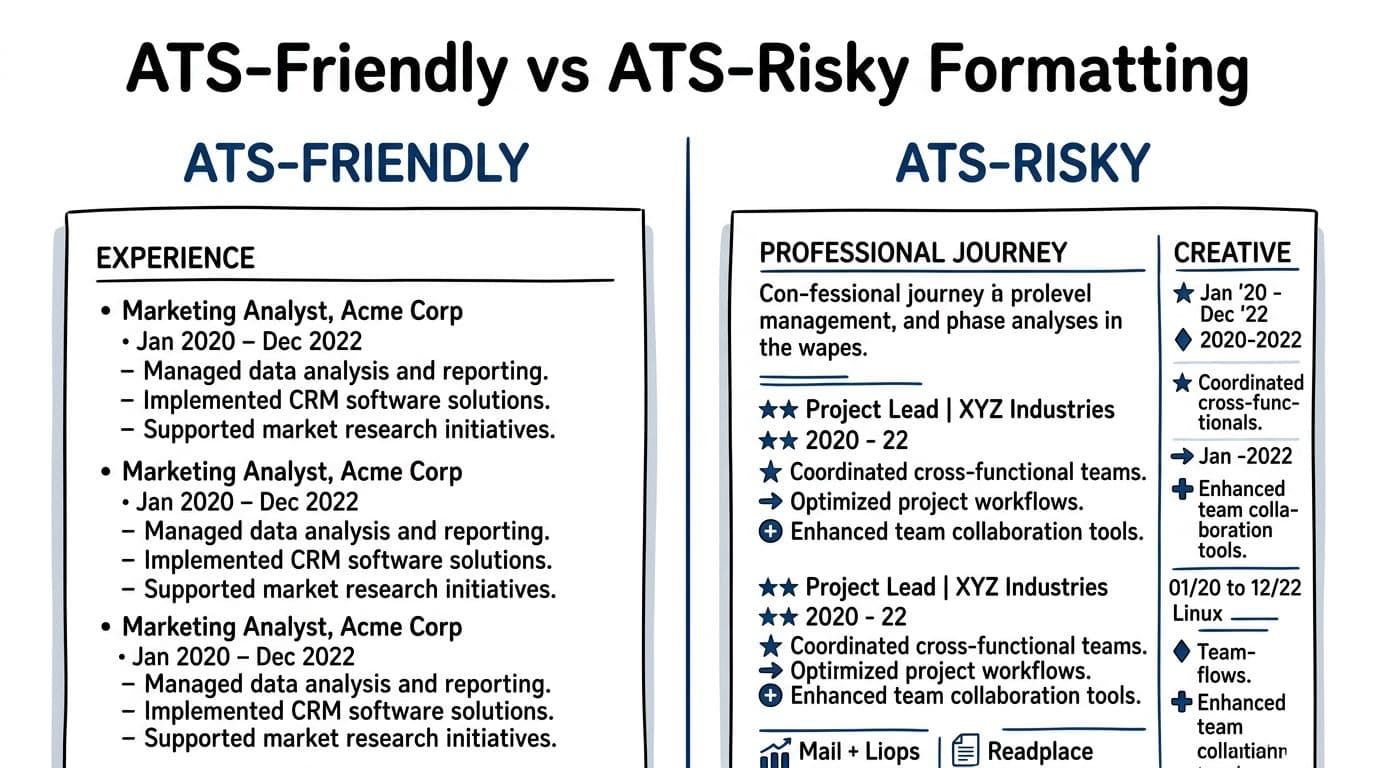
Cornerstone is an enterprise hiring platform (often called Cornerstone OnDemand). Its resume parsing software and automated resume filters support structured candidate data, which is why clean text extraction matters. If you want context on the platform side, Cornerstone’s developer documentation shows how candidate data is handled in systems like this (see the Cornerstone Candidate API guide).
So what goes wrong in practice?
Most parsing issues aren’t about your experience. They’re about layout tricks that look great to hiring managers but confuse text extraction. Cornerstone, like many ATS tools, needs a predictable reading order and clear section labels.
Here are the top format problems that cause “good resumes” to fail the first pass, especially when the work experience section and contact information are the first things to break:
- Two-column layouts and sidebars: the parser may read across the page in the wrong order, or merge lines.
- Headers and footers: contact information can get missed if it lives outside the document body.
- Tables, text boxes, icons, and shapes: content can vanish or import as random fragments.
- Non-standard headings: “My Journey” might be meaningful to you, but “Work Experience” is easier for systems to map.
- Weird bullets: custom symbols sometimes paste as boxes, question marks, or nothing at all.
A quick tip: using a reverse chronological format helps the system accurately map your career progression.
If you remember one rule, make your resume easy to copy into plain text. If it survives that, it usually survives parsing.
A quick reality check helps: ATS tools don’t “see” your resume like a recruiter does. They convert it to text, detect sections, then store fields. Clean structure beats clever design almost every time.
Cornerstone ATS resume format rules that hold up in 2026
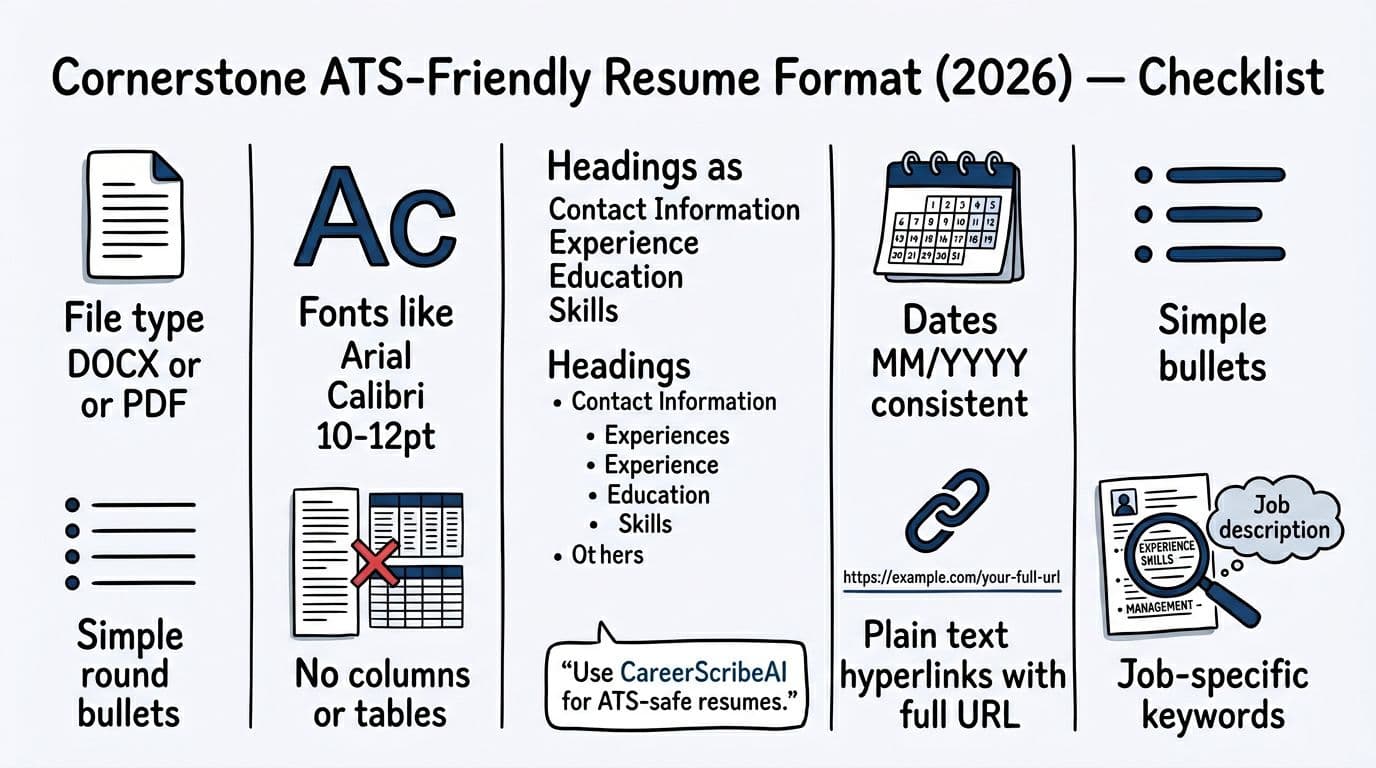
Think of your ATS-friendly resume like a shipping label. The content matters, but only if the scanner can read it. These rules keep the label readable.
File type: follow the application first, then default to DOCX
Many ATS-friendly resume guides still recommend DOCX when the employer doesn’t specify, because it tends to extract text consistently. For a broader 2026 overview, see ATS resume format best practices.
Use this simple decision table:
| File type | Use it when | Watch out for |
|---|---|---|
| DOCX | The application doesn’t specify, or you want the safest docx format parse | Formatting can shift slightly on other devices |
| The employer asks for PDF file format, or you need visual consistency | Some PDFs parse poorly if exported oddly |
Fonts, spacing, and headings: keep it boring on purpose
Safe fonts in 2026 are still the classics: Arial, Calibri, Cambria, Times New Roman, Helvetica. These clean resume fonts ensure reliable parsing. Stick to 10 to 12 point body text, with headings slightly larger, while maintaining standard resume margins.
Use standard section headings that most systems recognize:
- Contact Information
- Professional Summary (optional)
- Work Experience Section (or Professional Experience)
- Educational Background
- Skills
- Professional Certifications (optional)
Also, keep your contact info in the document body, not in a header.
Dates and bullets: consistency beats style
Pick one date format and use it everywhere. For example, MM/YYYY (01/2024) or YYYY (2024). Don’t mix “Spring 2023” with “01/2024”.
For bullets, use simple round bullets or hyphens, keep indentation minimal, and aim for 1 to 2 lines per bullet. In the work experience section, start with action verbs, then show scope through measurable achievements, then quantifiable results.
Good (parses cleanly):
- Increased renewal rate 12% by rebuilding customer onboarding in Salesforce.
- Cut monthly close by 2 days through automated reconciliations in Excel.
Risky (often parses poorly):
- “★ Increased renewal rate…” (symbol bullet)
- Lines broken with manual returns after every few words
If you want help tailoring ATS keywords without breaking layout, tools like CareerScribeAI can be practical. The Resume Builder approach (single-column structure plus job-post keyword matching) is especially helpful when you’re adapting the same base resume template to many Cornerstone applications, including hard and soft skills, technical competencies, and behavioral attributes in the work experience section. For a similar one-column layout example, use the one-column ATS resume template guide and apply the same formatting rules to Cornerstone.
The 2-minute copy-paste test (and fast fixes if it fails)
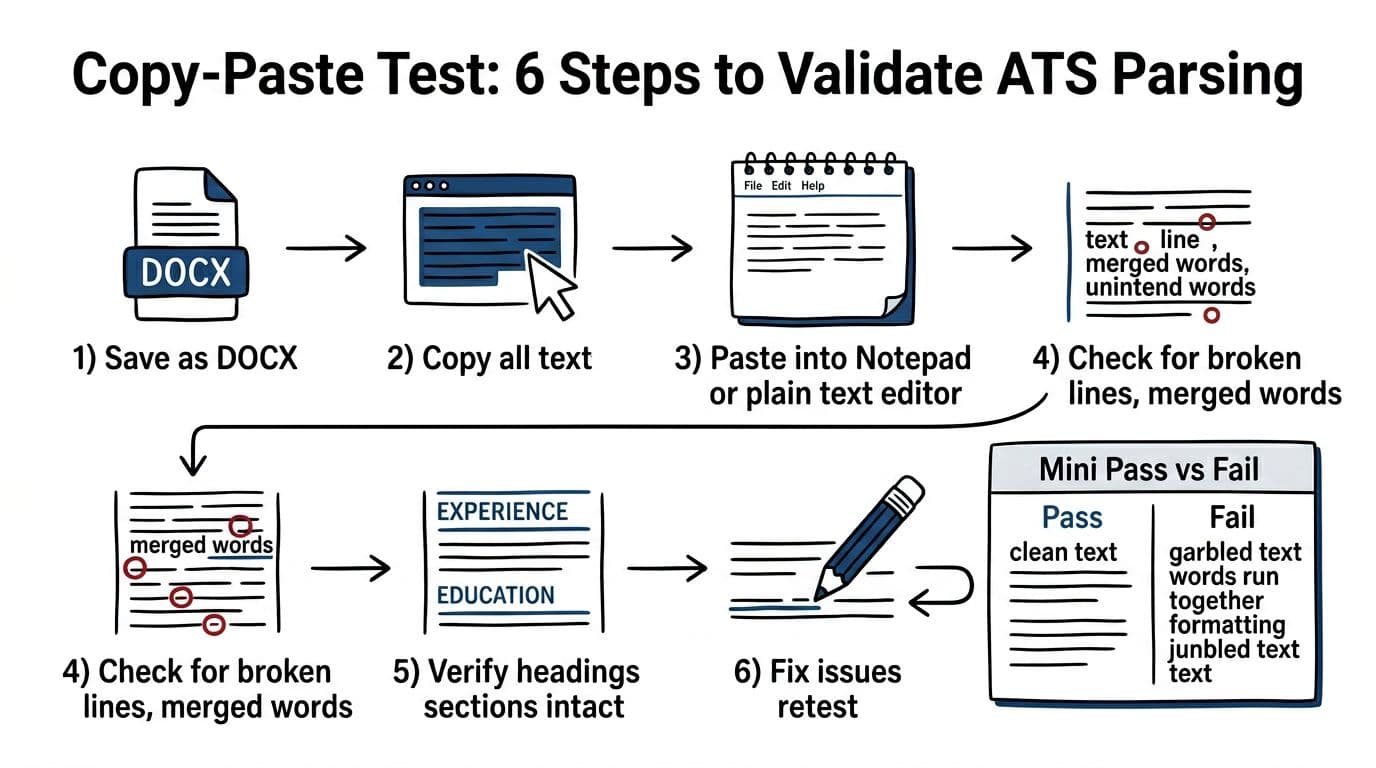
The copy-paste test is a quick way to preview what resume parsing software might do to your file and ensure it passes automated resume filters. It doesn’t guarantee perfection, but it catches the common failures that block screening.
Run the copy-paste test in six steps
- Save your resume as DOCX (even if you’ll submit a PDF later).
- Open the DOCX and select all text.
- Copy, then paste into a plain text editor (Notepad, TextEdit in plain text mode, or a basic notes app).
- Scan for broken lines, merged words, missing sections, and odd symbols, especially in bullet points.
- Confirm your headings still look like headings (simple words on their own lines).
- Fix one issue at a time, then re-test.
What “pass” looks like
After pasting, you should still see:
- Job titles, employers, and dates staying together
- Bullet points remaining readable (hyphens are fine)
- A clear Skills section that highlights hard and soft skills, technical competencies, and job description keywords without scattering across the page
- Contact information like your email and phone number visible near the top
Quick fixes based on what you see
Instead of redesigning everything, make small repairs while maintaining personal branding and ensuring skills-based resume elements or the work experience section don’t become garbled:
- Contact information missing: move it out of headers/footers into the main document body.
- Work experience section out of order: remove columns and sidebars, then re-test to preserve reverse chronological format.
- Dates drift away: put dates on the same line as the employer, or directly beneath it, and keep one format.
- Bullet points turn to squares: swap symbol bullets for standard bullets or hyphens to keep action verbs and measurable achievements intact.
- Professional summary, educational background, or professional certifications blend in: simplify formatting in your resume template and place each on its own lines.
- Weird spacing: delete manual line breaks (Shift+Enter) and use normal paragraph spacing to keep quantifiable results readable.
Once your formatting passes, focus on content. Add job description keywords and industry-specific terms from the job post in your Skills section and experience bullet points, using the same wording. If you’re also sending a tailored cover letter, keep the same plain formatting. CareerScribeAI’s Cover Letter Generator can help you stay consistent, and its Interview Prep tools can help after you hit submit.
Conclusion
A strong resume shouldn’t lose to formatting. In 2026, the safest Cornerstone ATS resume format relies on simple resume formatting: one column, standard headings, consistent dates, plain bullets, and keywords that match the posting. Aim for an ATS-friendly resume that passes both the Applicant Tracking System and hiring managers. Run the copy-paste test before every major application, because it exposes problems you can’t see in a polished PDF. Then spend your energy where it pays off, on clear impact, measurable results, and the right skills for the role.