
If your resume looks great but your Taleo application profile shows missing skills, you’re not imagining it. Taleo, a common Applicant Tracking System and leading Enterprise ATS, parses resumes in ways that can hide your qualifications. In 2026, an ATS-friendly resume still needs to be boring on purpose. Clean headings, plain text structure, and a single column beat stylish design every time.
The goal is simple: make Taleo read your resume the same way a hiring manager would. That means your SKILLS section must be easy to detect, easy to map, and hard to misplace. Below is the exact layout that reduces parsing errors, plus a fast copy-paste test you can run before you apply.
Why Taleo drops your Skills section (and where it goes)
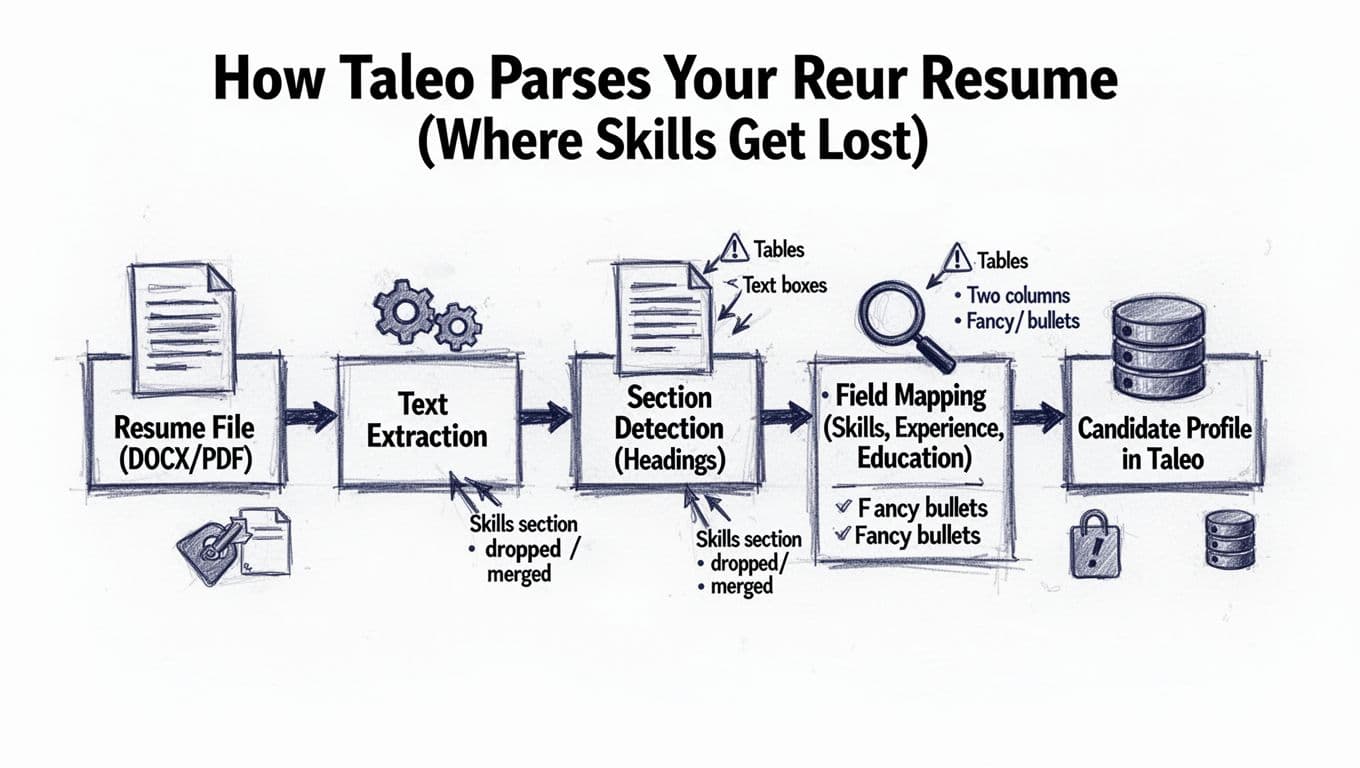
Taleo, popular among Fortune 500 companies, does not “see” your resume like a recruiter. It uses resume parsing and OCR technology to convert your file into raw text, then tries to detect sections based on patterns: headings, spacing, and consistent formatting. After that, it maps content into fields like Skills, Work Experience, and Education, often matching against job description keywords.
Skills often get dropped for three reasons:
First, the parser fails to recognize the section heading. If your heading says “Core Competencies” inside a colored bar, Taleo may treat it like decoration, not structure.
Second, the Skills content lives in a layout element Taleo struggles to extract. Two columns, tables, text boxes, and sidebars are common culprits. The text might still exist, but it arrives out of order, then gets merged into the wrong section.
Third, the skills list uses symbols or formatting that breaks clean text flow. Icon bullets, rating bars, and multi-level indentation can turn a neat list into gibberish when extracted.
If your SKILLS section is not plain text under a plain heading, assume Taleo will treat it as optional.
For a practical overview of how Taleo fits into the recruitment process to score and rank applicants, see Jobscan’s breakdown of how Taleo rates resumes. Even when the details differ by employer, the pattern is consistent: parsing and keyword matching drive what gets surfaced.
The 2026 Taleo-safe resume layout (single column, predictable headings)
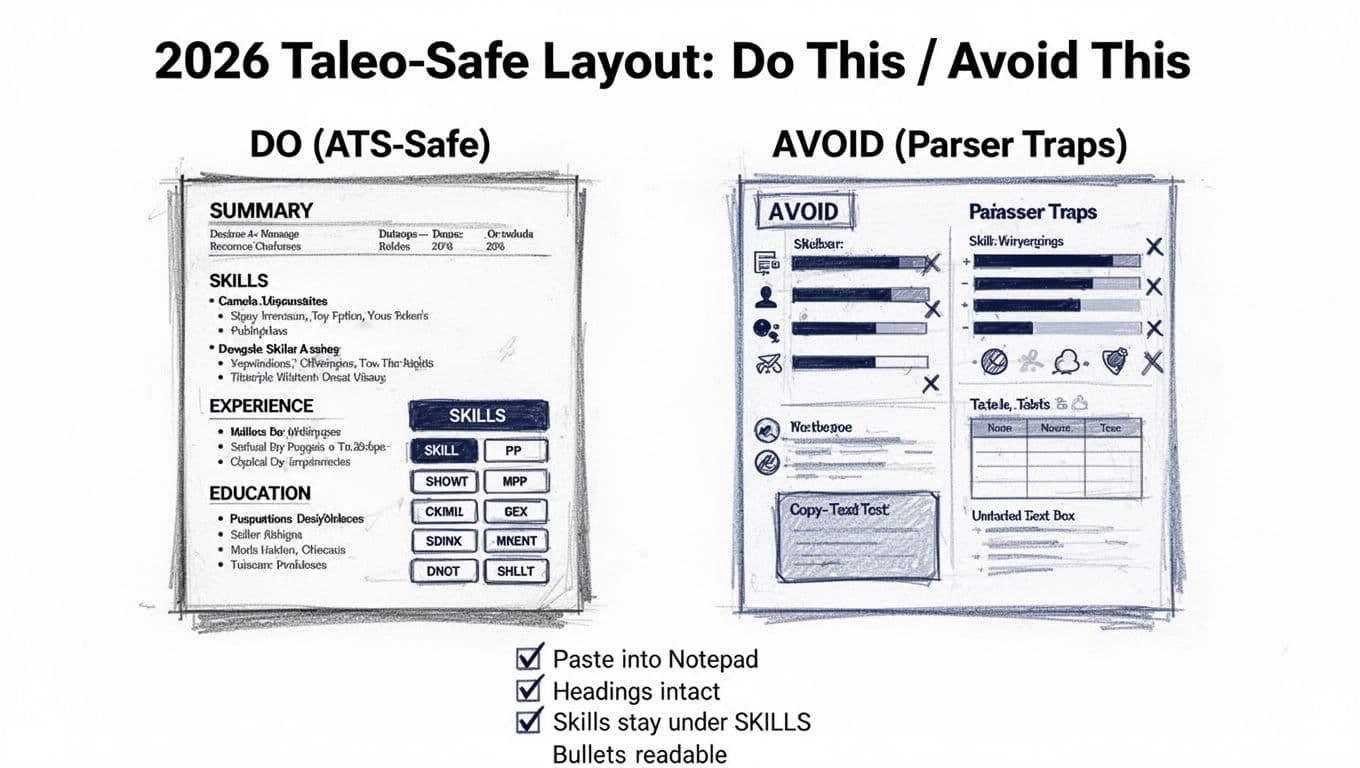
A Taleo ATS-friendly resume format that holds up in 2026 has one job: keep your content in the right order after text extraction. The most reliable approach is a single-column resume with standard section titles and simple spacing.
Here is the recommended resume template, top to bottom:
- Name and contact information (in the body, not the header)
- Professional summary (2 to 4 lines)
- Skills (high on page 1)
- Work experience section
- Education (and Certifications if relevant)
Keep standard fonts (Arial, Calibri, Times New Roman) at 10 to 12 pt. Use black text. Use simple bullets. List experience in reverse chronological order. Save as DOCX when possible, or a PDF format that copies cleanly.
Before the table, use this as your quick gut check: if your resume needs design to look organized, Taleo will struggle.
| Do (Taleo-safe) | Avoid (parser traps) |
|---|---|
| Single-column layout | Two columns or a sidebar |
| Headings: “Skills”, “Experience”, “Education” | Creative headings in shapes or banners |
| Skills as plain text bullets or comma-separated lists | Skill bars, icons, charts, or tables |
| Dates like 01/2023 to 02/2026 | Dates split across columns or floating right |
| Contact info in body text | Contact info in header/footer |
The takeaway: structure beats style. If you want help building this resume template fast, CareerScribeAI’s AI Resume Builder is useful for ATS-safe formatting and for shaping skill lists without tables, icons, or columns.
For broader ATS formatting guidance aligned with current expectations, Jobscan’s ATS-friendly resume guide for 2026 explains why simple templates keep parsing clean across many systems, including Taleo.
How to stop Taleo from dropping your SKILLS section
This is the part most people get wrong, even with an ATS-friendly resume. They include skills, but they don’t present them in a way Taleo, an Applicant Tracking System, can confidently label as “Skills.” Keyword optimization starts with clear presentation for systems like this.
Use the heading Taleo expects
Write the heading as SKILLS or Skills. Avoid “Core Competencies” and “Technical Toolbox” unless you also include “Skills” in the heading line (for example, “Skills and Tools”). Keep it left-aligned, on its own line, with normal font weight. Clear headings help the hiring manager and technical recruiter spot your strengths right away.
Place it near the top
Put Skills right after your Summary, before Experience. Taleo tends to map early sections more cleanly, and the hiring manager often searches skills first anyway.
Format the list so it survives extraction
Pick one of these formats and stick to it, or use a resume builder for consistent results:
- Simple bullets with short lines (best)
- A comma-separated line that wraps naturally (also good)
Keep each skill recognizable as plain text. Use the exact term from the job post when it matters (for example, “SQL” vs “Structured Query Language”). Incorporate action verbs for dynamic skills like “led Agile project management.” If a role uses both terms, include both, but keep it clean.
A safe Skills block can look like this (in normal resume text):
Skills
Python, SQL, Tableau, Excel
Salesforce, Jira, Git
Agile project management, stakeholder management
Group skills without creating mini-columns
Grouping helps keyword matching and readability, but don’t use tables. Instead, use 2 to 4 short lines by category (Tools, Data, Methods). Also skip proficiency meters. Taleo can’t score what it can’t read.
When you mirror job description keywords across documents, your application often looks more consistent end-to-end. CareerScribeAI’s Cover Letter Generator can help you echo the same keywords from the posting without copy-pasting your resume.
For another perspective on tailoring content to Taleo, an Applicant Tracking System, Resumly’s Taleo targeting guide reinforces the same core idea: clear headings and plain text skills improve how the system parses and scores you.
The 3-minute copy-paste test (pass/fail signals and fixes)
This manual resume checker requires no special software. It reveals how your resume holds up during Applicant Tracking System extraction, helping you clear automated screening hurdles. Simply check what your resume looks like after extraction.
Step-by-step test (good for PDF and DOCX)
- Open your resume file.
- Select all text, then copy.
- Paste into a plain text editor (Notepad on Windows, TextEdit in plain text mode on Mac).
- Scan the pasted text from top to bottom.
What “pass” looks like
Your content stays in order. Headings appear on their own lines. The Skills section stays under the Skills heading, the work experience section stays under its heading, and bullets look readable. Measurable achievements and quantifiable results appear clearly positioned.
If you can’t spot your SKILLS heading, work experience section, and their measurable achievements in 10 seconds after pasting, an Applicant Tracking System may not map it correctly either.
Common “fail” signals
- Skills appear at the very bottom, or inside Experience bullets.
- Headings vanish, or show up mid-sentence.
- Lines read left-right like a zigzag (classic two-column extraction).
- Bullets turn into random symbols or empty squares.
Fixes that work fast
If the paste is scrambled, remove columns, tables, and text boxes first, especially in the work experience section. Next, replace fancy bullets with standard round bullets or hyphens. Then re-save as DOCX and re-test. If you must use PDF format, export from Word (do not print to PDF) and test again to ensure the work experience section extracts cleanly.
After your resume passes, prepare for the next filter: interviews that pull directly from the job description. CareerScribeAI’s Interview Prep Tools can help you practice answers with job description keywords to impress the hiring manager, matching the same skills an Applicant Tracking System screened for.
Conclusion
An ATS-friendly resume in 2026 should feel plain, because plain text parses clean in any Applicant Tracking System, including Taleo and Workday used by large firms. Use a single column, standard headings, and put Skills near the top in simple text, so recruiters using Boolean search can easily find what matches. Then run the copy-paste test before every major application. Structure your work experience section with a reliable resume template or resume builder. Your resume shouldn’t just look right to the hiring manager; it should survive extraction intact, so they actually see what you can do.