
If your resume looks great but your applications go quiet, the problem might be invisible. Many employers use Jobvite, an Applicant Tracking System, to collect applications and turn resumes into searchable text. When that text comes out messy, your best points can land in the wrong place, or vanish.
The fix isn’t to “design” harder. In 2026, the safest Jobvite ATS resume format is plain, consistent, and easy to parse. Jobvite streamlines talent acquisition, and a clean layout ensures a better candidate experience. Below you’ll get the layout rules that tend to hold up, plus a step-by-step copy-paste test you can run in minutes before you submit.
How Jobvite reads your resume (and where formatting goes wrong)
Jobvite, like other Applicant Tracking System tools, doesn’t “see” your resume the way you do. Its parsing engine extracts text, tries to recognize sections, then maps details into fields (name, employer, job title, dates, skills). Hiring managers often search and filter using that parsed data to compare candidates against the job description, so clean extraction matters. In enterprise hiring, these systems commonly include bias blocking features to ensure fair evaluation.
Jobvite’s own overview of how an applicant tracking system works is a helpful baseline because it shows what these systems are built to do, collect, organize, and search candidate info (including through social recruiting links that often pull data from a LinkedIn profile): Jobvite’s Applicant Tracking System FAQs.
Where do things break? Most issues come from layouts made for the eye, not for text extraction. Think of resume parsing like pouring your resume through a funnel. Simple text slides through. Decorative layout gets caught on the edges.
Common Jobvite parsing trouble spots:
- Columns and sidebars: the system may read across the page in the wrong order.
- Tables and text boxes: content can merge, scramble, or disappear.
- Icons instead of words: a phone icon isn’t a phone number.
- Headers and footers: key contact info sometimes gets skipped.
- Creative section titles: “My Journey” won’t map as well as “Experience.”
If the ATS can’t extract your structure, it can’t reliably match your skills to the job, even when you’re qualified.
The goal of an ATS-friendly resume is simple: make your content easy to turn into plain text, without surprises.
Jobvite ATS resume format for 2026: the layout that tends to parse cleanly
A good Jobvite ATS resume format looks almost boring. That’s the point. You’re trying to get perfect text extraction first, then impress with impact.
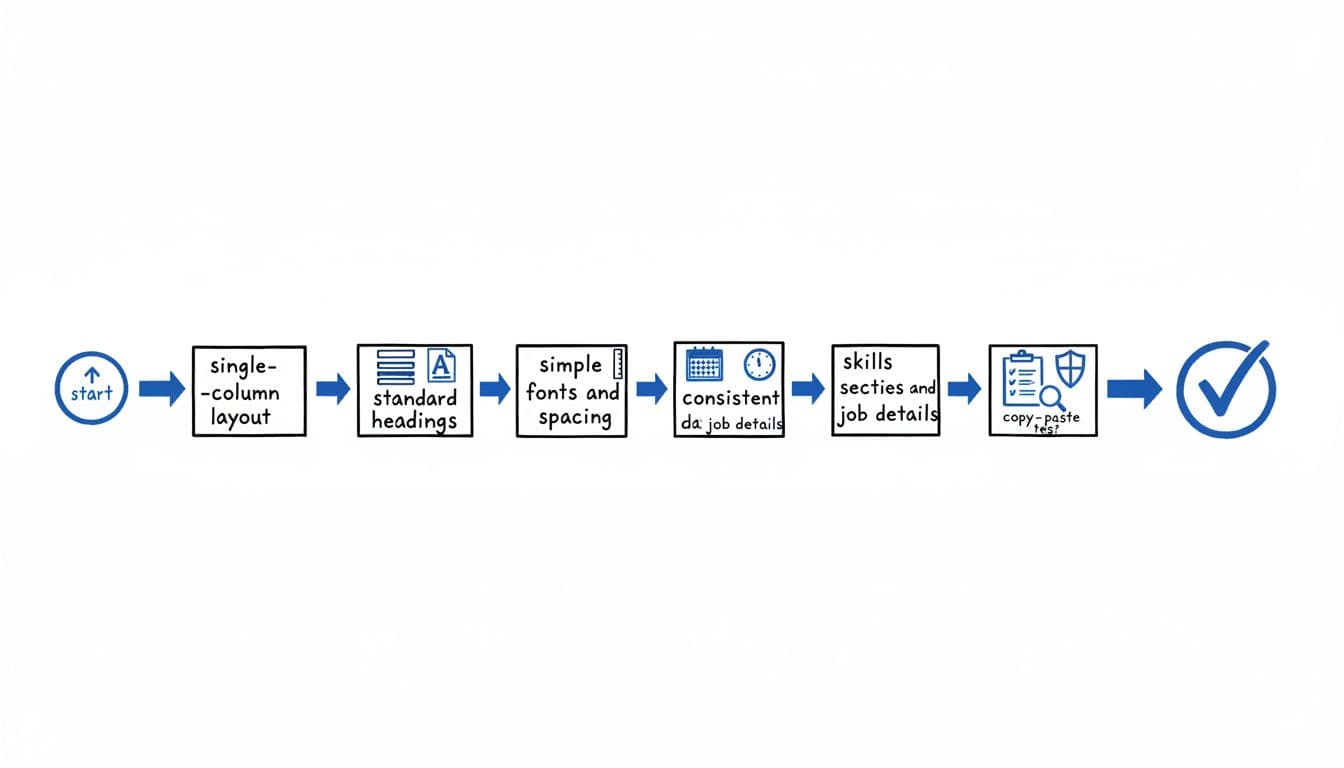
Start with these formatting choices:
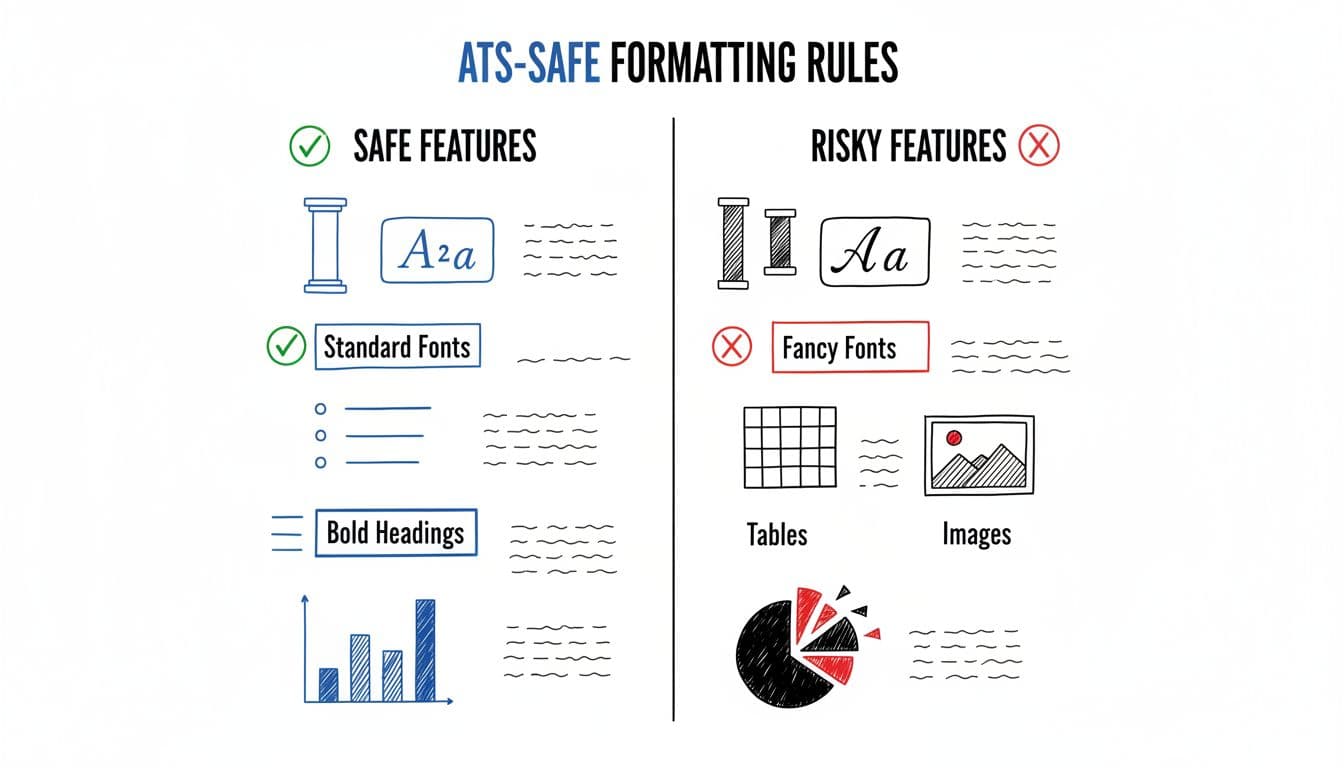
- Single-column layout with a straight top-to-bottom reading path
- Standard headings (Summary, Professional Experience, Work Experience, Skills Section, Education)
- Simple fonts (Arial, Calibri, Times New Roman) at 10 to 12 pt
- Left alignment for section content (centered headings can be hit or miss)
- Consistent dates (pick one style and stick to it)
- Simple bullets (round bullets or hyphens, no custom symbols)
- No horizontal lines to ensure high scannability
The infographic below shows the big idea: safe formatting keeps your resume readable after extraction, risky formatting increases the chance of jumbled text.
File type also matters, especially when the application doesn’t state a preference. Here’s the practical tradeoff for PDF and DOCX:
| File format | Parsing reliability in ATS | When to use it |
|---|---|---|
| DOCX | Best | When the posting doesn’t specify, or when you want fewer parsing surprises |
| Text-based PDF | Good | When the employer asks for PDF, and your PDF is not scanned |
| Scanned PDF (image-only) | Worst | Avoid for online applications unless the employer requires it |
Finally, keep the basics clean: a professional file name (FirstLast_Role_Resume), no password protection, and a reasonable file size. These tiny details can prevent upload issues before parsing even begins.
If you want a comparable example from a similar system, this one-column template for Lever ATS uses many of the same “parses-first” rules that also work well for Jobvite.
The copy-paste test for Jobvite (good vs bad results, plus fixes)
The copy-paste test is the fastest way to simulate what an Applicant Tracking System like Jobvite is likely to extract. It’s not perfect, but it catches the formatting problems that most often break resume parsing.
Step-by-step copy-paste test (takes about 2 to 3 minutes)
- Save a clean DOCX copy of your resume (even if you plan to submit PDF).
- Open the file, then select all (Ctrl+A or Cmd+A).
- Copy (Ctrl+C or Cmd+C).
- Paste into a plain text editor (Notepad on Windows, TextEdit in plain text mode on Mac).
- Scan the pasted text from top to bottom, as if you’re a computer. Check for special characters, out-of-order lines, or other issues.
- Fix what’s broken, then paste again to confirm.
What “good” looks like after paste
After pasting, you should still see your content in a logical order:
- Contact info appears as text, near the top
- Section headers remain obvious (EXPERIENCE, SKILLS, EDUCATION)
- Job title, company, location, and dates stay grouped
- Bullets remain readable (even if bullets turn into hyphens)
What “bad” looks like (and what it often means)
Bad results usually show up in a few predictable ways:
- Lines read out of order: often caused by columns, tables, or text boxes
- Missing words or missing sections: sometimes caused by headers/footers or graphics
- Weird symbols replacing bullets: caused by custom bullet characters or icon fonts
- Dates drifting away from roles: caused by right-aligned tabs or table-style alignment
Fixes that usually work fast
Try the smallest fix that removes the problem:
- Remove columns and sidebars: rebuild as one column with normal paragraph spacing.
- Delete tables and text boxes: use simple line breaks and bold for structure.
- Replace custom bullets: switch to standard bullets, or use hyphens.
- Put dates on the same line as the employer or directly below it, left-aligned.
- Move contact info into the body: don’t place it in a header/footer.
- Rename creative headings: change “Career Highlights” to “Experience” if parsing looks confused.
A quick content reminder: parsing is only half the battle. Once your layout holds up, align your wording to the job description by incorporating relevant buzzwords, and verify consistency with your LinkedIn profile. For a plain explanation of how ATS parsing rules can affect field mapping across systems, see this broader guide: resume parsing rules you need to know.
Clean parsing also enables smoother automation on career sites and within an HRIS, boosting recruiting metrics like time to hire, interview scheduling, and collaborative hiring. If you want help without wrestling with formatting every time, CareerScribeAI can speed things up: use an AI Resume Builder to keep an ATS-friendly structure while tailoring skills and bullets to the job, then pair it with a matching Cover Letter Generator for Jobvite submissions. After you apply, Interview Prep Tools help you turn the same keywords into clear STAR stories.
Conclusion: keep the format boring so your experience stands out
In 2026, a strong Jobvite ATS resume format is simple: one column, standard headings, clean dates, and a safe file type. This approach works for any Applicant Tracking System, supporting the candidate lifecycle from initial applications to internal mobility and employee referrals. Run the copy-paste test before you upload, because it shows what the system is most likely to read. Simple formatting powers data-driven hiring in talent acquisition and delivers a better candidate experience. Once your resume survives that plain-text view, your achievements can do their job and get you to the next step.