
Silence after submitting your job application, your initial interaction in the hiring journey, can feel like shouting into a canyon. Most of the time, it’s not personal, it’s process. Recruiters juggle intake meetings, approvals, and ATS queues, and your application can sit untouched longer than you’d expect.
A smart follow up email templates plan fixes two problems at once: it puts you back on the radar, and it does it without sounding impatient. Below you’ll get timing rules for 2026 hiring cycles, plus copy and paste templates with clean placeholders you can reuse.
Timing rules for a follow-up email after applying (2026 schedule)
Here’s the simplest rule: follow up after the employer has had enough time to actually review applicants following the trigger event of your submission. If you send an outreach email too early, you force a “no update” response (or none at all). If you wait too long, you miss momentum.
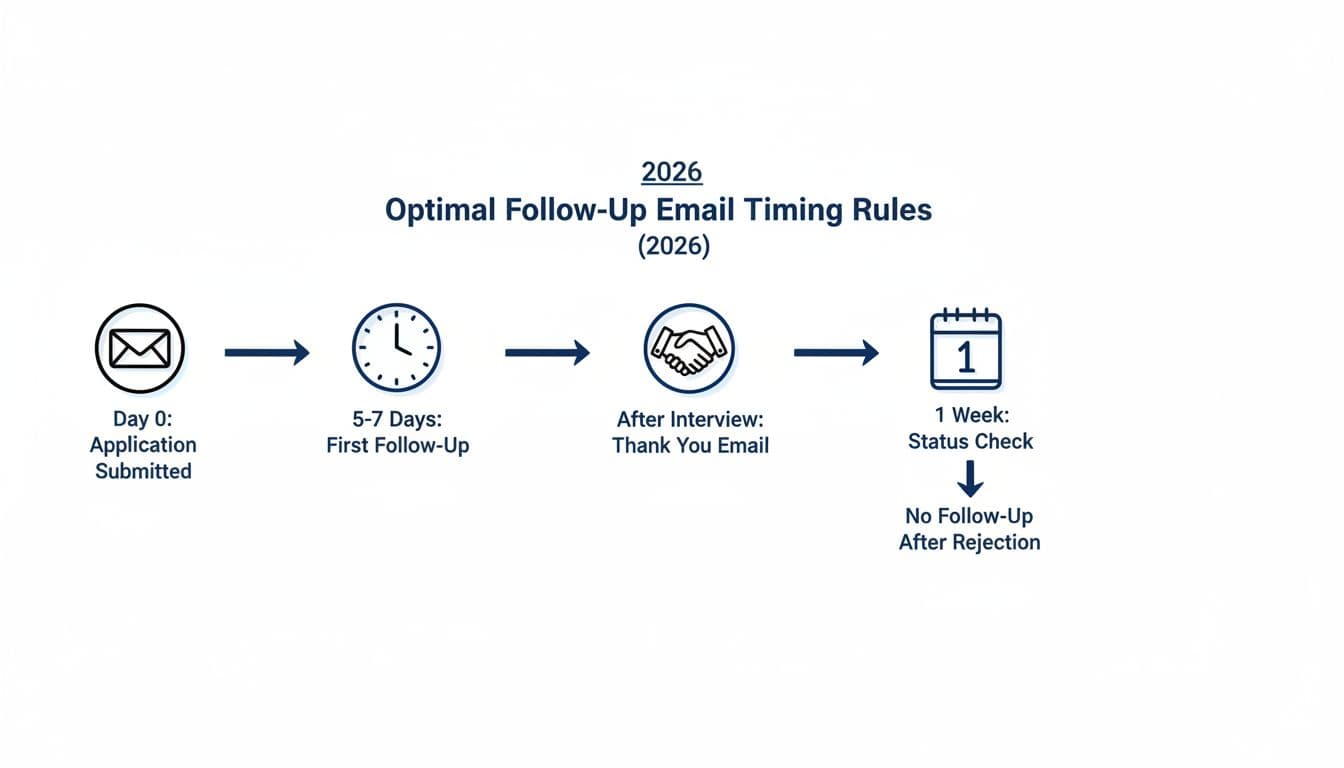
Use this table as your timing “guardrails” (business days, not calendar days):
| Situation | When to send | Who to email | Best channel |
|---|---|---|---|
| Applied online (no interview yet) | 5 to 7 business days after applying | Recruiter listed, or hiring manager if known | |
| Applied via referral (e.g., networking event) | 2 to 4 business days | Referrer first, then recruiter | Email or LinkedIn message |
| After first interview | 24 to 48 hours | Interviewer(s) and recruiter | |
| After final round | 3 to 5 business days | Recruiter, then hiring manager if appropriate | |
| No response after first follow-up | Wait 5 to 7 business days, then one final nudge | Same contact | |
| Rejection received | Don’t follow up about reconsideration (unless invited) | Recruiter (optional thanks) |
A few timing details that matter in 2026 as part of professional etiquette:
- Respect “no phone calls” instructions. If the posting says email only, stick to email.
- Send during their workday. Aim for 9 to 11 a.m. in the company’s time zone.
- Cap it at two follow-ups total per application stage (think of your job search like a sales pipeline). More starts to look like you don’t take hints.
- Keep your materials ready. If your resume layout breaks in an ATS, follow-ups won’t help much. A clean, one-column format improves parsing, see this One-Column Template for Lever ATS.
If you want another perspective on timing and tone, compare your plan to Indeed’s follow-up email guidance before you hit send.
A quick checklist before you email (so it sounds human, not needy)
Even good job application follow-up timing can fail if the message feels generic instead of personalized. Think of your follow-up like a tap on the shoulder, not a tug on the sleeve.
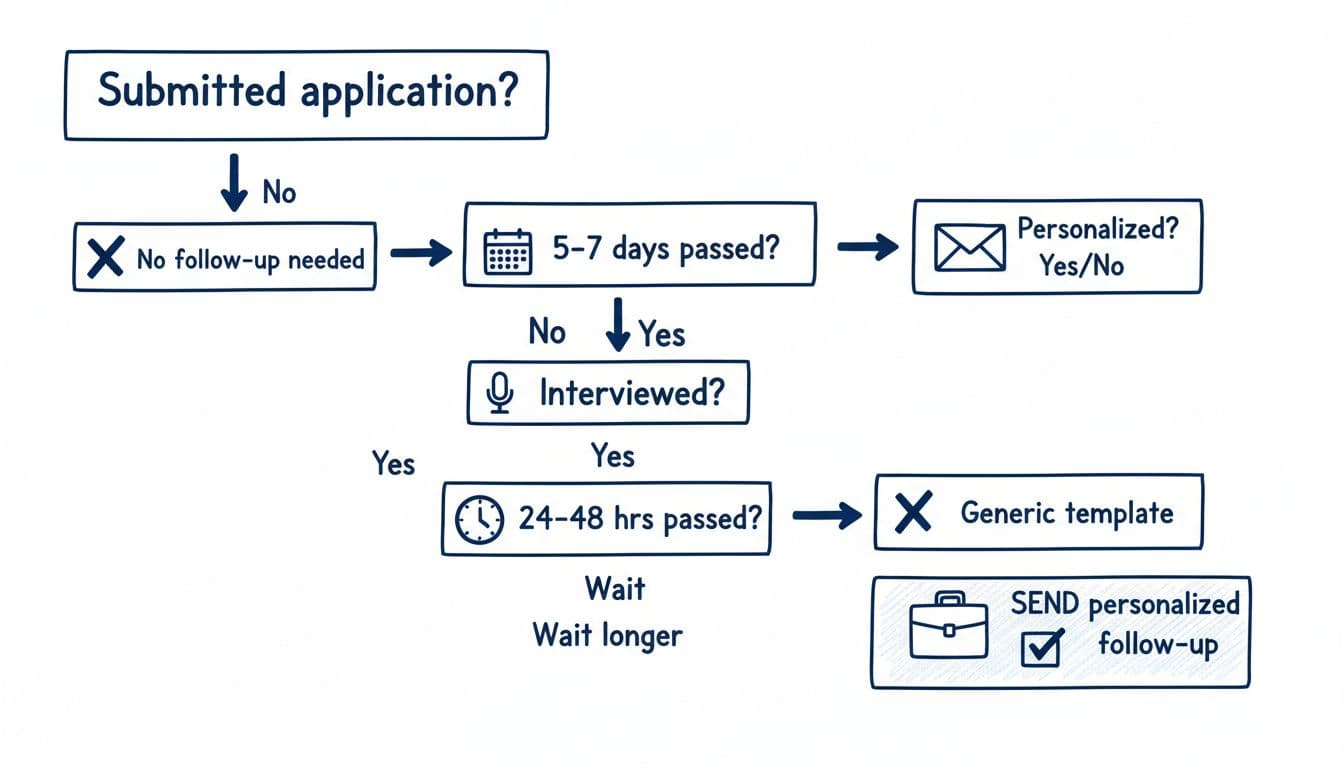
Before sending, confirm four things:
First, you’re emailing the right person. A recruiter follow-up usually works best for status checks. A hiring manager follow-up fits when you have a direct relationship (for example, you spoke to them, or a referral introduced you).
Next, you’re adding a reason to reply. “Any updates?” alone is easy to ignore. A one-line value addition works better, like addressing an industry pain point with a relevant metric, tool stack match, or certification (unlike CRM software pings).
Then, your subject line matches the ask. Make it easy to triage. If you applied through a system, include the requisition number.
Finally, your message is consistent with your documents. If your resume says “Data Analyst” and your email says “Business Analyst,” it creates friction. Tools like CareerScribeAI’s AI Resume Builder and Cover Letter Generator can help you keep titles, keywords, and impact bullets aligned to the posting, while staying ATS-friendly. If you already interviewed, its Interview Prep Tools can also help you mirror the same stories you’ll share live.
Keep the tone calm and specific. Your goal is a reply on next steps, not a confession of anxiety.
For more examples of what “specific” looks like, this 2026 job application follow-up guide has useful framing you can compare against your draft.
Follow up email templates you can copy and paste (with subject lines)
These templates are modeled after high-performing sales follow-up emails. They’re short on purpose because in 2026, most recruiting inboxes get scanned fast, often on mobile. Each one features effective subject line options, a clear call to action for the recruiter, and instructions for a personalized greeting. Reply from the original application to maintain a clean email thread.
Template 1: First follow-up email after applying (5 to 7 business days)
Subject line options: “{{Role}} application follow-up ({{Requisition ID}})”, “Checking in on {{Role}}”, “{{Your Name}} for {{Role}}”
Subject: {{Role}} application follow-up ({{Requisition ID}})
Hi {{Recruiter or Hiring Manager Name}},
I applied for the {{Role}} role on {{Date}} ({{Requisition ID}}). I’m excited about the team’s work on {{Specific project, product, or value}}.
In my last role, I {{1 line achievement tied to the posting, with a number if you have one}}. That lines up closely with your need for {{Requirement from job description}}.
If you’re still reviewing candidates, I’d welcome the chance to share more. Is there a decision timeline you can share?
Thanks,
{{Your Full Name}}
{{Phone}} | {{LinkedIn URL}}
Template 2: Follow-up when you don’t have a contact (portal-only application)
Subject line options: “Question about {{Role}} application”, “{{Role}} candidate, quick check-in”, “Application status: {{Role}}”
Subject: Question about {{Role}} application
Hello {{Company}} Recruiting Team,
I’m following up on my application for {{Role}} submitted on {{Date}}. If there’s a recruiter assigned to this requisition, I’d appreciate being pointed to the right contact.
I’m a strong match for {{Top requirement}} and {{Second requirement}}, based on my experience with {{Tool, domain, or industry}}.
Thanks for your time, and I look forward to hearing what the next steps look like.
Best,
{{Your Full Name}}
{{Phone}} | {{Email}}
Template 3: Post-interview follow-up (thank-you within 24 to 48 hours, meeting summary style)
Subject line options: “Thank you, {{Role}} interview”, “Appreciate your time today”, “Next steps for {{Role}}”
Subject: Thank you, {{Role}} interview
Hi {{Interviewer Name}},
Thanks again for meeting with me on {{Day}} about the {{Role}} position. I enjoyed our conversation about {{Specific topic you discussed}}.
Based on what you shared, the team needs {{Need}}. I’ve handled that by {{Brief example using STAR style, 2 sentences max}}.
If helpful, I can send a work sample or walk through my approach to {{Relevant task}}.
Thanks,
{{Your Full Name}}
Template 4: Second follow-up (final nudge after no reply)
Subject line options: “Final check-in: {{Role}}”, “Circling back on {{Role}} ({{Requisition ID}})”, “Any update on {{Role}} timeline?”
Subject: Final check-in: {{Role}}
Hi {{Recruiter Name}},
I wanted to share one last check-in on the {{Role}} role ({{Requisition ID}}). I know schedules get tight, so I’ll keep this brief.
I’m still very interested, and I’m a strong match for {{Key requirement}} because I {{One-line proof}}.
If the team has paused hiring or moved ahead, a quick note helps me plan. Either way, thanks for your time.
Best,
{{Your Full Name}}
If you prefer more variations, this roundup of follow-up templates after applying can give you extra subject line ideas without changing the core timing rules.
If you still hear nothing, do this instead of emailing again
At some point, another message won’t help. When you’ve sent two thoughtful follow-ups to a prospect or potential client like the recruiter, and it becomes a cold lead, shift your energy to higher-return moves.
Update your resume bullets to better match the role, especially skills that an ATS can scan. Then apply to a few similar jobs at the same company, treating them as fresh prospects or potential clients to avoid similar cold leads, but only if it’s allowed and makes sense. A separate requisition often means a separate hiring loop. Consider attaching a case study of previous work or a demo of your technical skills; this approach aids in closing deals on job offers.
Also, keep momentum by improving your interview stories while you wait. That way, if they reply suddenly, you’re ready.
Conclusion
Follow-ups work when they’re timed well and written with restraint, acting as a friendly reminder of your value. Use follow up email templates that boost your response rate by clearly reminding them who you are, why you fit, and what you want next; it’s like presenting your value proposition without sending a pricing quote. Two messages, spaced properly, beats five frantic nudges. If the silence continues, treat it as a sign to keep moving, because the best job searches stay in motion.