
Ever feel like you’ve done the work, but your resume still reads “wrong” to the job post? In 2026, a lot of rejections happen for a simple reason: your experience is real, but your Resume Keywords do not align with the Job Description.
That’s where ATS skills synonyms come in. The Applicant Tracking System, along with recruiters, doesn’t only look for “skills”; they look for the same labels used in the posting, especially for tools and platforms.
The good news: you don’t need to rename your whole career. You need a clean mapping system, plus proof in your bullets.
Why ATS skills synonyms matter more in 2026
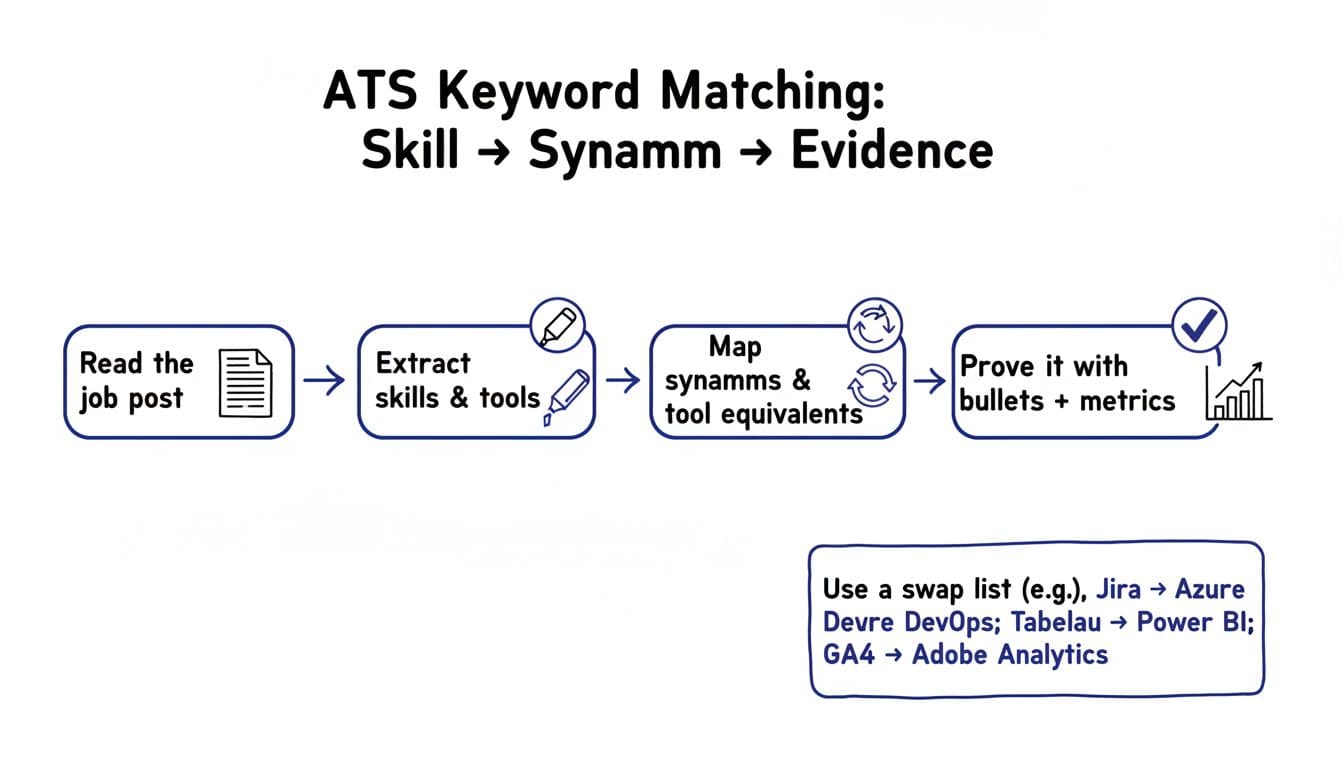
An Applicant Tracking System is not “thinking” like a hiring manager. It’s closer to a sorter that calculates a Match Score based on pattern recognition. If the Job Description says “Jira,” but your resume says “Azure DevOps Boards,” you might be describing the same workflow, but the match can look weak at first glance.
This problem shows up most in three places in Applicant Tracking Systems:
- Tool names: Different companies standardize on different Software Names (Jira vs Azure DevOps, Tableau vs Power BI). These are critical Industry-Specific Terms that determine Machine Readability.
- Skill labels: One team says “stakeholder management,” another says “cross-functional alignment.”
- Job families: Titles shift faster than the work (RevOps vs Sales Operations).
Think of it like traveling with a plug adapter. Your device still works, but you need the right shape for the Applicant Tracking System outlet.
If you’re unsure what employers tend to list as “universal” language across roles, scan a few examples like this ATS keywords list for 2026. Don’t copy random terms. Use it to notice patterns in Resume Keywords, then mirror only what fits your background.
A step-by-step way to match resume keywords when names don’t match
Keyword matching doesn’t mean pasting the job post into your resume. It means translating your experience into the employer’s vocabulary with resume keywords, while staying accurate.
Here’s a simple process you can reuse for every application:
- Read the job description twice, then highlight hard skills and soft skills
On the second pass, mark tools, systems, methods, and outputs found in the job description (examples: “SQL,” “ticketing,” “dashboards,” “A/B testing,” “incident response”). - List what you used, in your words
Perform keyword mapping by pulling from your projects, performance reviews, and day-to-day tools to identify relevant software names. Be exact (GA4, Looker Studio, Zendesk, Notion). - Create a synonym bridge, not a rewrite
Add the employer’s term next to yours using keyword synonyms, as long as it’s truthful. You can also use “also known as” phrasing in a skills section or bullet to bridge your experience and the Applicant Tracking System (example: “Agile ticketing (Azure DevOps Boards)”). - Prove the bridge with evidence
A synonym without proof looks like fluff. A synonym with strong action verbs and a metric looks like experience.
One fast way to validate your wording is to compare a few sources that discuss how Applicant Tracking System scanning works and why job posts tend to repeat the same terms. This 2026 ATS keywords guide is helpful for understanding the difference between empty buzzwords and real, skill-based matches.
A 2026 swap list for tool equivalents (use it as a translator)
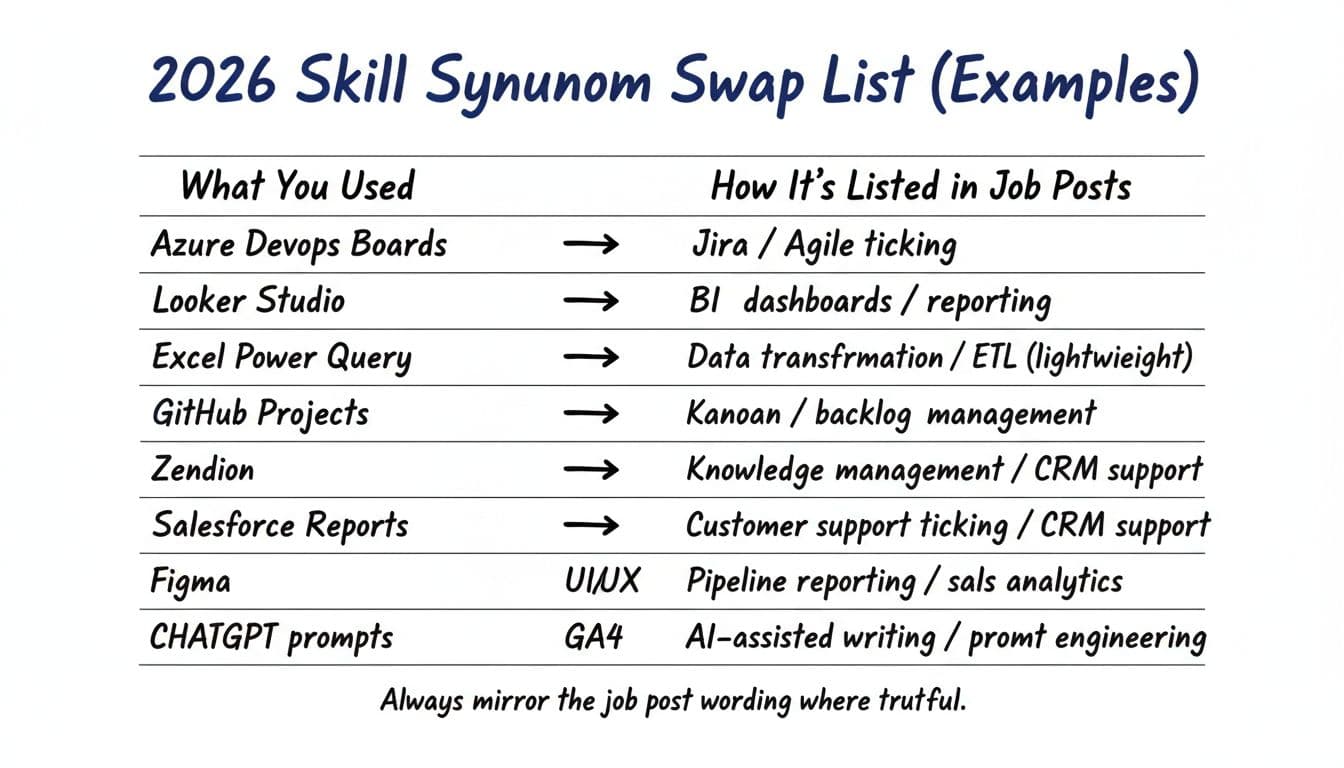
Swap lists work because many job posts describe outcomes using industry-specific terms and certifications that overlap with the software names you used, rather than the exact product. If you supported the same outcome, mirror the employer’s label (keep your tool in parentheses).
Here’s a practical swap list mapping software names to hard skills. It improves resume keywords alignment so the Applicant Tracking System categorizes your profile for the target role. Copy it into your notes, adapt per job description, and boost your resume keywords to pass Applicant Tracking System filters.
| What You Used | How It’s Listed in Job Posts |
|---|---|
| Azure DevOps Boards | Jira, Agile ticketing, sprint tracking |
| GitHub Projects | Kanban, backlog management, work tracking |
| Looker Studio | BI dashboards, reporting, data visualization |
| Tableau | Business intelligence, dashboarding, data storytelling |
| Power BI | BI reporting, dashboards, executive reporting |
| Excel Power Query | Data transformation, ETL (lightweight), data prep |
| GA4 | Digital analytics, web analytics, event tracking |
| Adobe Analytics | Digital analytics, marketing analytics, attribution |
| Zendesk | Customer support ticketing, CRM support, case management |
| Notion | Knowledge management, documentation, SOPs |
| Figma | UI/UX prototyping, wireframing, design collaboration |
| ChatGPT prompts | AI-assisted writing, prompt engineering, GenAI workflows |
If you also want stronger wording for your skills section (without making it sound fake), this guide to resume synonyms for “skills” can help you pick labels that sound natural on a modern resume.
How to show ATS-friendly synonyms without stretching the truth
Resume keywords get you noticed by applicant tracking systems, but proof gets you interviews. The goal is to combine the employer’s wording from the job description with your real work, then back it with results.
Where to place tool synonyms (so they count)
In 2026, the safest placements use ATS-friendly formatting in a single-column layout with standard headings to avoid formatting errors and ensure applicant tracking system compatibility. For PDF vs DOCX, test both formats against the target role’s applicant tracking system, as some parse DOCX better while others favor PDF.
- Skills section: List the job-post term first, then your tool in parentheses when helpful. Integrate keyword synonyms here alongside hard skills and soft skills.
Example: “Agile ticketing (Azure DevOps Boards)” - Work experience bullets: Use the tool where it mattered, tied to a deliverable, and weave in resume keywords from the job description.
Example: “Built BI dashboards in Looker Studio to track weekly churn signals…”
Add resume keywords to your professional summary, work experience, and skills section for optimal flow. Avoid dumping a giant tools list with no context. It can read like keyword stuffing, and it gives you nothing to talk about later.
Turn mapped skills into measurable bullets
A strong bullet usually has four parts: action verb, tool or method, scope, result. Start with powerful action verbs to highlight quantifiable achievements, measurable results, and performance metrics that boost your match score.
Example (before):
“Created dashboards and reports for leadership.”
Example (after):
“Built BI dashboards (Looker Studio) for weekly exec reviews, reducing manual reporting time by 6 hours per week and improving forecast accuracy by 12%, delivering key performance metrics and quantifiable achievements.”
If you want help aligning language quickly, CareerScribeAI can support the workflow without rewriting your story. Its AI Resume Builder can suggest resume keywords and synonym alignment from a job description while optimizing keyword density to avoid keyword stuffing. The Cover Letter Generator can mirror role language so your narrative matches the posting, and the Interview Prep Tools can turn your mapped skills, including soft skills, into clear STAR stories you can repeat under pressure. It creates a tailored resume for the target role that passes applicant tracking systems and recruiter review.
Truthfulness disclaimer: Only mirror terms that accurately describe your experience, including soft skills and hard skills, and tailor each resume to the specific job post. If you didn’t use a tool, don’t claim it. Use synonyms to clarify equivalence, then show evidence through real projects, outcomes, and metrics for measurable results and quantifiable achievements.
Matching words is the filter to clear applicant tracking systems, but matching facts is the win. Tighten your swap list, prove it in bullets with strong action verbs, and you’ll look “obvious” for the target role, even when your tools had different names.