A resume can look sharp on your screen and still fall apart inside an ATS resume format check. That gap costs interviews.
As of March 2026, navigating the hiring process starts with the safest choice: a simple one-column ATS-friendly resume in reverse chronological order with standard headings and clean text. Then you verify it with a copy-paste test. If the text survives that test, your odds of clean parsing go up.
What an ATS reads, and why pretty layouts fail
An applicant tracking system doesn’t admire design. It strips your file into text, maps sections, and looks for keywords, job titles, dates, and skills. In other words, the resume parser reads data first, style second.
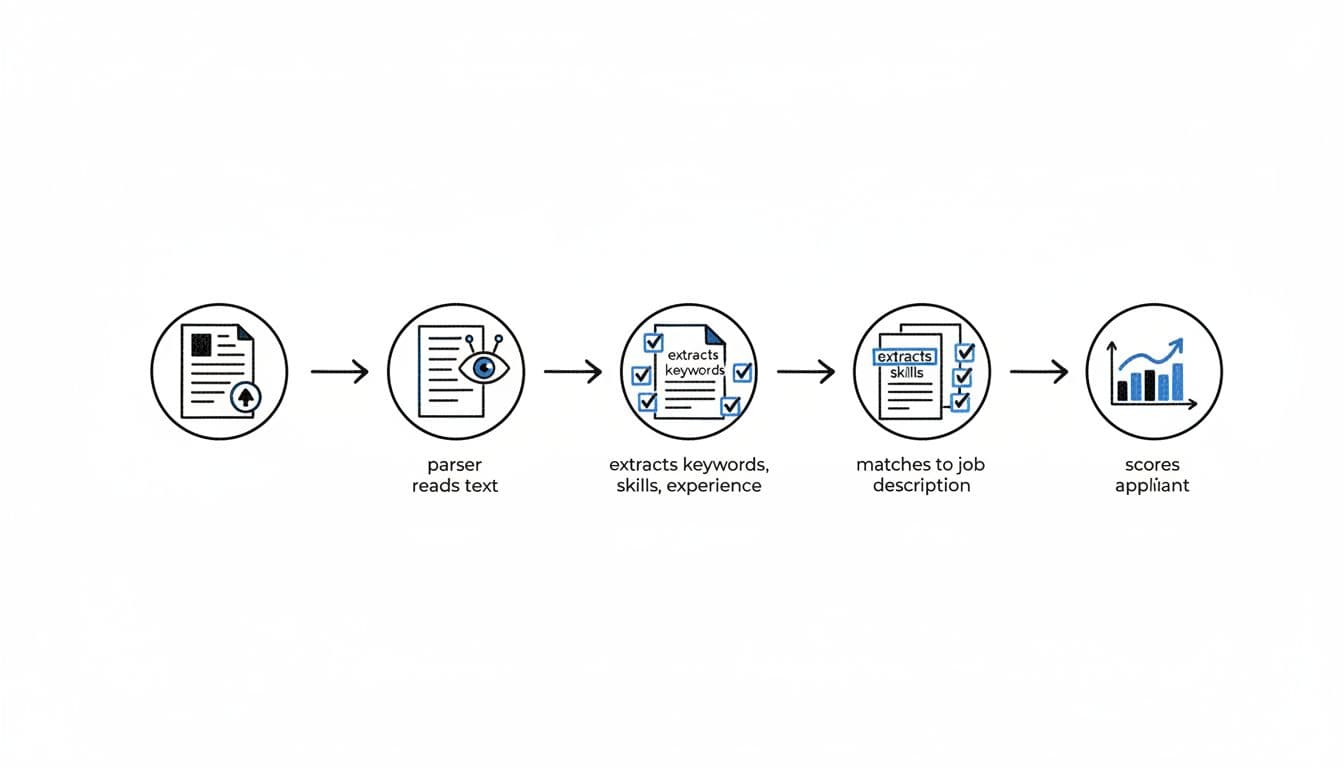
That’s why decorative layouts often backfire. Two columns can scramble reading order. Tables can trap text. Icons can replace real words the system needs to see. Even headers and footers can hide your phone number or email. These problems frustrate hiring managers who rely on clean previews.
Think of it like a resume scanner. A standardized layout moves through fast. A cluttered design gets flagged.
Current 2026 guidance still points to ATS compliance with clean structure over visual flair. If you want a second opinion, compare your draft against these ATS formatting rules for 2026. For a platform-specific example, this Lever ATS one-column resume template shows how the same plain layout works across a major ATS.
If your resume breaks in plain text, treat that as a parser warning, not a cosmetic glitch.
The ATS-friendly resume format that works now
Good resume formatting in 2026 feels almost boring, and that’s the point. A strong ATS-friendly resume uses one reading path from top to bottom. It also uses headings the system already expects: Contact Information, resume summary, work experience, skills section, and education section. While a functional layout or hybrid layout exists, the single-column path is preferred.
Keep your font simple. A standard font like Arial, Calibri, Cambria, Georgia, Helvetica, or Times New Roman is a safe choice. Body text should usually sit at 10 to 12 pt. Headings can go a bit larger, but don’t turn them into design elements.
This quick table keeps the main rules easy to scan:
| Resume element | Safe choice | Risky choice |
|---|---|---|
| Layout | One column, left-aligned | Two columns, sidebars |
| Headings | Resume Summary, Work Experience, Skills Section, Education Section | My Journey, Core Strengths |
| Dates | One format throughout, such as 03/2023 to 01/2026 | Mixed styles like Spring 2023 and 01/2026 |
| Bullets | Standard round bullets or hyphens | Custom symbols, arrows, icons |
| Visuals | No charts or graphics | Skill bars, logos, photos |
The takeaway is simple: if a human can skim it fast and a machine can read it line by line, you’re in good shape.
File type matters too. Follow the job post first. If it asks for Microsoft Word, send Microsoft Word. If it asks for PDF format, send PDF format. When the employer gives no direction, Microsoft Word is still the safest default because text extraction is usually cleaner. A PDF format can work well, but only if it exports as real text, not as an image.
Keyword placement also needs some care. Put resume keywords from the job description in three places: your resume summary, your skills section, and your work experience bullets. Don’t dump them into one block. Spread them where they naturally prove fit. For example, instead of listing “Salesforce, onboarding, retention” only in Skills, write a bullet like Improved client onboarding in Salesforce and cut churn by 12%. That reads well to people and machines.
If you struggle to sort the resume keywords in a posting to match job criteria, this must-have vs nice-to-have skills guide can help you decide which words belong in the resume and which fit better in a cover letter.
Run the copy-paste test before every application
The copy-paste test is the fastest way to check ATS readability while creating an ATS-compliant resume. It’s not perfect, but it catches the most common failures in under three minutes.
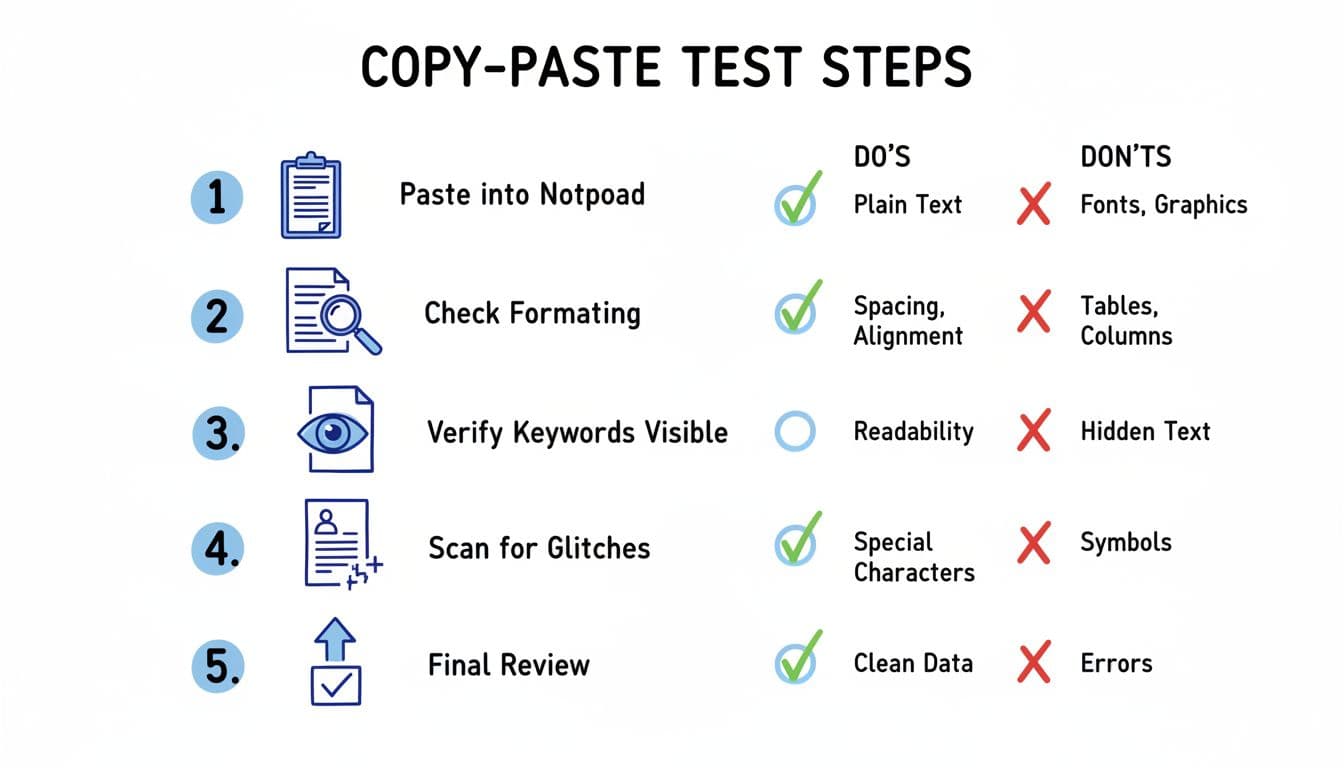
Here’s the process:
- Save the resume in the same file type you plan to upload.
- Open that file and copy all text.
- Paste it into Notepad, TextEdit in plain-text mode, or another basic editor.
- Read it from top to bottom.
- Look for missing text, broken bullets, odd symbols, mixed-up sections, or dates floating to the wrong line.
A passing result looks plain, but stable, with white space intact. Your name stays at the top. Each employment history entry stays grouped. Bullets remain readable, even if they turn into hyphens. Keywords still appear as real words. This ensures correct parsing into a candidate profile within the system’s ranking system.
Common failures usually point to simple fixes. If bullets become strange characters, switch to standard bullets or hyphens. If resume header disappears, move it out of headers and footers. If dates drift, keep them on the same line for every job. If sections paste out of order, remove tables, text boxes, and columns.
This is also where a tool can help without overcomplicating things. CareerScribeAI’s resume builder can keep your structure consistent while you tailor content to a job ad using its resume templates. Its Cover Letter Generator can carry the same language into your letter, and its Interview Prep Tools can help you match your resume claims with clear stories in the interview. That matters because a clean format gets you seen, but strong evidence gets you hired.
For another benchmark, this broader ATS resume format guide for 2026 is useful for cross-checking your final draft.
Conclusion
The best ATS resume format in 2026 isn’t flashy. It’s an ATS-friendly resume: readable, one-column, reverse-chronological, and easy to paste into plain text without breaking. Keep the structure simple, place resume keywords where they prove value, and run the copy-paste test before every upload. Your resume should look good to a recruiter, but first it has to survive the applicant tracking system.