Ever been told your resume “doesn’t match” the role, even though you’ve done the work? Often, the issue isn’t your skills, it’s the job title you used and how it lines up with the job description.
An Applicant Tracking System (ATS)-friendly resume isn’t about tricking software. It’s about making your experience easy to file, search, and understand. Job titles act like the label on a folder. If the label is unclear, your resume can end up in the wrong stack.
This guide shows how to build an ATS-friendly resume by matching the job description title without inflating seniority or changing your function, plus concrete job title mapping examples you can copy.
How ATS and recruiters actually use job titles
Most Applicant Tracking System (ATS) platforms use parsing to process your resume into fields like employer, dates, skills, and title. Recruiters and the hiring manager then search and filter. Title is one of the fastest filters because it signals “this person has done something similar.”
That doesn’t mean you need an exact title match to get interviews. It means you should remove avoidable friction in job title matching. If your company used quirky titles (or very generic ones), a recruiter might not connect the dots during a 10-second scan.
It also helps to drop the myth that ATS is a magical robot judge. It’s closer to a database plus search. If you want a plain-English explanation of what ATS scanners do, see how ATS resume scanners work.
So where does that leave you?
- If your title is accurate but uncommon, add a clear “translation” for job title alignment.
- If your title is broad (like “Associate”), add a functional equivalent when the job description is broad or unique.
- If the posting title implies higher seniority than you had, don’t “upgrade” yourself to match it.
A good resume title alignment makes the match obvious, without rewriting history.
Job title mapping that matches the posting without misrepresenting you
Job title matching is a simple strategy for the work experience section: you keep your official title, and add the posting’s language as a clarifier. Done right, it improves keyword matching and reduces confusion, while staying truthful.
The safest default format is:
Official Title (Posting Title Equivalent)
It reads clearly for humans, and it keeps your HR or payroll title intact. This formatting style ensures an exact match for keywords while providing keyword optimization. It’s also easy to reuse across applications, which matters because inconsistency is where people get burned.
Truth and consistency disclaimer: Stay honest and keep titles consistent with HR records, offer letters, and background checks. You can clarify, you shouldn’t fabricate.
A quick process that works in real life
Start with the job posting and work backward:
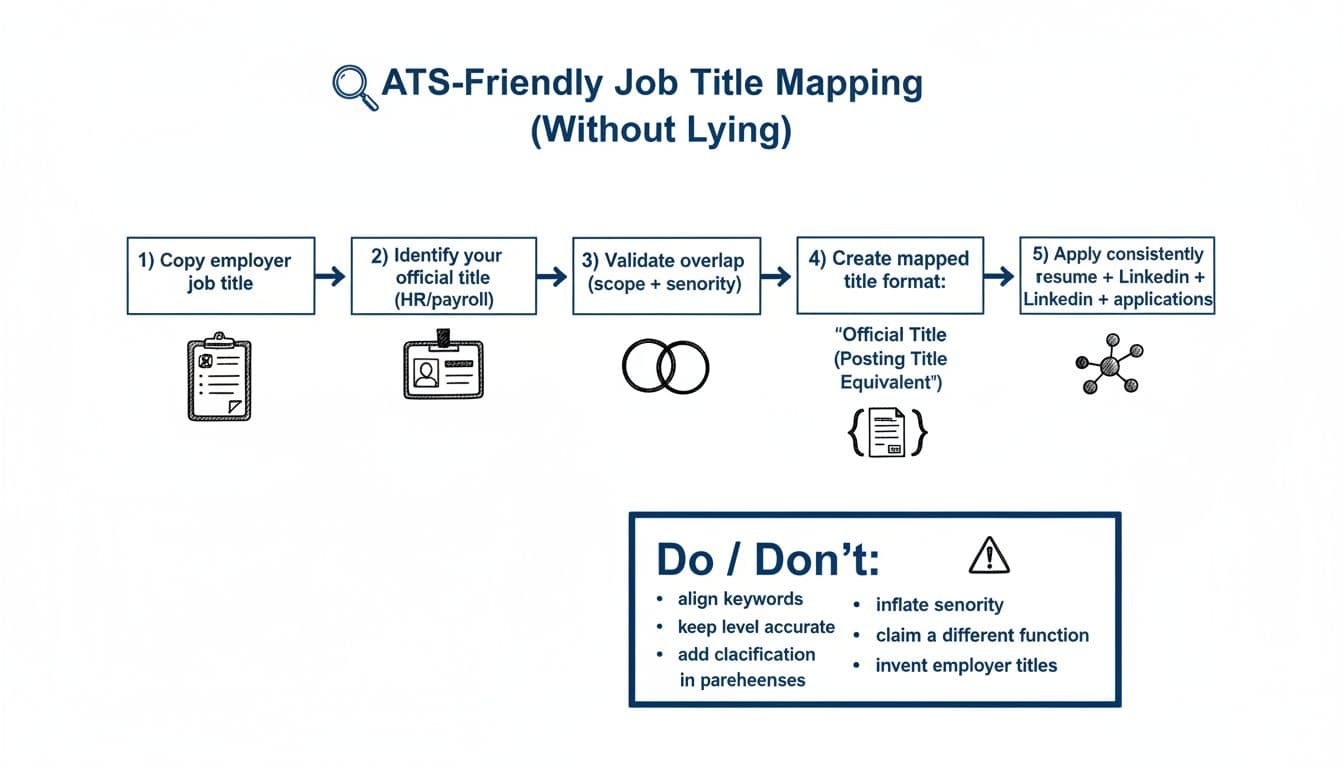
- Copy the employer’s job title exactly as written.
- Identify required skills and industry-specific terminology from the job description.
- Write down your official title from HR, payroll, or your offer letter.
- Compare scope and level (team size, decision rights, budget, complexity).
- Choose a mapped format that clarifies, not upgrades.
- Apply the same mapping across your resume, LinkedIn, and application forms (when the form allows notes).
If you’re unsure where the line is, this guidance on changing job titles on your resume is a helpful reference point for what’s acceptable versus risky.
When to use parenthetical format vs other title formats
Use Official Title (Posting Title Equivalent) when:
- Your company title is unique, internal, or vague.
- The posting title is the same function and level, but a more common name. This method allows for the use of synonyms to help the Applicant Tracking System (ATS) identify the candidate’s relevance.
- You want ATS-friendly resume job titles without creating questions later.
Use Official Title – Posting Title Equivalent (hyphen format) when:
- Your resume template looks cramped with parentheses.
- You want the “equivalent” to read like a subtitle.
- You’re applying in industries that prefer a more formal look (some finance and government contexts).
Use a light clarification (not a second title) when:
- The posting title is close, but not quite right.
- You need to signal a narrower specialty.
Example: “Project Manager (Operations)” is clearer than renaming yourself “Senior Program Manager” to match a posting.
The key rule: match function and level, then mirror the posting’s words.
ATS-friendly resume job title mapping examples (copy-and-edit)
If your employer uses “creative” titles, you’re not alone. Many organizations normalize roles internally, and job boards use a different vocabulary. (This is a known problem at the market level; see Lightcast’s take on why employers normalize job titles.)
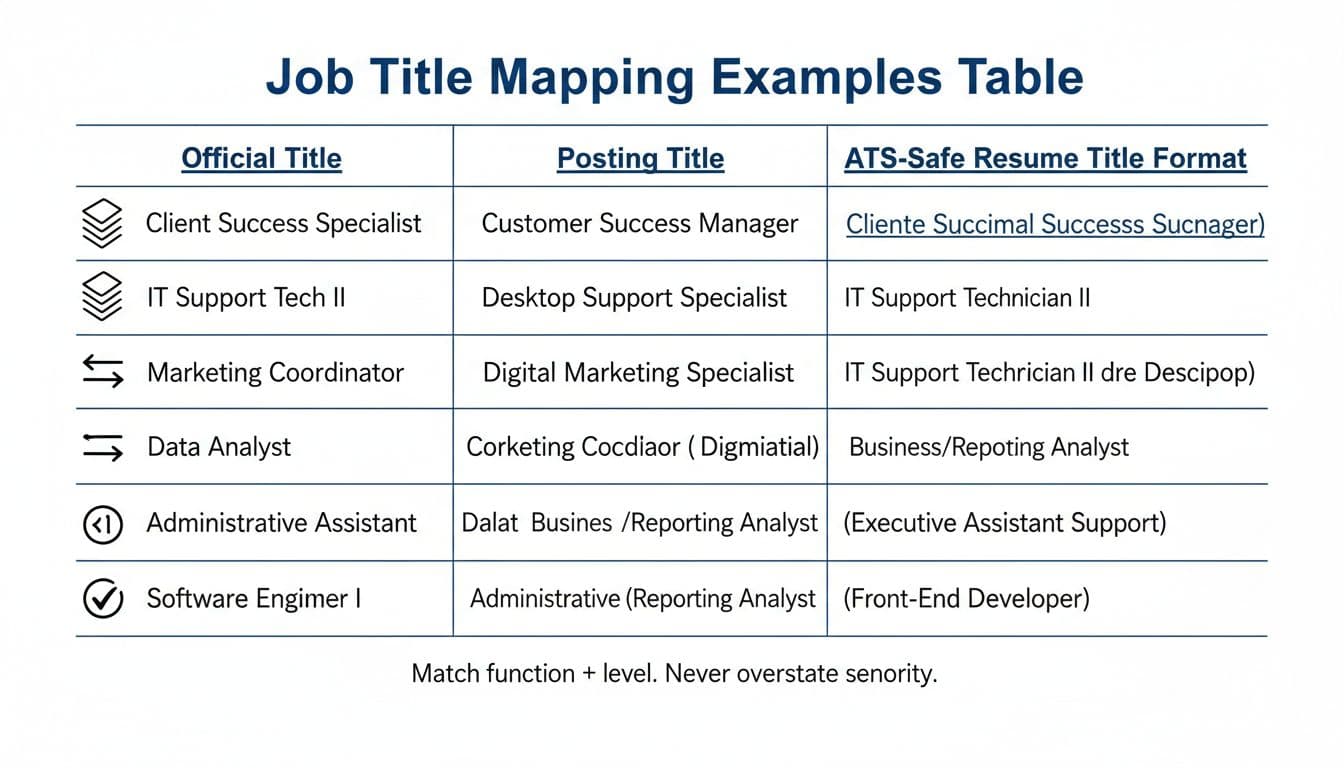
Here are concrete title mapping examples that keep the truth intact and help ensure the work experience section reflects the job description:
| Official Title | Job Description Title | ATS-Safe Resume Title Format |
|---|---|---|
| Client Success Specialist | Customer Success Manager | Client Success Specialist (Customer Success Manager) |
| IT Support Tech II | Desktop Support Specialist | IT Support Technician II (Desktop Support) |
| Marketing Coordinator | Digital Marketing Specialist | Marketing Coordinator (Digital Marketing) |
| Data Analyst | Business Analyst | Data Analyst (Business/Reporting Analyst) |
| Administrative Assistant | Executive Assistant | Administrative Assistant (Executive Assistant Support) |
| Software Engineer I | Front-End Developer | Software Engineer I (Front-End Developer) |
Two more mappings that come up often. While an exact match is preferred by the Applicant Tracking System (ATS), truthfulness regarding seniority is paramount:
Sales Associate to Account Executive (careful): If you owned a full-cycle book of business, “Sales Associate (Account Executive Support)” can be accurate. If you worked the floor and handled transactions, don’t map to “Account Executive.”
Operations Specialist to Project Coordinator: If you coordinated schedules, vendors, and status updates, “Operations Specialist (Project Coordination)” is usually safe. If you didn’t run projects, don’t label yourself as a project manager.
These examples show the goal: match job posting title language, while keeping your seniority and function honest.
Quick self-audit checklist before you submit (plus tools that help)
Before you apply, do a 2-minute self-check. Small mismatches can snowball once you’re in interviews.
- Title truth check: Would your manager confirm this title mapping without hesitation?
- Level check: Did you add “Senior,” “Lead,” or “Manager” without managing people or owning that scope?
- Function check: Did you shift departments (for example, “Operations” to “Product”) just to match keywords?
- Consistency check: Is the mapped title consistent across resume, LinkedIn, and applications (where possible)?
- Keyword alignment check: Do your bullets support the mapped title with matching tasks, tools, and outcomes?
- Acronym check: If the posting uses “QA,” did you also include “Quality Assurance” at least once?
- Clarity check: Would a stranger understand your role in 5 seconds?
- Risk check: If a background check lists a different title, is your resume clearly a “mapped” equivalent?
- Professional summary check: Does your professional summary open with strong action verbs to showcase your key strengths?
- Accomplishments check: In the work experience section, do your bullets highlight measurable accomplishments and quantified results using the STAR method (Situation, Task, Action, Result)?
- Formatting check: Does your chronological resume use standard fonts, clear section headings, and prominent contact information, all saved in PDF format?
If you want help doing this quickly, CareerScribeAI.com’s AI resume checker can compare a posting to your resume, flag where your title and keywords drift, and provide a percentage score based on resume layout and keyword density. Its Cover Letter Generator is also useful when your official title is unusual (you can explain scope in one sentence without sounding defensive). For interviews, the Interview Prep Tools can help you practice a clean explanation of your title mapping, so you don’t stumble when someone asks, “So what was your actual role?”
Conclusion
Job title alignment in your work experience section is the cleanest way to match a job description while staying honest, satisfying both the hiring manager and the Applicant Tracking System (ATS). Keep your official title, add a clear equivalent, and make sure your bullets prove it. When your ATS-friendly resume job titles line up with the posting, recruiters spend less time guessing and more time reading. The best test is simple: if HR pulled your records tomorrow, would everything still make sense against the job description?