Hiring teams are tired of fuzzy claims. In 2026, your resume projects section can work like a receipt. It shows what you built, improved, shipped, or solved, without asking a recruiter to “trust you.” The Applicant Tracking System (ATS) is the software that scans resumes first.
The catch is that your projects provide a proof of capability that has to survive two readers: the ATS (which parses your resume into fields) and a human skimming fast. If your Projects section is messy and lacks machine readability, the system may miss keywords, and the recruiter may miss the point.
This guide covers what “ATS-safe” really means today and three copy-paste-ready formats that help your projects read cleanly and sound credible.
How ATS and recruiters actually read a projects section on a resume
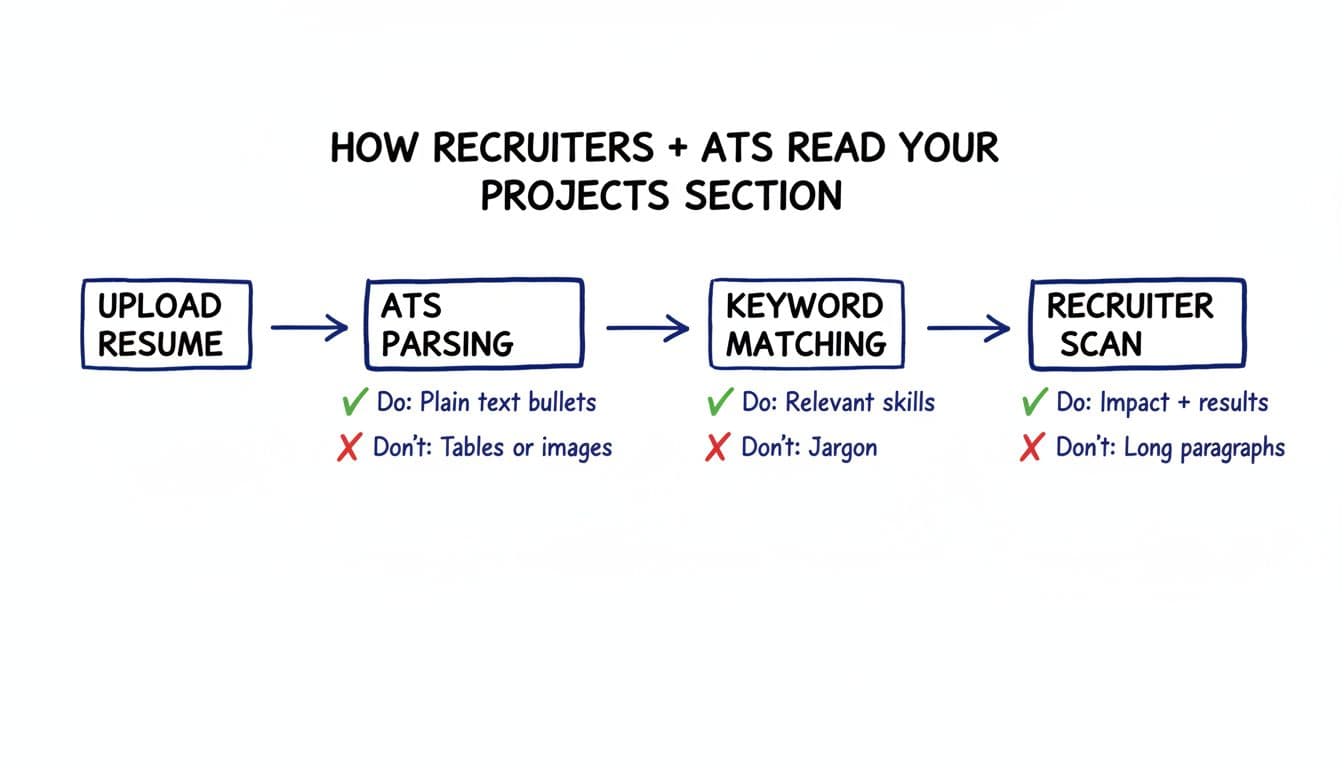
Think of an Applicant Tracking System like a strict librarian. It doesn’t “see” design, it extracts text. If your Projects are inside columns, text boxes, icons, or image-based layouts, your best bullets can turn into scrambled lines from parsing errors. Stick to a single-column layout and standard fonts so the Applicant Tracking System can read the text properly.
A recruiter reads differently. They scan for pattern and proof in seconds, often with AI-powered screening alongside the Applicant Tracking System:
- What was the project? (context)
- What did you do? (scope and role)
- What tools did you use? (technical skills match)
- What changed because of your work? (results)
In practice, your projects section on resume should be built for skimming. That means standard headings (Projects), plain text, and strong first lines. It also means your bullets need “hook words” that are keywords mirroring the job description (automation, SQL, forecasting, stakeholder updates, QA, accessibility, incident response). Use keywords from the job description to help the Applicant Tracking System match your resume. If you’re unsure what an Applicant Tracking System-friendly resume format looks like in 2026, reviewing a few examples helps, like these ATS resume examples and formatting guidance.
One more reality: recruiters often read Projects to confirm you can do the work when your job titles don’t scream fit. Career switchers, new grads, return-to-work candidates, and self-taught builders usually win interviews by showing project proof early.
ATS-safe rules for Projects (and a quick “before vs after” rewrite)
Start with the rules that keep your resume project examples readable to both Applicant Tracking Systems and humans.
Formatting that stays ATS-safe
- The single-column layout is the gold standard for Applicant Tracking Systems; use plain text.
- Use simple bullets (hyphens are fine).
- Avoid tables, columns, text boxes, icons, and skill bars.
- Use standard section headings: Projects, Experience, Skills, Education.
- Save the file as a .docx file for maximum compatibility with Applicant Tracking Systems.
Where Projects belongs
- If Projects is your strongest proof (career change, student, limited experience), place it under the professional summary or Skills.
- If you’re mid-career, Projects can sit below Experience or inside each job entry as a “Selected Projects” sub-block.
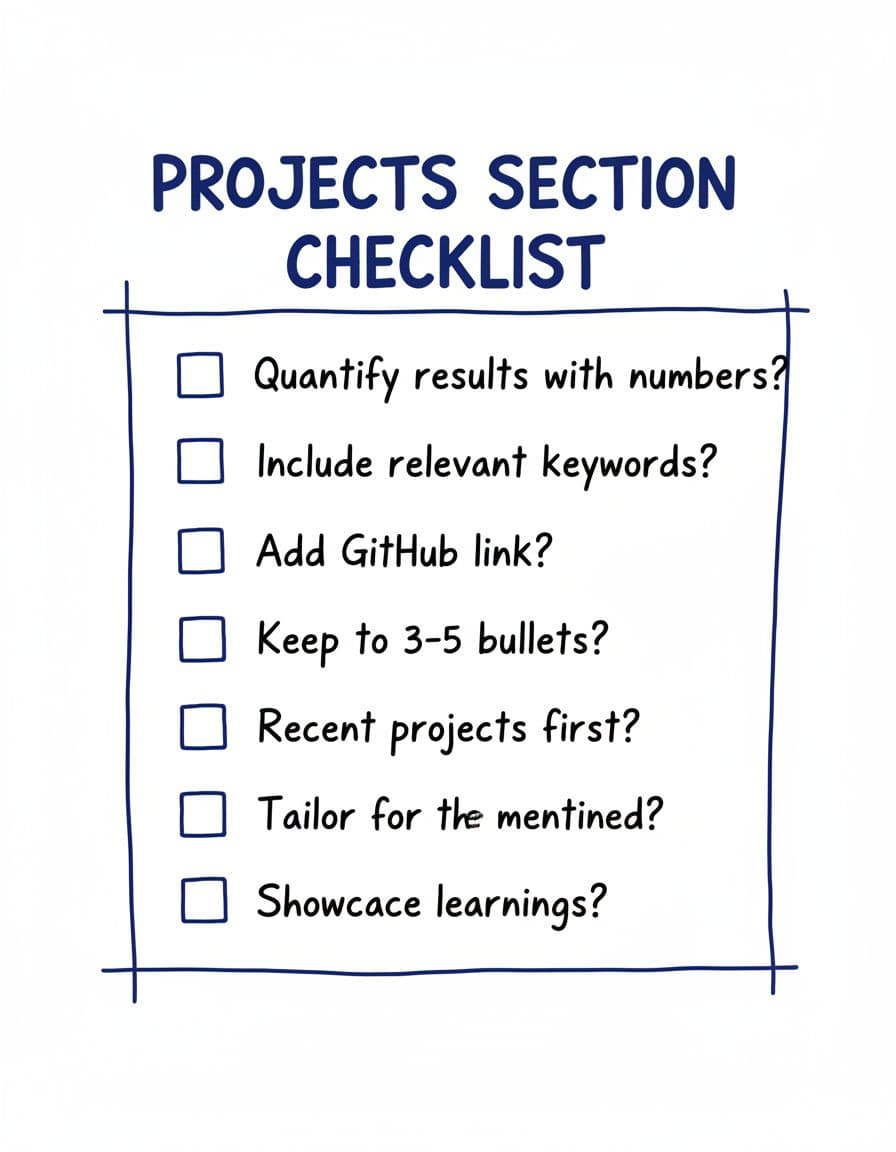
- Keep it tight: 2 to 4 projects that match the target role.
How to include links safely
Add links as plain text on their own line or at the end of the project header. Don’t hide them behind icons. Use a label so it’s obvious what it is: “GitHub:” or “Portfolio:”. In templates below, use placeholders like [GitHub/portfolio URL], then paste your real link in your resume file. Save the file as a .docx file to ensure Applicant Tracking System compatibility.
Mini before vs after rewrite (same project, more proof)
Before:
- Built a Tableau dashboard for the sales team.
After:
- Built a Tableau sales dashboard used by 12 reps, cutting weekly reporting time from 3 hours to 45 minutes.
That “after” bullet has scope (who), a measurable change (time saved), and a clear tool keyword. It starts with a strong action verb while highlighting quantifiable achievements and measurable metrics.
If you want more guidance on how to list projects on a resume and where they fit, this projects-on-resume breakdown is a solid reference.
For faster tailoring, tools like CareerScribeAI’s AI Resume Builder can help you map each project to keywords from the specific job description, so your wording matches the role’s keywords from the job description without sounding forced.
3 ATS-safe resume projects section formats you can copy and paste (2026)
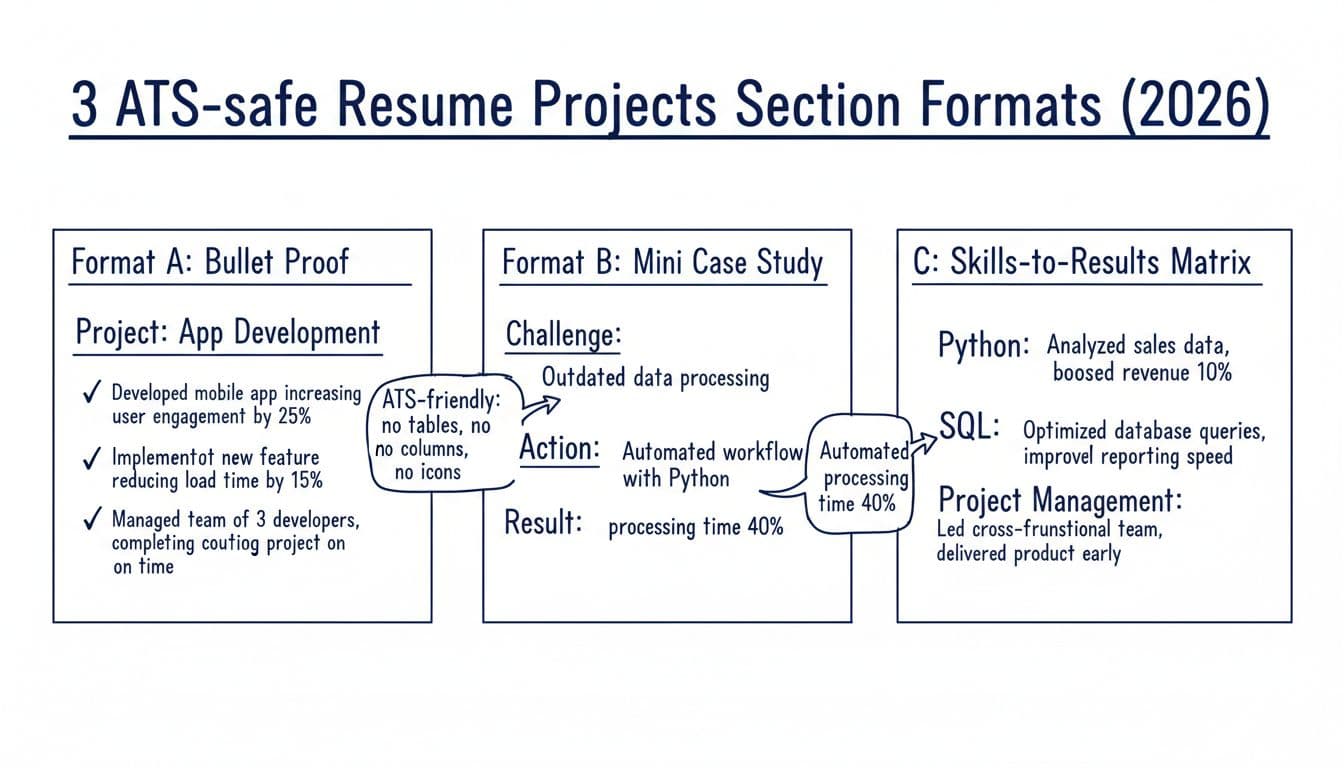
Each ATS-safe format below avoids ATS traps and makes your work easy to verify. These resume templates make your work easy to verify. Choose one resume template and stay consistent.
Format A: “Bullet-proof” (best for most roles)
Use this when you want clean scanning and quick impact. It’s the safest option for an ATS-friendly resume format.
Template (copy and edit):
Projects
Project: [Project name] ([personal projects/academic projects/freelance]), [Role], [Month YYYY to Month YYYY]
Tools: [Tools, languages, platforms including technical skills]
- [Action verb] [what you built/did], resulting in [metric or outcome].
- [Action verb] improved [process/system] by [how], reducing [time/cost/errors] by [number].
- [Action verb] collaborated with [who], delivered [what] in [timeframe].
Link: [GitHub/portfolio URL]
Tip: Make your first bullet the most job-relevant technical skill. Start it with an action verb. If the job emphasizes technical skills like Python, SQL, React, or Jira, lead with that.
Format B: Mini case study (best when the project needs context)
Some work needs a short story. This format fits product, ops, analytics, marketing, and cross-functional projects where “what changed” matters as much as “what you used.”
Template (copy and edit):
Projects
Project: [Project name], [Role], [Month YYYY to Month YYYY]
Challenge: [1 sentence describing the problem and who it affected]
Action: [1 sentence on what you did, tools used, and your ownership]
Result: [1 sentence with a metric, decision made, or outcome]
Tools: [Tools]
Link: [GitHub/portfolio URL]
Tip: If a project is strong but complex, expand it into a cover letter paragraph. These project descriptions demonstrate skills-first hiring principles. CareerScribeAI’s Cover Letter Generator can turn the Challenge, Action, Result lines into a clean narrative that doesn’t repeat your resume.
Format C: Skills-to-results matrix (without using a table)
Hiring managers often think in skills. This ATS-safe format answers “Do you really have it?” by pairing a skill keyword with a result line. It’s also helpful when you’re aiming at roles with a long skill list.
Template (copy and edit):
Projects
Project: [Project name], [Role], [Dates]
Core skills: [Hard skills like technical skills 1], [technical skills 2], [Skill 3]
- [Skill 1]: [What you did], [result metric].
- [Skill 2]: [What you did], [quality/speed/cost improvement].
- [Skill 3]: [What you did], [scale/uptime/adoption outcome].
Link: [GitHub/portfolio URL]
Tip: Pull skill wording from the job post, then sanity-check your list against a credible skills roundup like Indeed’s resume skills examples. After that, use CareerScribeAI’s Interview Prep Tools to turn each bullet into a STAR method story, so your interview answers match your proof-of-work for transferable skills.
Conclusion
A strong resume projects section isn’t extra, it’s evidence. The Resume Projects Section in 2026 strategy, with 3 ATS-safe formats that prove you can do the work, relies on clear project descriptions. Keep it safe for the Applicant Tracking System (plain text, simple headings, no columns), then pick the format that matches your work and your target role. For a career change, a strategic hybrid format that balances these projects with the work experience section is most effective. Tight bullets, clear tools, and real outcomes will do more than any fancy design. If you’re updating your resume for 2026, choose one project today and rewrite it until it reads like proof, not a promise. Showcasing accomplishments is the key to getting hired.