
A resume can have strong results and great skills, then still get tripped up by something small: resume date format. In 2026, many employers rely on the Applicant Tracking System, a digital gatekeeper, to parse your work history into neat fields. If your dates don’t parse cleanly, your timeline can look wrong, gaps can appear that don’t exist, or roles can land in the wrong order. While dates are vital, an ATS-friendly resume also depends on a single-column layout and the use of standard fonts to ensure overall readability.
Think of an ATS like a fast reader with no patience for odd punctuation. It doesn’t “understand” your intent, it matches patterns. The goal is simple: write dates in a pattern most systems recognize, then use it everywhere.
Why ATS misreads resume dates (and what it’s trying to do)
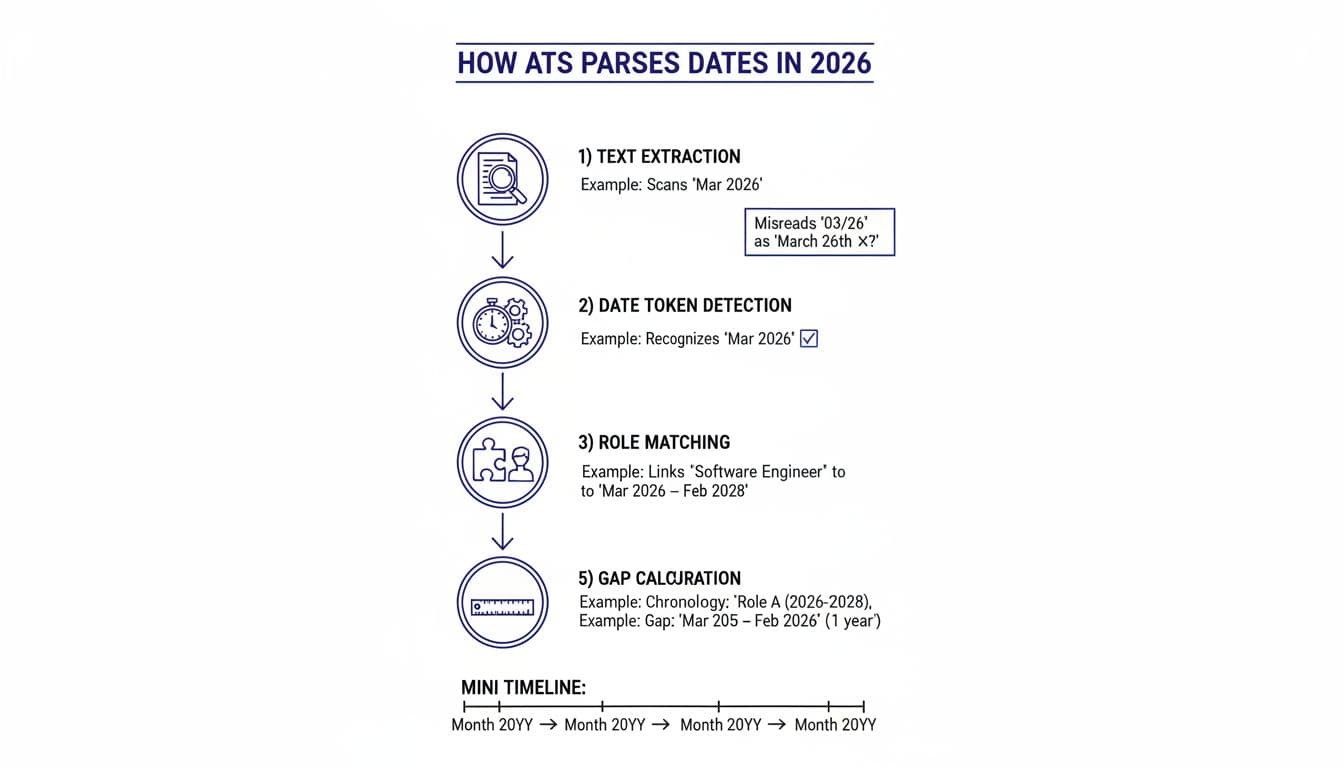
Most ATS tools, which hiring managers rely on to organize employment history correctly, follow a rough pattern: extract text, detect date tokens, tie dates to job titles, build a timeline, then calculate gaps. Parsing errors happen when your dates look like something else.
Common causes of misreads in 2026:
- Slashes and dots:
01/2024can be read as Jan 2024, or as a fraction-like token, or mis-split if the parser expectsMM/YYYY. Dots like2024.01can be treated as version numbers. - Two-digit years:
03/26can be read as March 2026, March 1926, or day-month depending on locale rules. - Non-date words: “Spring 2024” is meaningful to a human, but many systems won’t map seasons to months.
- Inconsistent separators: mixing
to, hyphens, and long dashes makes the parser guess; automated screening processes often struggle with non-standard separators. - Tight spacing:
Jan2024orJan-2024can get tokenized in odd ways. - File format: The file format you choose (like PDF vs docx) can also influence how these dates are extracted.
If you want a sanity check on what recruiters expect, see guidance on proper resume date formatting. The key theme is consistency and simple patterns.
The safest resume date format in 2026 (Month and year YYYY and YYYY)
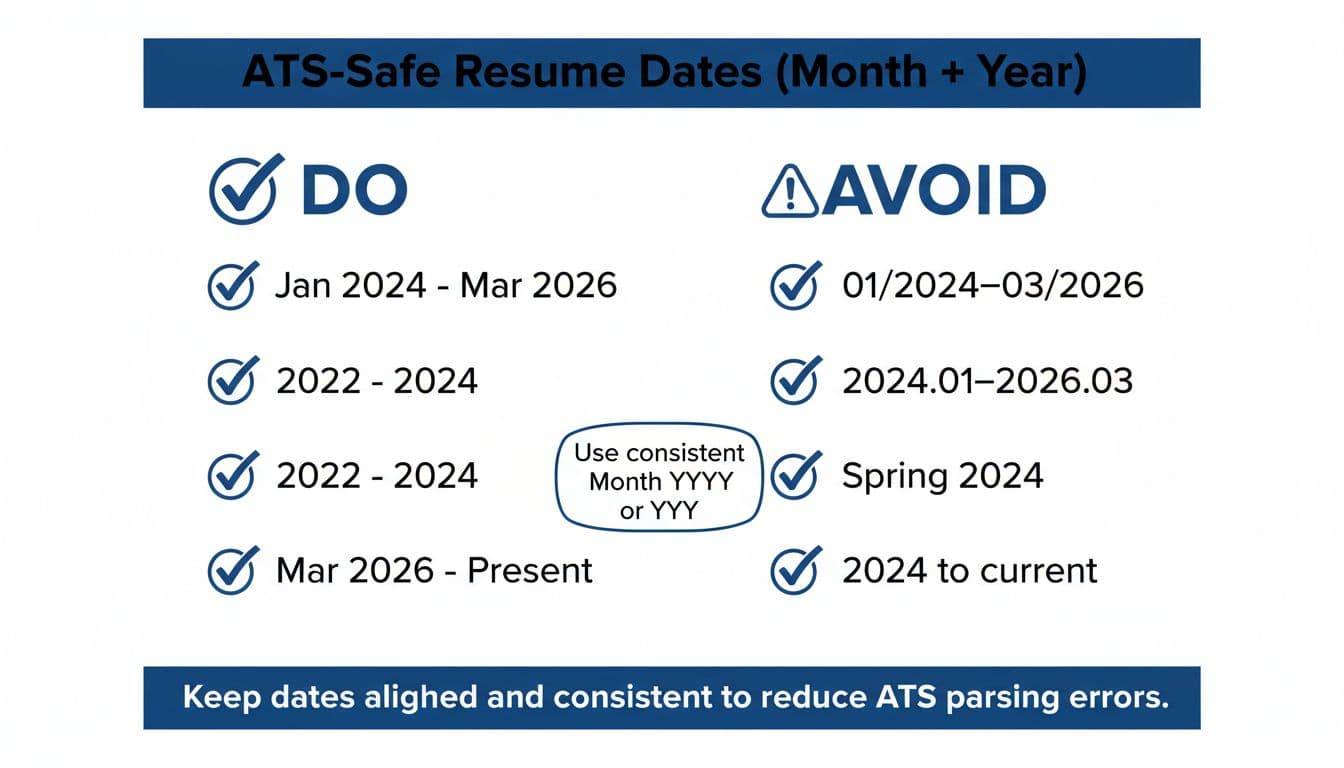
For most job seekers, the safest choice is one of these two patterns, the month and year format or year-only:
- Month and year for roles where month detail matters:
Jan 2024 - Year-only where month detail doesn’t matter or you’re compressing older history:
2021
For ranges, keep it plain in the work experience section, using an en dash or a simple hyphen:
Jan 2024 - Mar 2026Mar 2026 - Present2022 - 2024
These date patterns help maintain reverse chronological order, which is the preferred format for most systems.
Avoid “to,” avoid slashes, avoid dots, and don’t shorten years. If you’re unsure what your target employers’ systems handle well, ATS formatting rules for 2026 offer useful context on parsing and reading order.
Do vs avoid: formats that often change how your timeline parses
| Use this (Do) | Avoid this | Why ATS may misread it |
|---|---|---|
Jan 2024 - Mar 2026 | 01/2024-03/2026 | Slashes can trigger locale confusion or token splitting. |
2022 - 2024 | 22-24 | Two-digit years can map to the wrong century. |
Mar 2026 - Present | Mar 2026 - Current | “Present” is more consistently recognized as ongoing. |
Feb 2025 - Apr 2025 | 2025.02-2025.04 | Dots can be treated like decimals or version numbers. |
May 2023 - Aug 2023 | Summer 2023 | Seasons don’t reliably convert to months in parsers. |
| Dates in plain text | Tables and text boxes | They complicate the parsing of section headings. |
One more rule that prevents quiet errors: don’t mix formats across sections. If work history uses Mon YYYY, keep education and certs in the same style unless you switch everything to year-only.
Clean, copy-ready examples (work, education, certs, projects)
Use the same resume date format everywhere, then keep dates aligned on the page (right-aligned is fine, just stay consistent).
Work experience examples (including temp and short-term)
Software Engineer, Northwind Labs (Remote)
Jan 2024 – Present
Contract Data Analyst, Blue River Health (Contract)
Sep 2023 – Dec 2023
If a role lasted only weeks, you can still use months without looking odd. ATS tools usually prefer a clean month range over a precise day range. While dates must be clean, the bullets should focus on quantifiable achievements and action verbs.
Education examples (year-only is often enough)
B.S. Computer Science, State University
2019 – 2023
Certificate in Project Management, Community College
2024
Education dates are a good place to use year-only if you want fewer age signals or if month detail doesn’t add value. Match these dates to the style used in the professional summary.
Certifications examples (include month when recency matters)
AWS Certified Solutions Architect, Associate
Nov 2025
CompTIA Security+
2023
If the certification expires, add it as plain text after the date (don’t turn it into a second “date format” experiment). Keep dates consistent with the skills section.
Projects examples (make the timeframe easy to scan)
Customer Churn Model (Python, SQL)
Mar 2025 – Jun 2025
Portfolio Website Refresh (Next.js)
2024
When projects overlap with work, dates help the reader, but only if they parse cleanly. Including hard skills alongside dates helps provide context for the technical timeframe.
Ongoing roles, overlaps, gaps, and month omission rules that stay ATS-safe
Ongoing role formatting is simple: pick one word and stick to it. Present is the safest choice across systems, and it reads well to humans too.
Overlapping roles happen often (promotion, part-time consulting, second job). The ATS problem is when overlap looks like duplication or a date error. Make each line unambiguous:
Marketing Manager, Apex Retail
Jun 2023 – Present
Freelance Copywriter
Jan 2022 – Present
For temp or contract work, label the job type in the title area, not in the date. Dates should stay clean so the parser doesn’t confuse the range.
Career gaps are where people get nervous, then over-format. Don’t. Keep it plain and honest:
Career Gap (Family Care)
Apr 2024 – Dec 2024
Month omission rules that work in 2026:
- Use Month YYYY for your most recent roles, contract work, and anything where timing matters.
- Use YYYY for older roles, education, or projects where month detail doesn’t help.
- Don’t mix month styles (for example,
January 2024in one spot andJan 2024in another).
If you want help keeping timelines consistent across documents and aligning your timeline to the job description as part of effective keyword optimization to improve your match rate, CareerScribeAI’s AI Resume Builder can enforce one date style throughout. Its Cover Letter Generator also helps you mirror the same timeline in your letter, and Interview Prep Tools can help you explain gaps or overlaps without sounding defensive. For broader formatting reminders beyond dates, ATS-friendly resume tips for 2026 are a helpful cross-check.
Final ATS date checklist before you submit
- Use
Mon YYYYorYYYY, then stick to it everywhere. - Use a simple hyphen with spaces for ranges:
Jan 2024 - Mar 2026. - Use Present for ongoing roles.
- Avoid slashes, dots, seasons, and two-digit years.
- Keep date placement consistent (same side, same line position).
- Don’t put dates inside text boxes or graphics.
- Make overlaps explicit by separating roles clearly.
- Add career gaps as a dated entry, not a blank gap.
- Check for acronyms and full terms and ensure the resume headline is clear.
- Use an AI resume checker to verify that Applicant Tracking System software can read the final document without parsing errors.
Clean dates don’t make your resume better, they make your real experience easier to read. In 2026, that’s the difference between a timeline that parses correctly and one that quietly falls apart. Commit to one resume date format, apply it everywhere, then submit with confidence.